Chapter 11 Agentic-RL
11.1 From LLM Training to Agentic RL
In previous chapters, we implemented various agent paradigms and communication protocols. However, when agents handle more complex tasks, they perform poorly, naturally raising questions: How can we make agents have stronger reasoning capabilities? How can we make agents learn to use tools better? How can we make agents capable of self-improvement?
This is precisely the core problem that Agentic RL (agent training based on reinforcement learning) aims to solve. This chapter will introduce reinforcement learning training capabilities to the HelloAgents framework, enabling you to train agents with advanced capabilities such as reasoning and tool use. We will start from the basics of LLM training and gradually delve into practical techniques such as Supervised Fine-Tuning (SFT) and Group Relative Policy Optimization (GRPO), ultimately building a complete agent training pipeline.
11.1.1 From Reinforcement Learning to Agentic RL
In Section 2.4.2 of Chapter 2, we introduced agents based on reinforcement learning. Reinforcement Learning (RL) is a learning paradigm focused on solving sequential decision-making problems. It learns how to maximize long-term rewards through direct interaction between agents and the environment, learning through "trial and error".
Now, let's apply this framework to LLM agents. Consider a mathematical problem-solving agent that needs to answer questions like this:
Question: Janet's ducks lay 16 eggs per day. She eats three for breakfast
every morning and bakes muffins for her friends every day with four.
She sells the remainder at the farmers' market daily for $2 per fresh
duck egg. How much in dollars does she make every day at the farmers' market?This problem requires multi-step reasoning: first calculate the number of eggs Janet has left each day (16 - 3 - 4 = 9), then calculate her income (9 × 2 = 18). We can map this task to the reinforcement learning framework:
- Agent: LLM-based reasoning system
- Environment: Mathematical problems and verification system
- State: Current problem description and existing reasoning steps
- Action: Generate next reasoning step or final answer
- Reward: Whether the answer is correct (correct +1, incorrect 0)
Traditional supervised learning methods have three core limitations: first, data quality completely determines training quality, and models can only imitate training data, making it difficult to surpass; second, lack of exploration ability, only passively learning paths provided by humans; third, difficulty optimizing long-term goals, unable to precisely optimize intermediate processes of multi-step reasoning.
Reinforcement learning provides new possibilities. By allowing agents to autonomously generate multiple candidate answers and receive rewards based on correctness, they can learn which reasoning paths are better, which steps are critical, and even discover better problem-solving methods than human annotations[8]. This is the core idea of Agentic RL: treating LLM as a learnable policy, embedding it in the agent's perception-decision-execution loop, and optimizing multi-step task performance through reinforcement learning.
11.1.2 LLM Training Landscape
Before diving into Agentic RL, we need to first understand the complete process of LLM training. The birth of a powerful LLM (such as GPT, Claude, Qwen) typically goes through two main stages: Pretraining and Post-training. As shown in Figure 11.1, these two stages constitute the complete evolutionary path of LLM from "language model" to "conversational assistant".
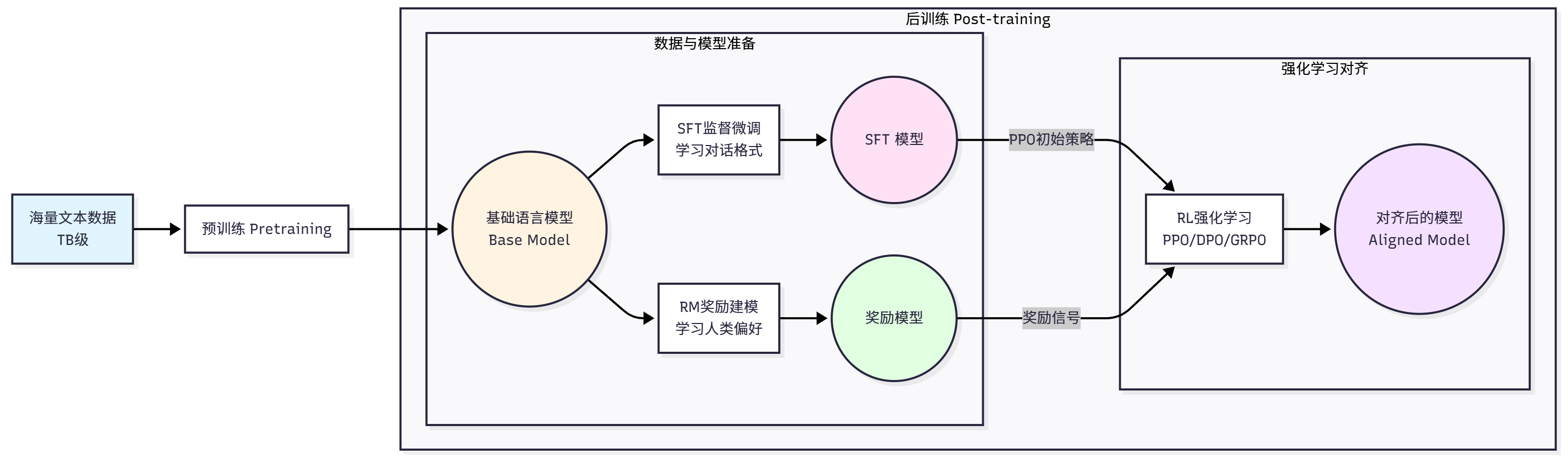
Pretraining Stage is the first stage of LLM training, with the goal of making the model learn basic language patterns and world knowledge. This stage uses massive amounts of text data (usually TB-level) and trains the model through self-supervised learning. The most common pretraining task is Causal Language Modeling, also known as Next Token Prediction.
Given a text sequence
Where
The characteristics of the pretraining stage are: massive data volume, high computational cost, learning general language understanding and generation capabilities, and using unsupervised learning.
Post-training Stage aims to address the shortcomings of pretrained models. Although pretrained models have powerful language capabilities, they are just "next word prediction" models and don't know how to follow human instructions, generate helpful, harmless, and honest answers, refuse inappropriate requests, and interact with humans in a conversational manner. The post-training stage aims to solve these problems and align the model with human preferences and values.
Post-training typically includes three steps. The first step is Supervised Fine-Tuning (SFT)[15], with the goal of making the model learn to follow instructions and dialogue formats. Training data consists of (prompt, completion) pairs, and the training objective is similar to pretraining, still maximizing the probability of correct output:
Where
The second step is Reward Modeling (RM). Although SFT models can follow instructions, the quality of generated answers varies. We need a way to evaluate answer quality, which is the role of the reward model[13,14]. Reward model training data consists of preference comparison data, containing two answers to the same question, one better (chosen) and one worse (rejected). The reward model training objective is to learn human preferences:
Where
The third step is Reinforcement Learning Fine-tuning. With the reward model, we can use reinforcement learning to optimize the language model to generate higher quality answers. The most classic algorithm is PPO (Proximal Policy Optimization)[1], with the training objective:
Where
Traditional RLHF (Reinforcement Learning from Human Feedback)[5] requires a large amount of manual preference data annotation, which is costly. To reduce costs, researchers proposed RLAIF (Reinforcement Learning from AI Feedback)[7], using powerful AI models (such as GPT-4) to replace human annotators. The RLAIF workflow is: use SFT model to generate multiple candidate answers, use powerful AI model to score and rank answers, use AI scores to train reward model, use reward model for reinforcement learning. Experiments show that RLAIF's effectiveness is close to or even exceeds RLHF, while costs are significantly reduced[11].
11.1.3 Core Philosophy of Agentic RL
After understanding the basic training process of LLM, let's look at the difference between Agentic RL and traditional training methods. Traditional post-training (which we call PBRFT: Preference-Based Reinforcement Fine-Tuning) mainly focuses on optimizing single-turn dialogue quality: given a user question, the model generates an answer, then receives a reward based on answer quality. This approach is suitable for optimizing conversational assistants, but for agent tasks requiring multi-step reasoning, tool use, and long-term planning, it falls short.
Agentic RL is a new paradigm that treats LLM as a learnable policy embedded in a sequential decision-making loop. In this framework, agents need to interact with the external world in dynamic environments, execute multi-step actions to complete complex tasks, obtain intermediate feedback to guide subsequent decisions, and optimize long-term cumulative rewards rather than single-step rewards.
Let's understand this difference through a specific example. In the PBRFT scenario, a user asks "Please explain what reinforcement learning is", the model generates a complete answer, then scores directly based on answer quality. In the Agentic RL scenario, a user requests "Help me analyze the code quality of this GitHub repository", the agent needs to go through multiple steps: first call GitHub API to get repository information, successfully obtain repository structure and file list, get +0.1 reward; then read main code files, successfully obtain code content, get +0.1 reward; then analyze code quality reasonably, get +0.2 reward; finally generate analysis report with high quality, get +0.6 reward. Total reward is the accumulation of all steps: 1.0.
As can be seen, key features of Agentic RL are multi-step interaction, each action changes environment state, each step can receive feedback, and optimizing overall task completion quality.
Reinforcement learning is formalized based on the Markov Decision Process (MDP) framework. MDP is defined by a five-tuple
In terms of state, PBRFT's state
In terms of action, PBRFT's action space only has text generation, single action type, represented as
In terms of transition function, PBRFT has no state transition, represented as
In terms of reward, PBRFT only has single-step reward
Where
In terms of objective function, PBRFT maximizes single-step expected reward:
While Agentic RL maximizes cumulative discounted reward:
Where
This transformation is not just a difference in technical details, but a fundamental shift in thinking. PBRFT thinking focuses on "how to make the model generate better single answers", optimizing answer quality, focusing on language expression, making single-step decisions. While Agentic RL thinking focuses on "how to make agents complete complex tasks", optimizing task completion, focusing on action strategies, making multi-step planning. This transformation enables LLM to evolve from "conversational assistant" to "autonomous agent", capable of actively seeking information, knowing when and how to use external tools, willing to execute seemingly "detour" intermediate steps for the ultimate goal, and learning from mistakes.
Agentic RL aims to endow LLM agents with six core capabilities, as shown in Figure 11.2.
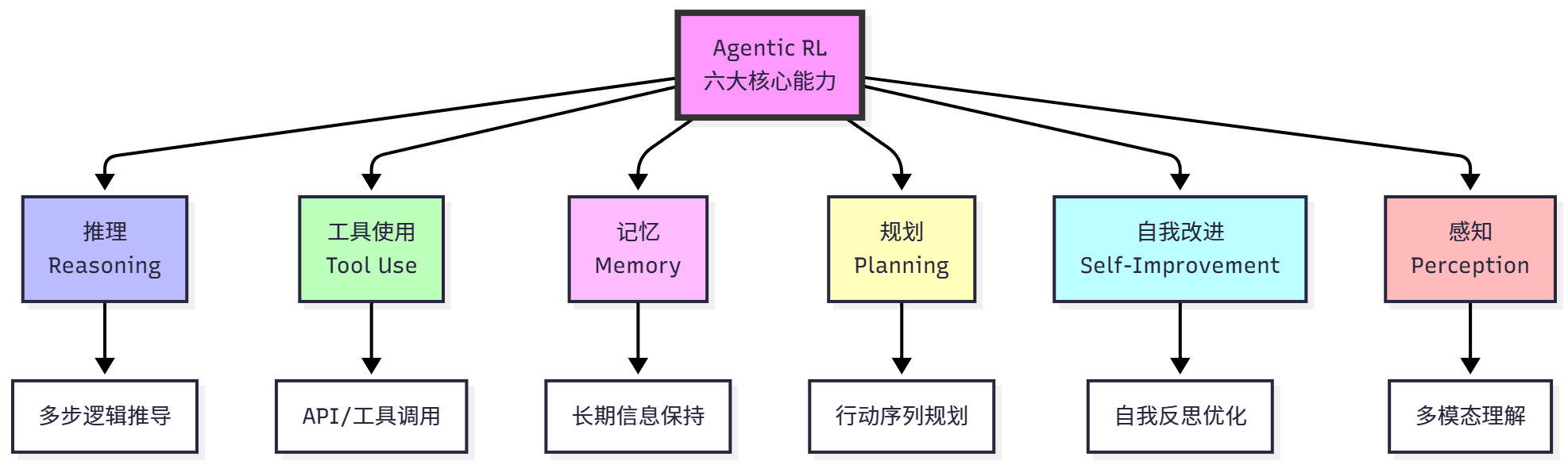
Reasoning refers to the process of logically deriving conclusions from given information, which is the core capability of agents. Traditional CoT prompting methods rely on few-shot examples with limited generalization ability; SFT can only imitate reasoning patterns in training data, making it difficult to innovate. The advantage of reinforcement learning is learning effective reasoning strategies through trial and error, discovering reasoning paths not in training data, learning when deep thinking is needed and when quick answers are possible. Reasoning tasks can be modeled as sequential decision problems. Given question
Tool Use refers to the agent's ability to call external tools to complete tasks. In tool use tasks, the action space expands to
Memory refers to the agent's ability to retain and reuse past information, which is crucial for long-term tasks. LLM's context window is limited, and static retrieval strategies (such as RAG) cannot be optimized for tasks. Reinforcement learning allows agents to learn memory management strategies: deciding which information is worth remembering, when to update memory, and when to delete outdated information. This is similar to human working memory, where we actively manage information in our brains, retaining important information and forgetting irrelevant information.
Planning refers to the ability to formulate action sequences to achieve goals. Traditional CoT is linear thinking and cannot backtrack; prompt engineering uses static planning templates that are difficult to adapt to new situations. Reinforcement learning allows agents to learn dynamic planning: discovering effective action sequences through trial and error, learning to balance short-term and long-term benefits. For example, in multi-step tasks, agents may need to first execute some seemingly "detour" steps, such as collecting information, before ultimately completing the task.
Self-Improvement refers to the agent's ability to review its own output, correct errors, and optimize strategies. Reinforcement learning allows agents to learn self-reflection: identifying their own errors, analyzing failure causes, and adjusting strategies. This capability enables agents to continuously improve without human intervention, similar to human "learning from mistakes".
Perception refers to the ability to understand multimodal information. For example, reinforcement learning can enhance visual reasoning capabilities, allowing models to learn to use visual tools and learn visual planning. This enables agents to not only understand text but also understand and operate in the visual world.
11.1.4 HelloAgents' Agentic RL Design
After understanding the core philosophy of Agentic RL, let's see how to implement these capabilities in the HelloAgents framework.
In terms of technology selection, we integrated the TRL (Transformer Reinforcement Learning) framework[9] and chose the Qwen3-0.6B model[10]. TRL is Hugging Face's reinforcement learning library, mature and stable, feature-complete, and easy to integrate. Qwen3-0.6B is Alibaba Cloud's small language model, with 0.6B parameters suitable for ordinary GPU training, excellent performance, and open source and free.
HelloAgents' Agentic RL module adopts a four-layer architecture design, as shown in Figure 11.3.
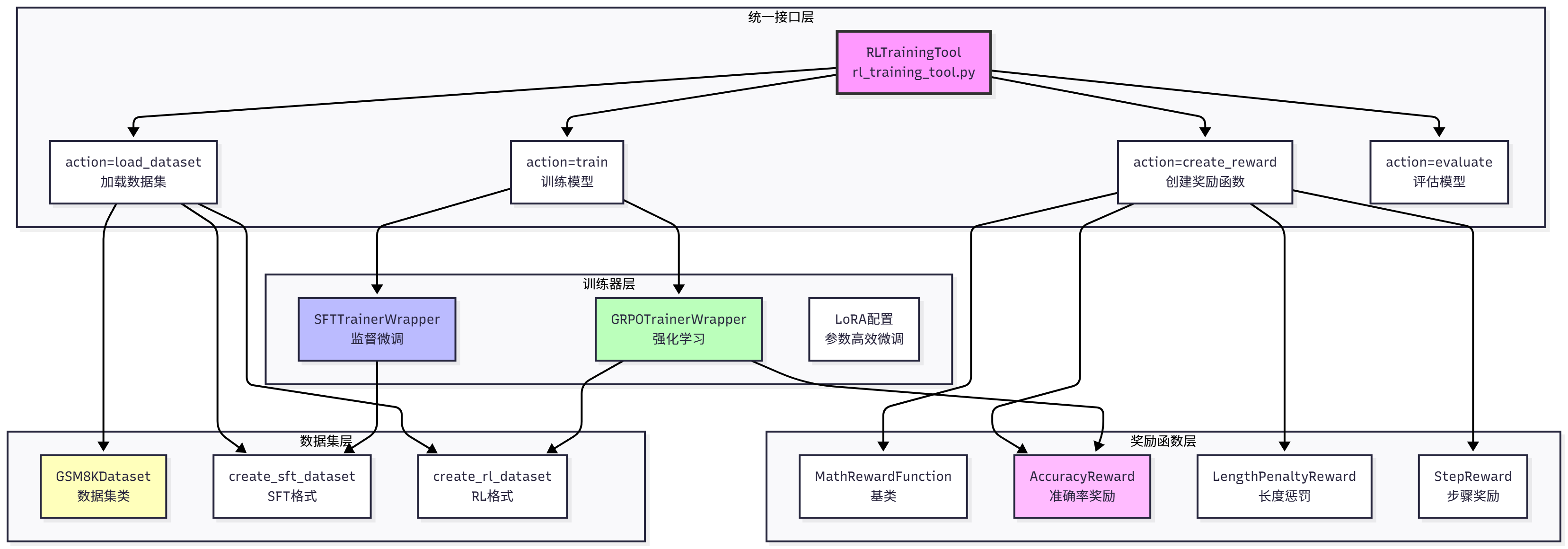
The bottom layer is the Dataset Layer, containing the GSM8KDataset class, create_sft_dataset() function, and create_rl_dataset() function, responsible for data loading and format conversion. The second layer is the Reward Function Layer, containing the MathRewardFunction base class, AccuracyReward accuracy reward, LengthPenaltyReward length penalty, StepReward step reward, and convenient creation functions create_*_reward(), responsible for defining what good behavior is. The third layer is the Trainer Layer, containing SFTTrainerWrapper and GRPOTrainerWrapper, responsible for specific training logic and LoRA support. The top layer is the Unified Interface Layer, providing RLTrainingTool unified training tool, supporting four operations: action="train" (train model), action="load_dataset" (load dataset), action="create_reward" (create reward function), action="evaluate" (evaluate model).
11.1.5 Quick Start Example
Before diving into learning, let's quickly experience the complete training process. Since this chapter has a lot of theoretical content and practical debugging is quite tedious, we focus on learning to apply rather than constructing tools. First install the HelloAgents framework:
# Install HelloAgents framework (Chapter 11 version)
pip install "hello-agents[rl]==0.2.5"

# Or install from source
cd HelloAgents
pip install -e ".[rl]"Then run the quick training example:
import sys
import json

from hello_agents.tools import RLTrainingTool

# Create RL training tool
rl_tool = RLTrainingTool()

# 1. Quick test: SFT training (10 samples, 1 epoch)
sft_result_str = rl_tool.run({
    "action": "train",
    "algorithm": "sft",
    "model_name": "Qwen/Qwen3-0.6B",
    "output_dir": "./models/quick_test_sft",
    "max_samples": 10,      # Only use 10 samples for quick test
    "num_epochs": 1,        # Only train 1 epoch
    "batch_size": 2,
    "use_lora": True        # Use LoRA to accelerate training
})

sft_result = json.loads(sft_result_str)
print(f"\n✓ SFT training completed, model saved at: {sft_result['output_dir']}")

# 2. GRPO training (5 samples, 1 epoch)
grpo_result_str = rl_tool.run({
    "action": "train",
    "algorithm": "grpo",
    "model_name": "Qwen/Qwen3-0.6B",  # Use base model
    "output_dir": "./models/quick_test_grpo",
    "max_samples": 5,       # Only use 5 samples for quick test
    "num_epochs": 1,
    "batch_size": 2,        # Must be divisible by num_generations(8), use 2
    "use_lora": True
})

grpo_result = json.loads(grpo_result_str)
print(f"\n✓ GRPO training completed, model saved at: {grpo_result['output_dir']}")

# 3. Evaluate model
eval_result_str = rl_tool.run({
    "action": "evaluate",
    "model_path": "./models/quick_test_grpo",
    "max_samples": 10,      # Evaluate on 10 test samples
    "use_lora": True
})

eval_result = json.loads(eval_result_str)
print(f"\n✓ Evaluation completed:")
print(f"  - Accuracy: {eval_result['accuracy']}")
print(f"  - Average reward: {eval_result['average_reward']}")
print(f"  - Test samples: {eval_result['num_samples']}")

print("\n" + "=" * 50)
print("🎉 Congratulations! You have completed training your first Agentic RL model!")
print("=" * 50)
print(f"\nModel paths:")
print(f"  SFT model: {sft_result['output_dir']}")
print(f" GRPO model: {grpo_result['output_dir']}")This quick example demonstrates the complete training process: SFT training allows the model to learn basic reasoning formats and dialogue patterns, GRPO training optimizes reasoning strategies through reinforcement learning to improve accuracy, and model evaluation assesses training effectiveness on the test set. Also, it's normal for accuracy to be very low after running, because the model has only seen 0.7% of training samples and only ran for one epoch.
11.2 Datasets and Reward Functions
Datasets and reward functions are the two cornerstones of reinforcement learning training. Datasets define the tasks the agent needs to learn, and reward functions define what good behavior is. In this section, we will learn how to prepare training data and design reward functions.
11.2.1 GSM8K Mathematical Reasoning Dataset
Mathematical reasoning is an ideal task for evaluating LLM reasoning capabilities. First, math problems have clear correct answers that can be automatically evaluated without manual annotation or complex reward models. Second, solving math problems requires decomposing problems and step-by-step derivation, which is a typical scenario for multi-step reasoning. Finally, learned reasoning capabilities can transfer to other domains with strong generalization. In contrast, open-ended Q&A tasks (such as "How to learn programming?") have answer quality that is difficult to objectively evaluate and requires extensive manual annotation.
GSM8K (Grade School Math 8K)[4] is a high-quality elementary school math word problem dataset. As shown in Table 11.2, the dataset contains 7,473 training samples and 1,319 test samples, with difficulty at elementary school math level (grades 2-8), problem types are word problems, requiring 2-8 steps of reasoning to arrive at answers.
Let's look at a typical GSM8K problem:
Question: Natalia sold clips to 48 of her friends in April, and then she sold half
      as many clips in May. How many clips did Natalia sell altogether in April
      and May?

Answer: Natalia sold 48/2 = >24 clips in May.
      Natalia sold 48+24 = >72 clips altogether in April and May.
      #### 72

Final Answer: 72This problem requires two steps of reasoning: first calculate the quantity sold in May (half of 48), then calculate the total (April + May). The > in the answer is a marker for intermediate calculation steps, and #### 72 marks the final answer.
The GSM8K dataset needs to be converted to different formats to adapt to different training methods, as shown in Figure 11.4.
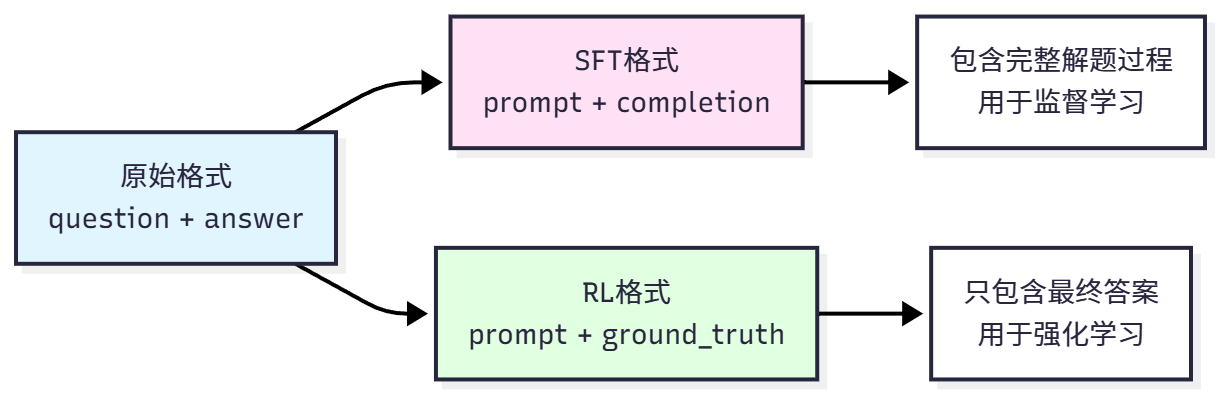
The original format comes directly from the dataset, containing question and answer (with solution steps), suitable for human reading. SFT format is used for supervised fine-tuning, converting questions to dialogue format prompts, with complete solutions as completion. For example:
{
    "prompt": "user\nNatalia sold clips to 48 of her friends...\nassistant\n",
    "completion": "Let me solve this step by step.\n\nStep 1: ...\n\nFinal Answer: 72"
}Key points are using the model's dialogue template (such as Qwen's `` marker), prompt contains user question, completion contains complete solution process and answer. This way the model can learn how to format output and how to reason step by step.
RL format is used for reinforcement learning, only providing questions and correct answers, not solution processes. For example:
{
    "prompt": "user\nNatalia sold clips to 48 of her friends...\nassistant\n",
    "ground_truth": "72"
}Key points are prompt is the same as SFT, but ground_truth only contains the final answer (used to calculate reward), and the model needs to generate the complete reasoning process itself. This design forces the model to learn autonomous reasoning rather than simply memorizing answers.
As shown in Table 11.3, the three formats each have their uses.
HelloAgents provides convenient dataset loading functions. Let's load and view the dataset through code:
from hello_agents.tools import RLTrainingTool
import json

# Create tool
rl_tool = RLTrainingTool()

# 1. Load SFT format dataset
sft_result = rl_tool.run({
    "action": "load_dataset",
    "format": "sft",
    "max_samples": 5  # Only load 5 samples to view
})
sft_data = json.loads(sft_result)

print(f"Dataset size: {sft_data['dataset_size']}")
print(f"Data format: {sft_data['format']}")
print(f"Sample keys: {sft_data['sample_keys']}")

# 2. Load RL format dataset
rl_result = rl_tool.run({
    "action": "load_dataset",
    "format": "rl",
    "max_samples": 5
})
rl_data = json.loads(rl_result)

print(f"Dataset size: {rl_data['dataset_size']}")
print(f"Data format: {rl_data['format']}")
print(f"Sample keys: {rl_data['sample_keys']}")As can be seen, SFT format contains complete solution processes for supervised learning; RL format only contains final answers, and the model needs to generate reasoning processes itself. The max_samples parameter controls the number of samples loaded, convenient for quick testing.
11.2.2 Reward Function Design
Reward functions are the core of reinforcement learning, defining what "good behavior" is. A good reward function can guide agents to learn correct strategies, while a poor reward function may lead to training failure or learning wrong behaviors.
In reinforcement learning, the reward function
For mathematical reasoning tasks, we can simplify to:
Where
Reward function design directly affects training effectiveness. Good reward functions should clearly define what success is, provide gradient signals, not produce excessive variance, and be easy to adjust and combine. Poor reward functions may only give rewards at task end with no intermediate feedback, have reward hacking where agents find "cheating" ways to get high rewards, have multiple conflicting objectives, or have excessive variance preventing convergence.
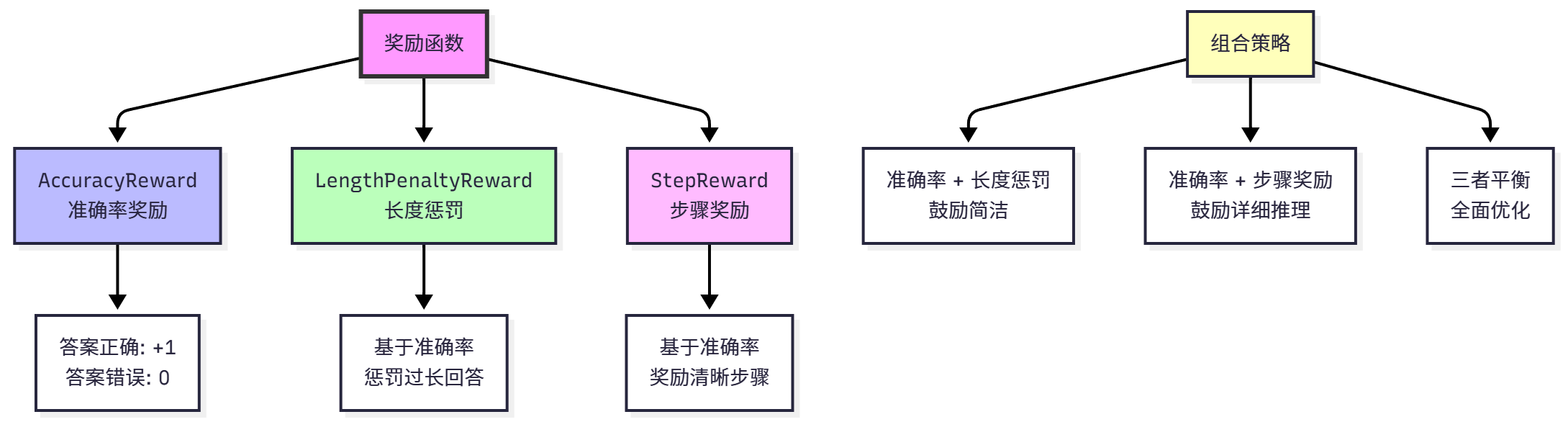
HelloAgents provides three built-in reward functions that can be used individually or in combination, as shown in Figure 11.5.
(1) Accuracy Reward
Accuracy Reward (AccuracyReward) is the most basic reward function, only caring whether the answer is correct. Mathematical definition:
Where
Implementation requires handling answer extraction and comparison. Model output may contain large amounts of text, and we need to extract the final answer. Common extraction methods include: finding numbers after "Final Answer:", finding numbers after "####" marker, using regular expressions to extract the last number. Answer comparison needs to handle numerical precision (such as 72.0 and 72 should be considered the same), unit conversion (such as 1000 and 1k), and format differences (such as "72" and "seventy-two").
Usage example:
from hello_agents.tools import RLTrainingTool
import json
rl_tool = RLTrainingTool()

# Create accuracy reward function
reward_result = rl_tool.run({
    "action": "create_reward",
    "reward_type": "accuracy"
})
reward_data = json.loads(reward_result)

print(f"Reward type: {reward_data['reward_type']}")
print(f"Description: {reward_data['description']}")

# Note: The create_reward operation of RLTrainingTool returns configuration information,
# the actual reward function will be automatically created and used during trainingOutput:
Prediction: 72, Ground truth: 72, Reward: 1.0
Prediction: 72.0, Ground truth: 72, Reward: 1.0
Prediction: 73, Ground truth: 72, Reward: 0.0Advantages of accuracy reward: simple and direct, easy to understand and implement, suitable for tasks with clear correct answers. Disadvantages: sparse reward, only fully correct answers get rewards, cannot distinguish between "close to correct" and "completely wrong", may lead to lack of effective feedback in early training.
(2) Length Penalty
Length Penalty (LengthPenaltyReward) encourages the model to generate concise answers, avoiding verbosity. Mathematical definition:
Where
Design rationale: if answer is incorrect, reward is 0 (regardless of length); if answer is correct and length is reasonable, reward is 1; if answer is correct but too long, reward is
Usage example:
# Create length penalty reward function
reward_result = rl_tool.run({
    "action": "create_reward",
    "reward_type": "length_penalty",
    "max_length": 1024,      # Maximum length
    "penalty_weight": 0.001  # Penalty weight
})
reward_data = json.loads(reward_result)

print(f"Reward type: {reward_data['reward_type']}")
print(f"Description: {reward_data['description']}")
print(f"Max length: {reward_data['max_length']}")
print(f"Penalty weight: {reward_data['penalty_weight']}")Output:
Prediction: 72, Ground truth: 72, Length: 50, Reward: 1.000
Prediction: 72, Ground truth: 72, Length: 200, Reward: 1.000
Prediction: 72, Ground truth: 72, Length: 500, Reward: 0.700
Prediction: 73, Ground truth: 72, Length: 50, Reward: 0.000Advantages of length penalty: encourages concise expression, avoids model generating redundant content, can control reasoning cost (shorter output means less token consumption). Disadvantages: may suppress detailed reasoning, requires careful adjustment of penalty coefficient, optimal length varies greatly across different tasks.
(3) Step Reward
Step Reward (StepReward) encourages the model to generate clear reasoning steps, improving interpretability. Mathematical definition:
Where
Step detection methods include: finding "Step 1:", "Step 2:" markers, counting newline characters, using regular expressions to match reasoning patterns. For example, a correct answer with 3 clear steps gets reward
Usage example:
# Create step reward function
reward_result = rl_tool.run({
    "action": "create_reward",
    "reward_type": "step",
    "step_bonus": 0.1  # 0.1 reward per step
})
reward_data = json.loads(reward_result)

print(f"Reward type: {reward_data['reward_type']}")
print(f"Description: {reward_data['description']}")
print(f"Step bonus: {reward_data['step_bonus']}")Output:
Prediction: 72, Ground truth: 72, Steps: 0, Reward: 1.00
Prediction: 72, Ground truth: 72, Steps: 2, Reward: 1.20
Prediction: 72, Ground truth: 72, Steps: 5, Reward: 1.50
Prediction: 73, Ground truth: 72, Steps: 5, Reward: 0.00Advantages of step reward: encourages interpretable reasoning, generated answers are easier to verify and debug, helps model learn systematic thinking. Disadvantages: may lead model to generate redundant steps to get more rewards, needs to balance step quantity and answer quality, step detection may be inaccurate.
In practical applications, we typically combine multiple reward functions to balance different objectives. Common combination strategies include:
Accuracy + Length Penalty: Encourages concise correct answers, suitable for dialogue systems and Q&A systems. Formula:
Accuracy + Step Reward: Encourages detailed reasoning processes, suitable for educational scenarios and explainable AI. Formula:
Three-way Balance: Comprehensively optimizes answer quality, conciseness, and interpretability. Formula:
Weights
Usage example:
# Combined reward function: accuracy + length penalty + step reward
# Note: RLTrainingTool currently supports single reward type
# Combined rewards need to be specified through reward_fn parameter in training configuration
# This shows how to configure different types of reward functions

# Accuracy reward
accuracy_result = rl_tool.run({
    "action": "create_reward",
    "reward_type": "accuracy"
})
print("Accuracy reward:", json.loads(accuracy_result)['description'])

# Length penalty reward
length_result = rl_tool.run({
    "action": "create_reward",
    "reward_type": "length_penalty",
    "max_length": 1024,
    "penalty_weight": 0.001
})
print("Length penalty reward:", json.loads(length_result)['description'])

# Step reward
step_result = rl_tool.run({
    "action": "create_reward",
    "reward_type": "step",
    "step_bonus": 0.1
})
print("Step reward:", json.loads(step_result)['description'])Output:
Combined reward: 1.200
  - Accuracy: 1.0
  - Length penalty: -0.100
- Step reward: +0.3As shown in Table 11.4, different reward functions are suitable for different application scenarios.
11.2.3 Custom Datasets and Reward Functions
Although HelloAgents provides the GSM8K dataset and common reward functions, in practical applications you may need to use your own dataset or design specific reward functions. This section will introduce how to extend the framework.
Before using custom datasets, you need to understand the data requirements for two training formats:
SFT Format: Used for supervised fine-tuning, needs to contain the following fields:
prompt: Input prompt (containing system and user messages)completion: Expected outputtext: Complete dialogue text (optional)
RL Format: Used for reinforcement learning, needs to contain the following fields:
question: Original questionprompt: Input prompt (containing system and user messages)ground_truth: Correct answerfull_answer: Complete answer (including reasoning process)
(1) Converting with format_math_dataset
The simplest method is to prepare raw data containing question and answer fields, then use the format_math_dataset() function for automatic conversion:
from datasets import Dataset
from hello_agents.rl import format_math_dataset

# 1. Prepare raw data
custom_data = [
    {
        "question": "What is 2+2?",
        "answer": "2+2=4. #### 4"
    },
    {
        "question": "What is 5*3?",
        "answer": "5*3=15. #### 15"
    },
    {
        "question": "What is 10+7?",
        "answer": "10+7=17. #### 17"
    }
]

# 2. Convert to Dataset object
raw_dataset = Dataset.from_list(custom_data)

# 3. Convert to SFT format
sft_dataset = format_math_dataset(
    dataset=raw_dataset,
    format_type="sft",
    model_name="Qwen/Qwen3-0.6B"
)
print(f"SFT dataset: {len(sft_dataset)} samples")
print(f"Fields: {sft_dataset.column_names}")

# 4. Convert to RL format
rl_dataset = format_math_dataset(
    dataset=raw_dataset,
    format_type="rl",
    model_name="Qwen/Qwen3-0.6B"
)
print(f"RL dataset: {len(rl_dataset)} samples")
print(f"Fields: {rl_dataset.column_names}")(2) Directly Passing Custom Dataset
When using RLTrainingTool, you can directly pass a custom dataset through the custom_dataset parameter:
from hello_agents.tools import RLTrainingTool

rl_tool = RLTrainingTool()

# SFT training
result = rl_tool.run({
    "action": "train",
    "algorithm": "sft",
    "model_name": "Qwen/Qwen3-0.6B",
    "output_dir": "./models/custom_sft",
    "num_epochs": 3,
    "batch_size": 4,
    "use_lora": True,
    "custom_dataset": sft_dataset  # Directly pass custom dataset
})

# GRPO training
result = rl_tool.run({
    "action": "train",
    "algorithm": "grpo",
    "model_name": "Qwen/Qwen3-0.6B",
    "output_dir": "./models/custom_grpo",
    "num_epochs": 2,
    "batch_size": 2,
    "use_lora": True,
    "custom_dataset": rl_dataset  # Directly pass custom dataset
})(3) Registering Custom Dataset (Recommended)
For datasets that need to be used multiple times, registration is recommended:
# 1. Register dataset
rl_tool.register_dataset("my_math_dataset", rl_dataset)

# 2. Use registered dataset
result = rl_tool.run({
    "action": "train",
    "algorithm": "grpo",
    "dataset": "my_math_dataset",  # Use registered dataset name
    "output_dir": "./models/custom_grpo",
    "num_epochs": 2,
    "use_lora": True
})Reward functions are used to evaluate the quality of answers generated by the model. Custom reward functions need to follow this signature:
from typing import List
import re

def custom_reward_function(
    completions: List[str],
    **kwargs
) -> List[float]:
    """
    Custom reward function

    Args:
        completions: List of completion texts generated by the model
        **kwargs: Other parameters, typically including:
            - ground_truth: List of correct answers
            - Other dataset fields

    Returns:
        List of reward values (each value between 0.0-1.0)
    """
    ground_truths = kwargs.get("ground_truth", [])
    rewards = []

    for completion, truth in zip(completions, ground_truths):
        reward = 0.0

        # Extract answer
        numbers = re.findall(r'-?\d+\.?\d*', completion)
        if numbers:
            try:
                pred = float(numbers[-1])
                truth_num = float(truth)
                error = abs(pred - truth_num)

                # Give different rewards based on error
                if error < 0.01:
                    reward = 1.0  # Completely correct
                elif error < 1.0:
                    reward = 0.8  # Very close
                elif error < 5.0:
                    reward = 0.5  # Close

                # Extra reward: encourage showing reasoning steps
                if "step" in completion.lower() or "=" in completion:
                    reward += 0.1

            except ValueError:
                reward = 0.0

        rewards.append(min(reward, 1.0))  # Limit maximum value to 1.0

return rewardsThere are two ways to use custom reward functions:
(1) Direct Passing
result = rl_tool.run({
    "action": "train",
    "algorithm": "grpo",
    "model_name": "Qwen/Qwen3-0.6B",
    "output_dir": "./models/custom_grpo",
    "custom_dataset": rl_dataset,
    "custom_reward": custom_reward_function  # Directly pass reward function
})(2) Registration (Recommended)
# 1. Register reward function
rl_tool.register_reward_function("my_reward", custom_reward_function)

# 2. Use registered reward function
result = rl_tool.run({
    "action": "train",
    "algorithm": "grpo",
    "dataset": "my_math_dataset",
    "output_dir": "./models/custom_grpo"
    # Reward function will automatically use registered function with same name as dataset
})Here is a complete example of custom dataset and reward function:
from datasets import Dataset
from hello_agents.tools import RLTrainingTool
from hello_agents.rl import format_math_dataset
import re
from typing import List

# 1. Prepare custom data
custom_data = [
    {"question": "What is 2+2?", "answer": "2+2=4. #### 4"},
    {"question": "What is 5+3?", "answer": "5+3=8. #### 8"},
    {"question": "What is 10+7?", "answer": "10+7=17. #### 17"}
]

# 2. Convert to training format
raw_dataset = Dataset.from_list(custom_data)
rl_dataset = format_math_dataset(raw_dataset, format_type="rl")

# 3. Define custom reward function
def tolerant_reward(completions: List[str], **kwargs) -> List[float]:
    """Reward function with tolerance"""
    ground_truths = kwargs.get("ground_truth", [])
    rewards = []

    for completion, truth in zip(completions, ground_truths):
        numbers = re.findall(r'-?\d+\.?\d*', completion)
        if numbers:
            try:
                pred = float(numbers[-1])
                truth_num = float(truth)
                error = abs(pred - truth_num)

                if error < 0.01:
                    reward = 1.0
                elif error < 5.0:
                    reward = 0.5
                else:
                    reward = 0.0
            except ValueError:
                reward = 0.0
        else:
            reward = 0.0

        rewards.append(reward)

    return rewards

# 4. Create tool and register
rl_tool = RLTrainingTool()
rl_tool.register_dataset("my_dataset", rl_dataset)
rl_tool.register_reward_function("my_dataset", tolerant_reward)

# 5. Train
result = rl_tool.run({
    "action": "train",
    "algorithm": "grpo",
    "model_name": "Qwen/Qwen3-0.6B",
    "dataset": "my_dataset",
    "output_dir": "./models/custom_grpo",
    "num_epochs": 2,
    "batch_size": 2,
    "use_lora": True
})11.3 SFT Training
Supervised Fine-Tuning (SFT) is the first step of reinforcement learning training and the most important foundation. SFT allows the model to learn the basic format of tasks, dialogue patterns, and preliminary reasoning capabilities. Without the foundation of SFT, directly conducting reinforcement learning often fails because the model doesn't even know the basic output format.
11.3.1 Why SFT is Needed
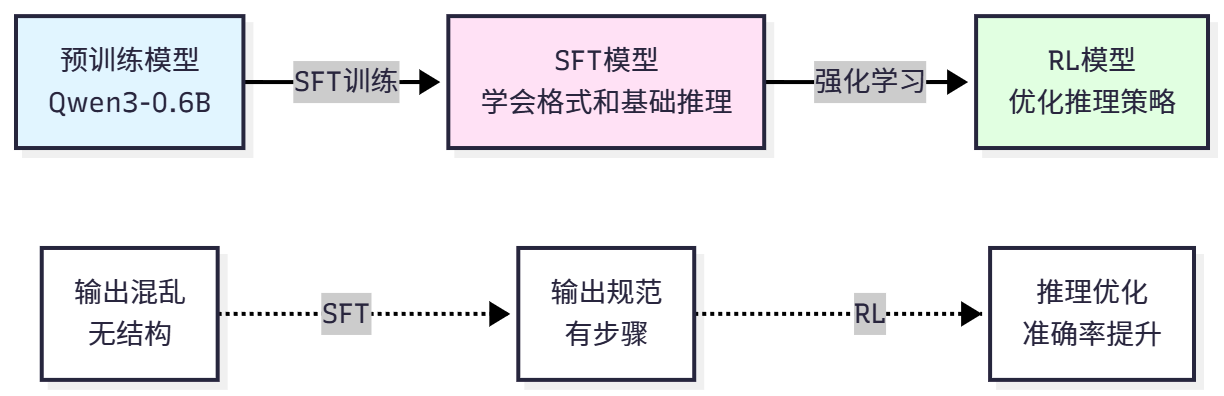
Before starting reinforcement learning, we need to conduct SFT training first. This is because although pretrained models have powerful language capabilities, they don't know how to complete specific tasks. The training objective of pretrained models is to predict the next word, not to solve math problems or use tools. The output format of pretrained models is free text, while we need structured output (such as "Step 1: ..., Step 2: ..., Final Answer: ..."). Pretrained models haven't seen task-related data and don't know what a "good" reasoning process is.
The role of SFT is to teach the model the basic rules of the task. First, learning output format, letting the model know how to organize answers (such as using "Step 1", "Final Answer" markers). Second, learning reasoning patterns, learning how to decompose problems and derive step by step through examples. Third, establishing baseline capabilities, providing a reasonable starting point for subsequent reinforcement learning. Finally, reducing exploration space, reinforcement learning doesn't need to start from scratch and can optimize based on SFT.
Let's understand the importance of SFT through a comparative experiment. Suppose we directly use a pretrained model to solve GSM8K problems:
from transformers import AutoTokenizer, AutoModelForCausalLM

# Load pretrained model
model_name = "Qwen/Qwen3-0.6B"
tokenizer = AutoTokenizer.from_pretrained(model_name)
model = AutoModelForCausalLM.from_pretrained(model_name)

# Test question
question = """Natalia sold clips to 48 of her friends in April, and then she sold half as many clips in May. How many clips did Natalia sell altogether in April and May?"""

# Construct input
prompt = f"user\n{question}\nassistant\n"
inputs = tokenizer(prompt, return_tensors="pt")

# Generate answer
outputs = model.generate(**inputs, max_new_tokens=200)
response = tokenizer.decode(outputs[0], skip_special_tokens=False)

print("Pretrained model's answer:")
print(response)The pretrained model's output might be:
user
Natalia sold clips to 48 of her friends in April, and then she sold half as many clips in May. How many clips did Natalia sell altogether in April and May?
assistant
I can help you with that. Let me think about this problem. Natalia sold clips to her friends. In April she sold 48 clips. In May she sold half as many. So we need to find out how many she sold in May and then add them together. But I'm not sure how to calculate half of 48. Maybe I should use a calculator? Or maybe I can just estimate...As can be seen, although the pretrained model understands the question, the output is very verbose, lacks structure, has no clear answer, and has confused reasoning process. Such output cannot be used for reinforcement learning because we cannot extract answers, cannot evaluate quality, and cannot provide effective reward signals.
Now let's look at the model after SFT:
# Load SFT model (assuming already trained)
sft_model_path = "./models/sft_model"
sft_model = AutoModelForCausalLM.from_pretrained(sft_model_path)

# Use the same question
outputs = sft_model.generate(**inputs, max_new_tokens=200)
response = tokenizer.decode(outputs[0], skip_special_tokens=False)

print("SFT model's answer:")
print(response)SFT model's output:
user
Natalia sold clips to 48 of her friends in April, and then she sold half as many clips in May. How many clips did Natalia sell altogether in April and May?
assistant
Let me solve this step by step.

Step 1: Calculate clips sold in May
Natalia sold half as many clips in May as in April.
Clips in May = 48 / 2 = 24

Step 2: Calculate total clips
Total = April + May = 48 + 24 = 72

Final Answer: 72As can be seen, the SFT model's output has clear structure (using "Step 1", "Step 2", "Final Answer" markers), correct reasoning, clear answer, and unified format. Such output can be used for reinforcement learning because we can extract answers, calculate rewards, and optimize strategies.
As shown in Figure 11.6, SFT is the bridge from pretrained models to reinforcement learning.
11.3.2 LoRA: Parameter-Efficient Fine-Tuning
Directly fine-tuning the entire model requires substantial computational resources and memory. For Qwen3-0.6B (0.6B parameters), full fine-tuning requires about 12GB memory (FP16) or 24GB memory (FP32). For larger models (such as 7B, 13B), full fine-tuning is almost impossible on consumer-grade GPUs.
LoRA (Low-Rank Adaptation)[3] is a parameter-efficient fine-tuning method that only trains a small number of additional parameters while keeping the original model parameters frozen. The core idea of LoRA is: parameter changes during model fine-tuning can be represented by low-rank matrices.
Assume the original model's weight matrix is
Where
During forward propagation, the output is:
The original model parameters
Parameter count comparison: original model parameter count is
Therefore, we can summarize LoRA's advantages: significantly reduced memory usage, faster training speed, easy deployment, and prevention of overfitting. However, training effectiveness is usually somewhat worse than full parameter tuning.
As shown in Table 11.5, comparison of LoRA effects at different model scales.
LoRA's key hyperparameters include: rank (r), controlling the rank of LoRA matrices, larger means stronger expressiveness but more parameters, typical values 4-64, default 8; Alpha (
11.3.3 SFT Training Practice
Now let's conduct SFT training using HelloAgents. The complete training process includes: preparing dataset, configuring LoRA, setting training parameters, starting training, and saving model.
Basic training example:
from hello_agents.tools import RLTrainingTool

# Create training tool
rl_tool = RLTrainingTool()

# SFT training
result = rl_tool.run({
    # Training configuration
    "action": "train",
    "algorithm": "sft",

    # Model configuration
    "model_name": "Qwen/Qwen3-0.6B",
    "output_dir": "./models/sft_model",

    # Data configuration
    "max_samples": 100,     # Use 100 samples for quick test

    # Training parameters
    "num_epochs": 3,        # Train for 3 epochs
    "batch_size": 4,        # Batch size
    "learning_rate": 5e-5,  # Learning rate

    # LoRA configuration
    "use_lora": True,       # Use LoRA
    "lora_rank": 8,         # LoRA rank
    "lora_alpha": 16,       # LoRA alpha
})

print(f"\n✓ Training completed!")
print(f"  - Model save path: {result['model_path']}")
print(f"  - Training samples: {result['num_samples']}")
print(f"  - Training epochs: {result['num_epochs']}")
print(f" - Final loss: {result['final_loss']:.4f}")If the loss gradually decreases during training, it indicates the model is learning.
(1) Training Parameter Details
Let's understand the meaning and tuning suggestions for each training parameter in detail.
Data Parameters:
max_samples: Number of training samples to use. For quick testing, use 100-1000 samples; for complete training, recommend using all data (7473 samples). More data usually brings better results, but training time is also longer.split: Dataset split, default "train". Can be set to "train[:1000]" to use only the first 1000 samples.
Training Parameters:
num_epochs: Number of training epochs. 1 epoch means traversing the entire dataset once. Too few (1-2 epochs) may underfit, too many (>10 epochs) may overfit. Recommend starting from 3 epochs, observe loss curve and adjust.batch_size: Number of samples used per update. Larger is more stable but uses more memory. Recommend adjusting based on memory: 4GB memory use batch_size=1-2, 8GB memory use batch_size=4-8, 16GB memory use batch_size=8-16.learning_rate: Learning rate, controls parameter update step size. Too small (1e-6) converges slowly, too large (1e-3) may not converge. SFT recommends 5e-5, LoRA can be slightly larger (1e-4).
LoRA Parameters:
use_lora: Whether to use LoRA. Recommend always enabling unless there is sufficient memory.lora_rank: LoRA rank, controls expressiveness. 4-8 suitable for small tasks, 16-32 suitable for complex tasks, 64 suitable for large-scale fine-tuning.lora_alpha: LoRA scaling factor, usually set to 2 times the rank. When rank=8, alpha=16; when rank=16, alpha=32.
Optimizer Parameters:
optimizer: Optimizer type, default "adamw". AdamW is the most commonly used choice, can also try "sgd" or "adafactor".weight_decay: Weight decay, prevents overfitting. Default 0.01, can try 0.001-0.1.warmup_ratio: Learning rate warmup ratio. Learning rate increases linearly for the first warmup_ratio steps, then decays linearly. Default 0.1 (warmup for first 10% steps).
(2) Complete Training Example
Let's conduct a complete SFT training using all data and best practices:
from hello_agents.tools import RLTrainingTool

rl_tool = RLTrainingTool()

# Complete SFT training
result = rl_tool.run({
    "action": "train",
    "algorithm": "sft",

    # Model configuration
    "model_name": "Qwen/Qwen3-0.6B",
    "output_dir": "./models/sft_full",

    # Data configuration
    "max_samples": None,    # Use all data (7473 samples)

    # Training parameters
    "num_epochs": 3,
    "batch_size": 8,
    "learning_rate": 5e-5,
    "warmup_ratio": 0.1,
    "weight_decay": 0.01,

    # LoRA configuration
    "use_lora": True,
    "lora_rank": 16,        # Use larger rank
    "lora_alpha": 32,
    "lora_target_modules": ["q_proj", "k_proj", "v_proj", "o_proj"],

    # Other configurations
    "save_steps": 500,      # Save every 500 steps
    "logging_steps": 100,   # Log every 100 steps
    "eval_steps": 500,      # Evaluate every 500 steps
})

print(f"Training completed! Model saved at: {result['model_path']}")This configuration is suitable for training on GPUs with 8GB memory, estimated to take 30-60 minutes.
(3) Training Monitoring and Debugging
During training, we need to monitor three key metrics. Loss should gradually decrease; if it doesn't decrease, learning rate may be too small or data may have problems; if it decreases then rises, learning rate may be too large or overfitting may occur. Gradient Norm should be in a reasonable range of 0.1-10; too large (>100) indicates gradient explosion and requires reducing learning rate; too small (<0.01) indicates gradient vanishing and requires checking model configuration. Learning Rate should change according to warmup strategy, linearly increasing for the first 10% steps, then linearly decaying to 0.
Common problems during training and solutions: when out of memory, reduce batch_size or max_length, use gradient accumulation or smaller model; when training is slow, increase batch_size, reduce logging frequency, or use mixed precision training; when loss doesn't decrease, increase learning rate, check data format, or increase training epochs; when overfitting, increase weight_decay, reduce training epochs, or use more data.
11.3.4 Model Evaluation
After training is complete, we need to evaluate the model's effectiveness. Evaluation metrics include:
Accuracy: Proportion of completely correct answers, most direct metric, range 0-1, higher is better.
Average Reward: Average reward across all samples, comprehensively considering accuracy, length, steps and other factors, range depends on reward function design.
Reasoning Quality: Clarity and logic of reasoning process, requires manual evaluation or specialized evaluation models.
Using HelloAgents to evaluate models:
from hello_agents.tools import RLTrainingTool

rl_tool = RLTrainingTool()

# Evaluate SFT model
eval_result = rl_tool.run({
    "action": "evaluate",
    "model_path": "./models/sft_full",
    "max_samples": 100,     # Evaluate on 100 test samples
    "use_lora": True,
})

eval_data = json.loads(eval_result)
print(f"\nEvaluation results:")
print(f"  - Accuracy: {eval_data['accuracy']}")
print(f"  - Average reward: {eval_data['average_reward']}")
print(f" - Test samples: {eval_data['num_samples']}")For small models like Qwen3-0.6B, achieving 40-50% accuracy on GSM8K after SFT is normal. Through reinforcement learning, we can further improve to 60-70%.
To better understand SFT's effectiveness, we can compare models at different stages:
# Evaluate pretrained model (without SFT)
base_result = rl_tool.run({
    "action": "evaluate",
    "model_path": "Qwen/Qwen3-0.6B",
    "max_samples": 100,
    "use_lora": False,
})
base_data = json.loads(base_result)

# Evaluate SFT model
sft_result = rl_tool.run({
    "action": "evaluate",
    "model_path": "./models/sft_full",
    "max_samples": 100,
    "use_lora": True,
})
sft_data = json.loads(sft_result)

# Compare results
print("Model comparison:")
print(f"Pretrained model accuracy: {base_data['accuracy']}")
print(f"SFT model accuracy: {sft_data['accuracy']}")In this section, we learned about SFT's importance (learning format, establishing baseline), LoRA principles (low-rank decomposition, parameter efficiency), SFT training practice (parameter configuration, training monitoring), and model evaluation (accuracy, comparative analysis).
11.4 GRPO Training
After completing SFT training, we have obtained a model capable of generating structured answers. However, the SFT model has only learned to "imitate" the reasoning process in training data and hasn't truly learned to "think". Reinforcement learning can allow the model to optimize reasoning strategies through trial and error, thereby surpassing the quality of training data.
11.4.1 From PPO to GRPO
In the field of reinforcement learning, PPO (Proximal Policy Optimization)[1] is one of the most classic algorithms. PPO ensures training stability by limiting the magnitude of policy updates. However, PPO has some problems in LLM training: it requires training a Value Model, increasing training complexity and memory usage; it requires maintaining four models simultaneously (Policy Model, Reference Model, Value Model, Reward Model), making engineering implementation complex; training is unstable, prone to reward collapse or policy degradation.
GRPO (Group Relative Policy Optimization)[2] is a simplified PPO variant specifically designed for LLMs. GRPO's core idea is: no need for Value Model, using group-relative rewards instead of absolute rewards; simplified training process, only requiring Policy Model and Reference Model; improved training stability, reducing risk of reward collapse.
Let's understand GRPO's principles through mathematical formulas. PPO's objective function is:
Where
GRPO's objective function is simplified to:
Where
As shown in Figure 11.7, comparison of PPO and GRPO training processes.

As can be seen, GRPO eliminates Value Model training, greatly simplifying the process.
As shown in Table 11.6, detailed comparison of PPO and GRPO.
For LLM training, GRPO is a better choice because it is simpler, more stable, and has lower memory usage.
11.4.2 GRPO Training Practice
Now let's conduct GRPO training using HelloAgents. The prerequisite for GRPO training is completing SFT training, because GRPO requires a reasonable initial policy.
Basic GRPO training example:
from hello_agents.tools import RLTrainingTool

# Create training tool
rl_tool = RLTrainingTool()

# GRPO training
result = rl_tool.run({
    # Training configuration
    "action": "train",
    "algorithm": "grpo",

    # Model configuration
    "model_name": "./models/sft_full",  # Start from SFT model
    "output_dir": "./models/grpo_model",

    # Data configuration
    "max_samples": 100,     # Use 100 samples for quick test

    # Training parameters
    "num_epochs": 3,
    "batch_size": 4,
    "learning_rate": 1e-5,  # GRPO learning rate usually smaller than SFT

    # GRPO-specific parameters
    "num_generations": 4,   # Generate 4 answers per question
    "kl_coef": 0.05,        # KL divergence penalty coefficient

    # LoRA configuration
    "use_lora": True,
    "lora_rank": 16,
    "lora_alpha": 32,

    # Reward function configuration
    "reward_type": "accuracy",  # Use accuracy reward
})

print(f"\n✓ Training completed!")
print(f"  - Model save path: {result['model_path']}")
print(f"  - Training samples: {result['num_samples']}")
print(f"  - Training epochs: {result['num_epochs']}")
print(f" - Average reward: {result['average_reward']:.4f}")If average reward gradually increases and KL divergence remains in a reasonable range during GRPO training, it indicates training is proceeding normally.
GRPO has some specific parameters that need to be understood and tuned.
Generation Parameters:
num_generations: How many answers to generate per question. More is better, but computational cost is also higher. Typical values are 4-8. The purpose of generating multiple answers is to calculate group-relative rewards and increase diversity of training signals.max_new_tokens: Maximum number of tokens to generate per answer. Too few may truncate answers, too many wastes computation. Recommend 256-512.temperature: Generation temperature, controls randomness. 0 means greedy decoding, 1 means standard sampling. GRPO recommends 0.7-1.0, maintaining some exploration.
Optimization Parameters:
learning_rate: GRPO's learning rate is usually smaller than SFT because we don't want to deviate too far from the SFT model. Recommend 1e-5 to 5e-5.kl_coef: KL divergence penalty coefficient, controls magnitude of policy updates. Too small (0.01) may cause policy to deviate too far, too large (0.5) may limit learning. Recommend 0.05-0.1.clip_range: Policy ratio clipping range, similar to PPO's epsilon. Recommend 0.2.
Reward Parameters:
reward_type: Reward function type, can be "accuracy", "length_penalty", "step", or "combined".reward_config: Additional configuration for reward function, such as target length for length penalty, coefficient for step reward, etc.
Let's conduct a complete GRPO training using all data and best practices:
from hello_agents.tools import RLTrainingTool

rl_tool = RLTrainingTool()

# Complete GRPO training
result = rl_tool.run({
    "action": "train",
    "algorithm": "grpo",

    # Model configuration
    "model_name": "./models/sft_full",
    "output_dir": "./models/grpo_full",

    # Data configuration
    "max_samples": None,    # Use all data

    # Training parameters
    "num_epochs": 3,
    "batch_size": 4,
    "learning_rate": 1e-5,
    "warmup_ratio": 0.1,

    # GRPO-specific parameters
    "num_generations": 4,
    "max_new_tokens": 512,
    "temperature": 0.8,
    "kl_coef": 0.05,
    "clip_range": 0.2,

    # LoRA configuration
    "use_lora": True,
    "lora_rank": 16,
    "lora_alpha": 32,

    # Reward function configuration
    "reward_type": "combined",
    "reward_config": {
        "components": [
            {"type": "accuracy", "weight": 1.0},
            {"type": "length_penalty", "weight": 0.5, "target_length": 200},
            {"type": "step", "weight": 0.3, "step_bonus": 0.1}
        ]
    },

    # Other configurations
    "save_steps": 500,
    "logging_steps": 100,
})

print(f"Training completed! Model saved at: {result['model_path']}")11.4.3 GRPO Training Process Analysis
Let's deeply understand GRPO's training process and see what happens at each step.
(1) Training Loop
GRPO's training loop includes the following steps:
Sampling Phase: For each question, use current policy to generate multiple answers (
num_generations). These answers form a "group" for calculating relative rewards.Reward Calculation: Calculate reward
for each generated answer. Rewards can be accuracy, length penalty, step reward, or their combination. Relative Reward: Calculate group average reward
, then calculate relative reward . The benefit of this is reducing reward variance and making training more stable. Policy Update: Use relative rewards to update policy, while adding KL divergence penalty to prevent policy from deviating too far from reference model.
Repeat: Repeat above steps until all training epochs are complete.
Let's understand through a specific example:
# Assume we have a question
question = "What is 48 + 24?"

# Generate 4 answers
answers = [
    "48 + 24 = 72. Final Answer: 72",      # Correct
    "48 + 24 = 72. Final Answer: 72",      # Correct
    "48 + 24 = 70. Final Answer: 70",      # Incorrect
    "Let me think... 72. Final Answer: 72" # Correct but verbose
]

# Calculate rewards (assuming using accuracy + length penalty)
rewards = [1.0, 1.0, 0.0, 0.8]  # 4th answer penalized for verbosity

# Calculate group average reward
avg_reward = (1.0 + 1.0 + 0.0 + 0.8) / 4 = 0.7

# Calculate relative rewards
relative_rewards = [
    1.0 - 0.7 = 0.3,   # Correct and concise, positive relative reward
    1.0 - 0.7 = 0.3,   # Correct and concise, positive relative reward
    0.0 - 0.7 = -0.7,  # Incorrect, negative relative reward
    0.8 - 0.7 = 0.1    # Correct but verbose, smaller relative reward
]

# Policy update: increase probability of first two answers, decrease probability of third answerAs can be seen, the relative reward mechanism encourages the model to generate answers "better than average" rather than simply pursuing high rewards. This can reduce reward variance and improve training stability.
(2) KL Divergence Penalty
KL divergence penalty is a key component of GRPO, preventing policy from deviating too far from the reference model. KL divergence is defined as:
In practice, we calculate KL divergence for each token, then sum:
The larger the KL divergence, the greater the difference between current policy and reference model. By adding KL divergence penalty term
The choice of kl_coef (
- Too small (0.01): Policy may deviate too far, causing output format confusion or quality degradation
- Too large (0.5): Policy updates are limited, learning is slow, difficult to surpass SFT model
- Recommended (0.05-0.1): Balance exploration and stability
(3) Training Monitoring
During GRPO training, we need to monitor the following metrics:
Average Reward: Should gradually increase. If reward doesn't increase, learning rate may be too small, KL penalty too large, or reward function design unreasonable. If reward rises then falls, may be overfitting or reward collapse.
KL Divergence: Should remain in reasonable range (0.01-0.1). If KL divergence is too large (>0.5), policy deviates too far, need to increase kl_coef or reduce learning rate. If KL divergence is too small (<0.001), policy is barely updating, need to reduce kl_coef or increase learning rate.
Accuracy: Should gradually improve. This is the most intuitive metric, reflecting the model's actual capability.
Generation Quality: Need manual inspection of generated answers to ensure correct format and clear reasoning.
HelloAgents integrates two mainstream training monitoring tools: Weights & Biases (wandb) and TensorBoard.
Method 1: Using Weights & Biases (Recommended)
Weights & Biases is currently the most popular machine learning experiment tracking platform, providing powerful visualization and experiment management features.
import os

# 1. Set up wandb (need to register account first: https://wandb.ai)
os.environ["WANDB_PROJECT"] = "hello-agents-grpo"  # Project name
os.environ["WANDB_LOG_MODEL"] = "false"            # Don't upload model files

# 2. Enable wandb in training configuration
result = rl_tool.run({
    "action": "train",
    "algorithm": "grpo",
    "model_name": "Qwen/Qwen3-0.6B",
    "output_dir": "./models/grpo_monitored",
    "num_epochs": 2,
    "batch_size": 2,
    "use_lora": True,
    # wandb will automatically log all training metrics
})

# After training completes, visit https://wandb.ai to view training curveswandb will automatically log the following metrics:
train/reward: Average rewardtrain/kl: KL divergencetrain/loss: Training losstrain/learning_rate: Learning ratetrain/epoch: Training epoch
Method 2: Using TensorBoard
TensorBoard is a visualization tool provided by TensorFlow, also supporting PyTorch training.
# 1. TensorBoard logs will be automatically created in output_dir during training
result = rl_tool.run({
    "action": "train",
    "algorithm": "grpo",
    "model_name": "Qwen/Qwen3-0.6B",
    "output_dir": "./models/grpo_tb",
    "num_epochs": 2,
    "batch_size": 2,
    "use_lora": True,
})

# 2. Launch TensorBoard to view training curves
# Run in command line:
# tensorboard --logdir=./models/grpo_tb
# Then visit http://localhost:6006Method 3: Offline Monitoring (No External Tools Required)
If you don't want to use wandb or TensorBoard, you can also monitor through training logs:
# Training process will print detailed logs
result = rl_tool.run({
    "action": "train",
    "algorithm": "grpo",
    "model_name": "Qwen/Qwen3-0.6B",
    "output_dir": "./models/grpo_simple",
    "num_epochs": 2,
    "batch_size": 2,
    "use_lora": True,
})

# Log example:
# Epoch 1/2 | Step 100/500 | Reward: 0.45 | KL: 0.023 | Loss: 1.234
# Epoch 1/2 | Step 200/500 | Reward: 0.52 | KL: 0.031 | Loss: 1.156
# ...In GRPO training, you may encounter some problems. When reward doesn't increase, it may be that learning rate is too small or KL penalty is too large limiting policy updates, or reward function design is unreasonable or SFT model quality is too poor. In this case, increase learning rate (from 1e-5 to 5e-5), reduce kl_coef (from 0.1 to 0.05), check reward function, or retrain SFT model.
When KL divergence explodes (exceeds 0.5 or even 1.0) causing generated answer format confusion, it's usually because learning rate is too large or KL penalty is too small, or reward function is too aggressive. You can reduce learning rate (from 5e-5 to 1e-5), increase kl_coef (from 0.05 to 0.1), adjust reward function, or use gradient clipping.
When generation quality degrades (accuracy improves but format is confused, reasoning unclear), it may be that reward function only focuses on accuracy ignoring other quality metrics, or KL penalty is too small causing model to deviate too far from SFT, or overfitting occurs. In this case, use combined reward function to optimize multiple metrics simultaneously, increase kl_coef to maintain consistency, reduce training epochs, or increase training data.
GRPO training has higher memory usage than SFT because it needs to generate multiple answers simultaneously and store reference model outputs, prone to OOM. You can reduce num_generations (from 8 to 4), batch_size (from 4 to 2), or max_new_tokens (from 512 to 256), or use gradient checkpointing and mixed precision training to alleviate.
11.5 Model Evaluation and Analysis
After training is complete, we need to comprehensively evaluate model performance, not only looking at accuracy as a single metric, but also deeply analyzing model's reasoning quality, error patterns, generalization ability, etc. This section will introduce how to systematically evaluate and analyze Agentic RL models.
11.5.1 Evaluation Metric System
A good evaluation system should be multi-dimensional, measuring model capabilities from different angles. We divide evaluation metrics into three categories: accuracy metrics, efficiency metrics, and quality metrics.
(1) Accuracy Metrics
Accuracy metrics measure whether the model can arrive at correct answers.
Accuracy: Most basic metric, proportion of completely correct answers. Calculation formula:
Advantages are simple and intuitive, easy to understand and compare. Disadvantages are inability to distinguish "nearly correct" from "completely wrong", may be too coarse for complex tasks.
Top-K Accuracy: Generate K answers, count as correct if at least one is correct. Calculation formula:
This metric reflects the model's "potential", i.e., whether correct answers can be found through multiple sampling.
Numerical Error: For mathematical problems, can calculate error between predicted and true values. Calculation formula:
This metric can distinguish "nearly correct" (e.g., predicted 72.5, actual 72) from "completely wrong" (e.g., predicted 100, actual 72).
(2) Efficiency Metrics
Efficiency metrics measure the cost of generating answers.
Average Length: Average number of tokens in generated answers. Calculation formula:
Shorter answers mean lower inference cost and faster response speed.
Reasoning Steps: Number of reasoning steps contained in answers. Calculation formula:
Appropriate number of steps (2-5 steps) indicates model can systematically decompose problems; too many steps may indicate redundant reasoning.
Inference Time: Time required to generate one answer. This metric is important in actual deployment, affecting user experience.
(3) Quality Metrics
Quality metrics measure readability and explainability of answers.
Format Correctness: Whether answers conform to expected format (e.g., containing markers like "Step 1", "Final Answer"). Calculation formula:
Correct format is a basic requirement; answers with confused format are difficult to use even if results are correct.
Reasoning Coherence: Whether reasoning steps are logically coherent. This metric usually requires manual evaluation or specialized evaluation models.
Explainability: Whether answers are easy to understand and verify. Answers with clear steps are more explainable than answers that directly give results.
As shown in Table 11.7, comparison of different metrics.
11.5.2 Evaluation Practice
HelloAgents provides comprehensive evaluation functionality, capable of calculating multiple metrics at once.
from hello_agents.tools import RLTrainingTool

rl_tool = RLTrainingTool()

# Comprehensive evaluation
print("=" * 50)
print("Comprehensive GRPO Model Evaluation")
print("=" * 50)

result = rl_tool.run({
    "action": "evaluate",
    "model_path": "./models/grpo_full",
    "max_samples": 200,
    "use_lora": True,

    # Evaluation configuration
    "metrics": [
        "accuracy",           # Accuracy
        "accuracy_at_k",      # Top-K accuracy
        "average_length",     # Average length
        "average_steps",      # Average steps
        "format_correctness", # Format correctness
    ],
    "k": 3,  # Top-3 accuracy
})

# Parse results
eval_data = json.loads(result)

# Print results
print(f"\nEvaluation results:")
print(f"  Accuracy: {eval_data['accuracy']}")
print(f"  Average reward: {eval_data['average_reward']}")
print(f" Test samples: {eval_data['num_samples']}")We can compare performance of pretrained model, SFT model, and GRPO model:
# Evaluate three models
models = [
    ("Pretrained Model", "Qwen/Qwen3-0.6B", False),
    ("SFT Model", "./models/sft_full", True),
    ("GRPO Model", "./models/grpo_full", True),
]

results = []
for name, path, use_lora in models:
    print(f"\nEvaluating {name}...")
    result = rl_tool.run({
        "action": "evaluate",
        "model_path": path,
        "max_samples": 200,
        "use_lora": use_lora,
        "metrics": ["accuracy", "average_length", "format_correctness"],
    })
    results.append((name, result))

# Print comparison table
print("\n" + "=" * 70)
print(f"{'Model':<15} {'Accuracy':<12} {'Avg Length':<15} {'Format Correct':<12}")
print("=" * 70)
for name, result in results:
    print(f"{name:<15} {result['accuracy']:<12.2%} {result['average_length']:<15.1f} {result['format_correctness']:<12.2%}")
print("=" * 70)11.5.3 Error Analysis
Knowing accuracy alone is not enough; we need to deeply analyze what types of problems the model is prone to errors on, thereby guiding subsequent improvements. Model errors can be divided into four categories: calculation errors (reasoning steps correct but calculation wrong, e.g., "48/2=25", indicating insufficient numerical calculation ability), reasoning errors (reasoning logic errors leading to wrong problem-solving approach, e.g., adding first then dividing instead of dividing first then adding, indicating insufficient logical reasoning ability), comprehension errors (not correctly understanding the problem, e.g., question asks for "total" but only calculated part, indicating insufficient language understanding ability), format errors (answer correct but format doesn't meet requirements, e.g., missing "Final Answer:" marker, indicating insufficient format learning).
Error analysis example:
from hello_agents.tools import RLTrainingTool

rl_tool = RLTrainingTool()

# Evaluate and collect error samples
result = rl_tool.run({
    "action": "evaluate",
    "model_path": "./models/grpo_full",
    "max_samples": 200,
    "use_lora": True,
    "return_details": True,  # Return detailed results
})

# Analyze error samples
errors = result['errors']  # Error sample list
print(f"Total errors: {len(errors)}")

# Classify by error type
error_types = {
    "Calculation Error": 0,
    "Reasoning Error": 0,
    "Comprehension Error": 0,
    "Format Error": 0,
}

for error in errors:
    question = error['question']
    prediction = error['prediction']
    ground_truth = error['ground_truth']

    # Simple error classification logic (may need more complex analysis in practice)
    if "Final Answer:" not in prediction:
        error_types["Format Error"] += 1
    elif "Step" in prediction:
        # Has reasoning steps, may be calculation or reasoning error
        # More detailed analysis needed here
        error_types["Calculation Error"] += 1
    else:
        error_types["Comprehension Error"] += 1

# Print error distribution
print("\nError type distribution:")
for error_type, count in error_types.items():
    percentage = count / len(errors) * 100
print(f" {error_type}: {count} ({percentage:.1f}%)")Output example:
Total errors: 76

Error type distribution:
  Calculation Error: 32 (42.1%)
  Reasoning Error: 18 (23.7%)
  Comprehension Error: 22 (28.9%)
Format Error: 4 (5.3%)As can be seen, calculation errors are the main error type (42.1%), indicating the model's numerical calculation ability needs strengthening. Format errors are rare (5.3%), indicating SFT training was effective. We can also analyze the model's performance on problems of different difficulty:
# Group by number of reasoning steps
step_groups = {
    "Easy (1-2 steps)": [],
    "Medium (3-4 steps)": [],
    "Hard (5+ steps)": [],
}

for sample in result['details']:
    steps = sample['ground_truth_steps']  # Number of steps in true answer
    correct = sample['correct']

    if steps <= 2:
        step_groups["Easy (1-2 steps)"].append(correct)
    elif steps <= 4:
        step_groups["Medium (3-4 steps)"].append(correct)
    else:
        step_groups["Hard (5+ steps)"].append(correct)

# Calculate accuracy for each group
print("\nAccuracy at different difficulty levels:")
for group_name, results in step_groups.items():
    if len(results) > 0:
        accuracy = sum(results) / len(results)
print(f" {group_name}: {accuracy:.2%} ({len(results)} samples)")Output example:
Accuracy at different difficulty levels:
  Easy (1-2 steps): 78.50% (85 samples)
  Medium (3-4 steps): 58.30% (96 samples)
Hard (5+ steps): 31.60% (19 samples)As can be seen, the model performs well on easy problems (78.5%) but poorly on hard problems (31.6%). This indicates the model's multi-step reasoning ability needs improvement.
11.5.4 Improvement Directions
Based on evaluation and analysis results, we can determine improvement directions for the model, as shown in Figure 11.8.
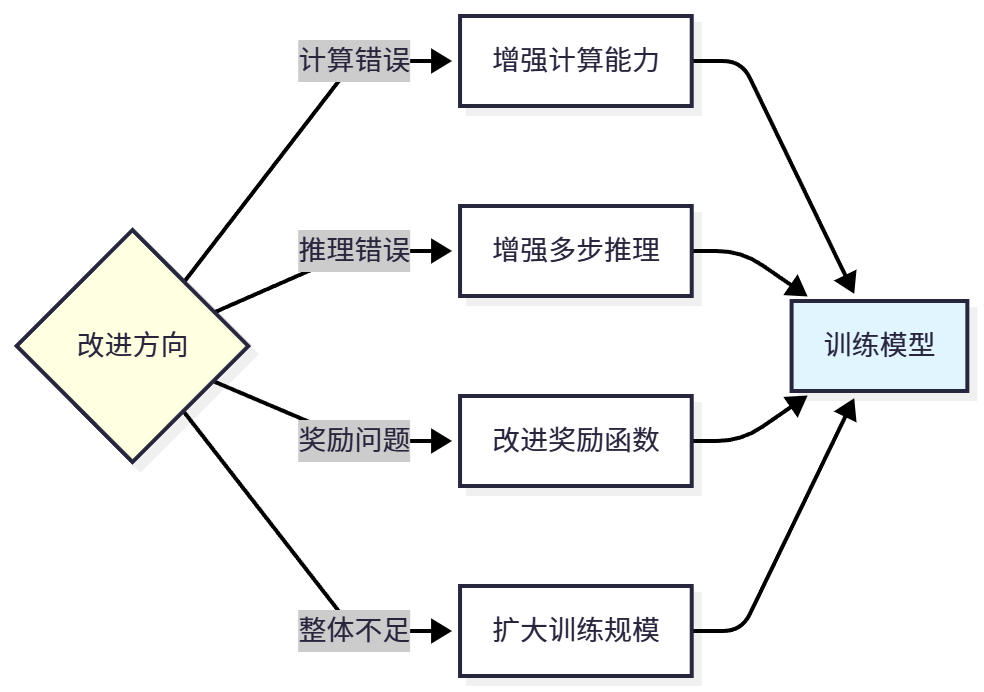
This is a continuous iteration process: train model → evaluate performance → analyze errors → identify problems → select improvement direction → retrain. Through multiple iterations, model performance will continuously improve.
11.6 Complete Training Pipeline Practice
In previous sections, we learned about data preparation, SFT training, GRPO training, and model evaluation separately. Now, let's integrate this knowledge to complete an end-to-end Agentic RL training pipeline.
11.6.1 End-to-End Training Pipeline
A complete Agentic RL training pipeline includes the following stages: data preparation, SFT training, SFT evaluation, GRPO training, GRPO evaluation, and model deployment. As shown in Figure 11.9.
Figure 11.9 End-to-End Training Pipeline (Image file not available)
Let's implement this pipeline through a complete script:
"""
Complete Agentic RL Training Pipeline
End-to-end example from data preparation to model deployment
"""

from hello_agents.tools import RLTrainingTool
import json
from datetime import datetime

class AgenticRLPipeline:
    """Agentic RL Training Pipeline"""

    def __init__(self, config_path="config.json"):
        """
        Initialize training pipeline

        Args:
            config_path: Configuration file path
        """
        self.rl_tool = RLTrainingTool()
        self.config = self.load_config(config_path)
        self.results = {}

    def load_config(self, config_path):
        """Load configuration file"""
        with open(config_path, 'r') as f:
            return json.load(f)

    def log(self, message):
        """Log message"""
        timestamp = datetime.now().strftime("%Y-%m-%d %H:%M:%S")
        print(f"[{timestamp}] {message}")

    def stage1_prepare_data(self):
        """Stage 1: Data Preparation"""
        self.log("=" * 50)
        self.log("Stage 1: Data Preparation")
        self.log("=" * 50)

        # Load and check dataset
        result = self.rl_tool.run({
            "action": "load_dataset",
            "format": "sft",
            "max_samples": self.config["data"]["max_samples"],
        })

        # Parse JSON result
        dataset_info = json.loads(result)

        self.log(f"✓ Dataset loaded")
        self.log(f"  - Samples: {dataset_info['dataset_size']}")
        self.log(f"  - Format: {dataset_info['format']}")
        self.log(f"  - Data columns: {', '.join(dataset_info['sample_keys'])}")

        self.results["data"] = dataset_info

        return dataset_info

    def stage2_sft_training(self):
        """Stage 2: SFT Training"""
        self.log("\n" + "=" * 50)
        self.log("Stage 2: SFT Training")
        self.log("=" * 50)

        sft_config = self.config["sft"]

        result = self.rl_tool.run({
            "action": "train",
            "algorithm": "sft",
            "model_name": self.config["model"]["base_model"],
            "output_dir": sft_config["output_dir"],
            "max_samples": self.config["data"]["max_samples"],
            "num_epochs": sft_config["num_epochs"],
            "batch_size": sft_config["batch_size"],
            "use_lora": True,
            # Training monitoring configuration
            "use_wandb": self.config.get("monitoring", {}).get("use_wandb", False),
            "use_tensorboard": self.config.get("monitoring", {}).get("use_tensorboard", True),
            "wandb_project": self.config.get("monitoring", {}).get("wandb_project", None),
        })

        # Parse JSON result
        result_data = json.loads(result)

        self.log(f"✓ SFT training completed")
        self.log(f"  - Model path: {result_data['output_dir']}")
        self.log(f"  - Status: {result_data['status']}")

        self.results["sft_training"] = result_data

        return result_data["output_dir"]

    def stage3_sft_evaluation(self, model_path):
        """Stage 3: SFT Evaluation"""
        self.log("\n" + "=" * 50)
        self.log("Stage 3: SFT Evaluation")
        self.log("=" * 50)

        result = self.rl_tool.run({
            "action": "evaluate",
            "model_path": model_path,
            "max_samples": self.config["eval"]["max_samples"],
            "use_lora": True,
        })
        eval_data = json.loads(result)

        self.log(f"✓ SFT evaluation completed")
        self.log(f"  - Accuracy: {eval_data['accuracy']}")
        self.log(f"  - Average reward: {eval_data['average_reward']}")

        self.results["sft_evaluation"] = eval_data

        return eval_data

    def stage4_grpo_training(self, sft_model_path):
        """Stage 4: GRPO Training"""
        self.log("\n" + "=" * 50)
        self.log("Stage 4: GRPO Training")
        self.log("=" * 50)

        grpo_config = self.config["grpo"]

        result = self.rl_tool.run({
            "action": "train",
            "algorithm": "grpo",
            "model_name": sft_model_path,
            "output_dir": grpo_config["output_dir"],
            "max_samples": self.config["data"]["max_samples"],
            "num_epochs": grpo_config["num_epochs"],
            "batch_size": grpo_config["batch_size"],
            "use_lora": True,
            # Training monitoring configuration
            "use_wandb": self.config.get("monitoring", {}).get("use_wandb", False),
            "use_tensorboard": self.config.get("monitoring", {}).get("use_tensorboard", True),
            "wandb_project": self.config.get("monitoring", {}).get("wandb_project", None),
        })

        # Parse JSON result
        result_data = json.loads(result)

        self.log(f"✓ GRPO training completed")
        self.log(f"  - Model path: {result_data['output_dir']}")
        self.log(f"  - Status: {result_data['status']}")

        self.results["grpo_training"] = result_data

        return result_data["output_dir"]

    def stage5_grpo_evaluation(self, model_path):
        """Stage 5: GRPO Evaluation"""
        self.log("\n" + "=" * 50)
        self.log("Stage 5: GRPO Evaluation")
        self.log("=" * 50)

        result = self.rl_tool.run({
            "action": "evaluate",
            "model_path": model_path,
            "max_samples": self.config["eval"]["max_samples"],
            "use_lora": True,
        })
        eval_data = json.loads(result)

        self.log(f"✓ GRPO evaluation completed")
        self.log(f"  - Accuracy: {eval_data['accuracy']}")
        self.log(f"  - Average reward: {eval_data['average_reward']}")

        self.results["grpo_evaluation"] = eval_data

        return eval_data

    def stage6_save_results(self):
        """Stage 6: Save Results"""
        self.log("\n" + "=" * 50)
        self.log("Stage 6: Save Results")
        self.log("=" * 50)

        # Save training results
        results_path = "training_results.json"
        with open(results_path, 'w') as f:
            json.dump(self.results, f, indent=2)

        self.log(f"✓ Results saved to: {results_path}")

    def run(self):
        """Run complete pipeline"""
        try:
            # Stage 1: Data preparation
            self.stage1_prepare_data()

            # Stage 2: SFT training
            sft_model_path = self.stage2_sft_training()

            # Stage 3: SFT evaluation
            self.stage3_sft_evaluation(sft_model_path)

            # Stage 4: GRPO training
            grpo_model_path = self.stage4_grpo_training(sft_model_path)

            # Stage 5: GRPO evaluation
            self.stage5_grpo_evaluation(grpo_model_path)

            # Stage 6: Save results
            self.stage6_save_results()

            self.log("\n" + "=" * 50)
            self.log("✓ Training pipeline completed!")
            self.log("=" * 50)

        except Exception as e:
            self.log(f"\n✗ Training failed: {str(e)}")
            raise

# Usage example
if __name__ == "__main__":
    # Create configuration file
    config = {
        "model": {
            "base_model": "Qwen/Qwen3-0.6B"
        },
        "data": {
            "max_samples": 1000  # Use 1000 samples
        },
        "sft": {
            "output_dir": "./models/sft_model",
            "num_epochs": 3,
            "batch_size": 8,
        },
        "grpo": {
            "output_dir": "./models/grpo_model",
            "num_epochs": 3,
            "batch_size": 4,
        },
        "eval": {
            "max_samples": 200,
            "sft_accuracy_threshold": 0.40  # SFT accuracy threshold
        },
        "monitoring": {
            "use_wandb": False,  # Whether to use Wandb
            "use_tensorboard": True,  # Whether to use TensorBoard
            "wandb_project": "agentic-rl-pipeline"  # Wandb project name
        }
    }

    # Save configuration
    with open("config.json", 'w') as f:
        json.dump(config, f, indent=2)

    # Run training pipeline
    pipeline = AgenticRLPipeline("config.json")
pipeline.run()Running this script, you will see the complete training process.
Running tips:
Start Small: Don't start training with all data at once. First use 100-1000 samples for quick iteration, validate process and parameters, and scale up after confirming effectiveness. This can save significant time and computational resources.
Data Quality Check: Check data quality before training, ensure correct format, accurate answers, and no duplicate samples. You can use the following code:
def check_data_quality(dataset):
    """Check data quality"""
    issues = []

    # Check required fields
    required_fields = ["prompt", "completion"]
    for field in required_fields:
        if field not in dataset.column_names:
            issues.append(f"Missing field: {field}")

    # Check null values
    for i, sample in enumerate(dataset):
        if not sample["prompt"] or not sample["completion"]:
            issues.append(f"Sample {i} contains null values")

    # Check duplicates
    prompts = [s["prompt"] for s in dataset]
    duplicates = len(prompts) - len(set(prompts))
    if duplicates > 0:
        issues.append(f"Found {duplicates} duplicate samples")

    return issues

# Usage
issues = check_data_quality(dataset)
if issues:
    print("Data quality issues:")
    for issue in issues:
        print(f"  - {issue}")
else:
print("✓ Data quality check passed")Data Augmentation: If data volume is insufficient, consider data augmentation, such as rewriting questions (keeping answers unchanged), generating similar questions, or back translation. But be careful to maintain data quality and avoid introducing noise.
11.6.2 Hyperparameter Tuning
Hyperparameter tuning is key to improving model performance. Here are some commonly used tuning strategies.
(1) Grid Search
Grid Search is the simplest tuning method, traversing all parameter combinations and selecting the best set.
# Define parameter grid
param_grid = {
    "learning_rate": [1e-5, 5e-5, 1e-4],
    "lora_rank": [8, 16, 32],
    "kl_coef": [0.05, 0.1, 0.2],
}

best_accuracy = 0
best_params = None

# Traverse all combinations
for lr in param_grid["learning_rate"]:
    for rank in param_grid["lora_rank"]:
        for kl in param_grid["kl_coef"]:
            print(f"Testing parameters: lr={lr}, rank={rank}, kl={kl}")

            # Train model
            result = rl_tool.run({
                "action": "train",
                "algorithm": "grpo",
                "learning_rate": lr,
                "lora_rank": rank,
                "kl_coef": kl,
                # Other parameters...
            })

            # Evaluate model
            eval_result = rl_tool.run({
                "action": "evaluate",
                "model_path": result["model_path"],
            })

            # Update best parameters
            if eval_result["accuracy"] > best_accuracy:
                best_accuracy = eval_result["accuracy"]
                best_params = {"lr": lr, "rank": rank, "kl": kl}

print(f"Best parameters: {best_params}")
print(f"Best accuracy: {best_accuracy:.2%}")Grid search advantages are simple and direct, can find global optimum. Disadvantages are high computational cost, impractical when many parameters.
(2) Random Search
Random Search randomly samples parameter combinations, more efficient than grid search.
import random

# Define parameter ranges
param_ranges = {
    "learning_rate": (1e-6, 1e-4),  # Log-uniform distribution
    "lora_rank": [4, 8, 16, 32, 64],
    "kl_coef": (0.01, 0.5),
}

best_accuracy = 0
best_params = None

# Random sampling N times
N = 10
for i in range(N):
    # Randomly sample parameters
    lr = 10 ** random.uniform(-6, -4)  # Log-uniform
    rank = random.choice(param_ranges["lora_rank"])
    kl = random.uniform(0.01, 0.5)

    print(f"[{i+1}/{N}] Testing parameters: lr={lr:.2e}, rank={rank}, kl={kl:.3f}")

    # Train and evaluate (same as above)
    # ...

print(f"Best parameters: {best_params}")
print(f"Best accuracy: {best_accuracy:.2%}")Random search advantages are high efficiency, suitable for large parameter spaces. Disadvantages are may miss optimal solution.
(3) Bayesian Optimization
Bayesian Optimization uses probabilistic models to guide search, more intelligent. Can use libraries like Optuna:
import optuna

def objective(trial):
    """Optimization objective function"""
    # Sample parameters
    lr = trial.suggest_loguniform("learning_rate", 1e-6, 1e-4)
    rank = trial.suggest_categorical("lora_rank", [8, 16, 32])
    kl = trial.suggest_uniform("kl_coef", 0.01, 0.5)

    # Train model
    result = rl_tool.run({
        "action": "train",
        "algorithm": "grpo",
        "learning_rate": lr,
        "lora_rank": rank,
        "kl_coef": kl,
        # Other parameters...
    })

    # Evaluate model
    eval_result = rl_tool.run({
        "action": "evaluate",
        "model_path": result["model_path"],
    })

    return eval_result["accuracy"]

# Create study
study = optuna.create_study(direction="maximize")
study.optimize(objective, n_trials=20)

# Print best parameters
print(f"Best parameters: {study.best_params}")
print(f"Best accuracy: {study.best_value:.2%}")Bayesian optimization advantages are high sample efficiency, can quickly find good parameters. Disadvantages are complex implementation, requires additional libraries.
As shown in Table 11.8, comparison of different tuning methods.
11.6.3 Distributed Training
When data volume and model scale increase, single GPU training becomes very slow. At this point we need to use distributed training to accelerate the training process. HelloAgents is based on TRL and Hugging Face Accelerate, naturally supporting multi-GPU and multi-node distributed training.
Solution Selection Recommendations:
- Single Machine Multi-GPU (2-8 cards): Use DDP, simple and efficient
- Large Models (>7B): Use DeepSpeed ZeRO-2 or ZeRO-3
- Multi-Node Cluster: Use DeepSpeed ZeRO-3 + Offload
(1) Configure Accelerate
First need to create Accelerate configuration file. Run the following command:
accelerate configSelect configuration according to prompts:
In which compute environment are you running?
> This machine

Which type of machine are you using?
> multi-GPU

How many different machines will you use?
> 1

Do you wish to optimize your script with torch dynamo?
> NO

Do you want to use DeepSpeed?
> YES

Which DeepSpeed config file do you want to use?
> ZeRO-2

How many GPU(s) should be used for distributed training?
> 4This will generate a configuration file at ~/.cache/huggingface/accelerate/default_config.yaml.
(2) Training with DDP
Data Parallel (DDP) is the simplest distributed solution, each GPU holds a complete model copy, data is split across GPUs.
Accelerate Configuration File (multi_gpu_ddp.yaml):
compute_environment: LOCAL_MACHINE
distributed_type: MULTI_GPU
num_processes: 4  # Number of GPUs
machine_rank: 0
num_machines: 1
gpu_ids: all
mixed_precision: fp16Training Script (no modification needed):
from hello_agents.tools import RLTrainingTool

rl_tool = RLTrainingTool()

# Training code remains unchanged
result = rl_tool.run({
    "action": "train",
    "algorithm": "grpo",
    "model_name": "Qwen/Qwen3-0.6B",
    "output_dir": "./models/grpo_ddp",
    "num_epochs": 3,
    "batch_size": 4,  # Batch size per GPU
    "use_lora": True,
})Launch Training:
# Using configuration file
accelerate launch --config_file multi_gpu_ddp.yaml train_script.py

# Or directly specify parameters
accelerate launch --num_processes 4 --mixed_precision fp16 train_script.py(3) Training with DeepSpeed ZeRO
DeepSpeed ZeRO significantly reduces memory usage by sharding optimizer states, gradients, and model parameters, supporting larger models and batch sizes.
ZeRO-2 Configuration File (deepspeed_zero2.yaml):
compute_environment: LOCAL_MACHINE
distributed_type: DEEPSPEED
num_processes: 4
machine_rank: 0
num_machines: 1
gpu_ids: all
mixed_precision: fp16
deepspeed_config:
  gradient_accumulation_steps: 4
  gradient_clipping: 1.0
  offload_optimizer_device: none
  offload_param_device: none
  zero3_init_flag: false
zero_stage: 2 # ZeRO-2ZeRO-3 Configuration File (deepspeed_zero3.yaml):
compute_environment: LOCAL_MACHINE
distributed_type: DEEPSPEED
num_processes: 4
machine_rank: 0
num_machines: 1
gpu_ids: all
mixed_precision: fp16
deepspeed_config:
  gradient_accumulation_steps: 4
  gradient_clipping: 1.0
  offload_optimizer_device: cpu  # Offload optimizer states to CPU
  offload_param_device: cpu      # Offload parameters to CPU
  zero3_init_flag: true
zero_stage: 3 # ZeRO-3Launch Training:
# ZeRO-2
accelerate launch --config_file deepspeed_zero2.yaml train_script.py

# ZeRO-3
accelerate launch --config_file deepspeed_zero3.yaml train_script.pyAs shown in Table 11.9, this is a memory comparison for training Qwen3-0.6B model with different methods:
(4) Multi-Node Training
For ultra-large-scale training, multiple nodes (machines) can be used.
Main Node Configuration (multi_node_main.yaml):
compute_environment: LOCAL_MACHINE
distributed_type: DEEPSPEED
num_processes: 16  # 4 nodes x 4 GPUs
machine_rank: 0    # Main node
num_machines: 4
main_process_ip: 192.168.1.100  # Main node IP
main_process_port: 29500
gpu_ids: all
mixed_precision: fp16
deepspeed_config:
  zero_stage: 3
  offload_optimizer_device: cpu
offload_param_device: cpuWorker Node Configuration (modify machine_rank to 1, 2, 3):
machine_rank: 1  # Worker node 1
# Other configurations sameLaunch Training:
# On main node
accelerate launch --config_file multi_node_main.yaml train_script.py

# On worker node 1
accelerate launch --config_file multi_node_worker1.yaml train_script.py

# On worker node 2
accelerate launch --config_file multi_node_worker2.yaml train_script.py

# On worker node 3
accelerate launch --config_file multi_node_worker3.yaml train_script.py(5) Distributed Training Best Practices
1. Batch Size Adjustment
In distributed training, total batch size = per_device_batch_size × num_gpus × gradient_accumulation_steps
# Single GPU: batch_size=4, gradient_accumulation=4, total_batch=16
# 4GPU DDP: batch_size=4, gradient_accumulation=1, total_batch=16 (keep consistent)2. Learning Rate Scaling
Use linear scaling rule: lr_new = lr_base × sqrt(total_batch_size_new / total_batch_size_base)
# Baseline: single GPU, batch=16, lr=5e-5
# 4GPU: batch=64, lr=5e-5 × sqrt(64/16) = 1e-43. Monitoring and Debugging
# Enable verbose logging
export ACCELERATE_LOG_LEVEL=INFO

# Enable NCCL debugging (multi-node)
export NCCL_DEBUG=INFO

# Check GPU utilization
watch -n 1 nvidia-smi11.6.4 Production Deployment
After training is complete, we need to deploy the model to production environment. Here are some deployment recommendations.
(1) Model Export
Merge LoRA weights into base model for easier deployment:
from transformers import AutoModelForCausalLM, AutoTokenizer
from peft import PeftModel

# Load base model
base_model = AutoModelForCausalLM.from_pretrained("Qwen/Qwen3-0.6B")

# Load LoRA weights
model = PeftModel.from_pretrained(base_model, "./models/grpo_model")

# Merge weights
merged_model = model.merge_and_unload()

# Save merged model
merged_model.save_pretrained("./models/merged_model")

# Save tokenizer
tokenizer = AutoTokenizer.from_pretrained("Qwen/Qwen3-0.6B")
tokenizer.save_pretrained("./models/merged_model")

print("✓ Model exported to: ./models/merged_model")(2) Inference Optimization
Use quantization and optimization techniques to accelerate inference:
from transformers import AutoModelForCausalLM, AutoTokenizer
import torch

# Load model (using 8-bit quantization)
model = AutoModelForCausalLM.from_pretrained(
    "./models/merged_model",
    load_in_8bit=True,  # 8-bit quantization
    device_map="auto",  # Auto device allocation
)

tokenizer = AutoTokenizer.from_pretrained("./models/merged_model")

# Inference
def generate_answer(question):
    prompt = f"user\n{question}\nassistant\n"
    inputs = tokenizer(prompt, return_tensors="pt").to(model.device)

    outputs = model.generate(
        **inputs,
        max_new_tokens=512,
        temperature=0.7,
        do_sample=True,
    )

    response = tokenizer.decode(outputs[0], skip_special_tokens=False)
    return response

# Test
question = "What is 48 + 24?"
answer = generate_answer(question)
print(answer)(3) API Service
Create inference service using FastAPI:
from fastapi import FastAPI
from pydantic import BaseModel
from transformers import AutoModelForCausalLM, AutoTokenizer

app = FastAPI()

# Load model
model = AutoModelForCausalLM.from_pretrained("./models/merged_model")
tokenizer = AutoTokenizer.from_pretrained("./models/merged_model")

class Question(BaseModel):
    text: str
    max_tokens: int = 512

class Answer(BaseModel):
    text: str
    confidence: float

@app.post("/generate", response_model=Answer)
def generate(question: Question):
    """Generate answer"""
    prompt = f"user\n{question.text}\nassistant\n"
    inputs = tokenizer(prompt, return_tensors="pt")

    outputs = model.generate(
        **inputs,
        max_new_tokens=question.max_tokens,
        temperature=0.7,
        return_dict_in_generate=True,
        output_scores=True,
    )

    response = tokenizer.decode(outputs.sequences[0], skip_special_tokens=False)

    # Calculate confidence (simplified version)
    confidence = 0.8  # Should actually be calculated based on output probabilities

    return Answer(text=response, confidence=confidence)

# Run: uvicorn api:app --host 0.0.0.0 --port 800011.7 Chapter Summary
In this chapter, we systematically learned the theory and practice of Agentic RL, from basic concepts to complete training pipeline, from data preparation to model deployment. Let's review the main content of this chapter.
(1) Essence of Agentic RL
Agentic RL treats LLM as a learnable policy, embedding it into the agent's perception-decision-execution loop, optimizing agent performance in multi-step tasks through reinforcement learning. Its core difference from traditional PBRFT (Preference-Based Reinforcement Fine-Tuning) lies in:
- Task Nature: From single-turn dialogue optimization to multi-step sequential decision-making
- State Space: From static prompts to dynamically evolving environment states
- Action Space: From pure text generation to text + tools + environment operations
- Reward Design: From single-step quality assessment to long-term cumulative returns
- Optimization Objective: From short-term response quality to long-term task success
(2) Six Core Capabilities
Agentic RL aims to enhance six core capabilities of agents:
- Reasoning: Multi-step logical deduction, learning reasoning strategies
- Tool Use: API/tool invocation, learning when and how to use
- Memory: Long-term information retention, learning memory management
- Planning: Action sequence planning, learning dynamic planning
- Self-Improvement: Self-reflection optimization, learning from mistakes
- Perception: Multimodal understanding, visual reasoning and tool use
(3) Training Pipeline
Complete Agentic RL training pipeline includes:
- Pretraining: Learning language knowledge on large-scale text (usually using existing pretrained models)
- Supervised Fine-Tuning (SFT): Learning task format and basic reasoning ability
- Reinforcement Learning (RL): Optimizing reasoning strategies through trial and error, surpassing training data quality
Among these, SFT is the foundation, RL is the enhancement. Without SFT foundation, RL is difficult to succeed; without RL optimization, models can only imitate training data.
If you want to deeply learn Agentic RL, recommend following this path:
Foundation Stage
- Reinforcement Learning Basics: Learn basic concepts like MDP, policy gradient, PPO
- LLM Basics: Understand technologies like Transformer, pretraining, fine-tuning
- Practice HelloAgents: Run example code from this chapter, understand complete pipeline
Advanced Stage
- Deep Dive into TRL: Learn TRL library implementation, understand details of algorithms like SFT and GRPO
- Custom Datasets: Train models using your own datasets
- Custom Reward Functions: Design reward functions suitable for your tasks
- Parameter Tuning: Systematically tune hyperparameters, improve model performance
Expert Stage
- Multi-Step Reasoning: Research long-sequence reasoning tasks
- Tool Learning: Enable agents to learn tool use
- Multi-Agent: Research multi-agent collaboration
- Cutting-Edge Papers: Read latest research papers, follow frontier progress
We hope this chapter helps you understand and master Agentic RL technology, apply this knowledge in your own projects, and build more intelligent Agent systems!
References
[1] Schulman, J., Wolski, F., Dhariwal, P., Radford, A., & Klimov, O. (2017). Proximal Policy Optimization Algorithms. arXiv preprint arXiv:1707.06347.
[2] Shao, Z., Wang, P., Zhu, Q., Xu, R., Song, J., Zhang, M., ... & Guo, D. (2024). DeepSeekMath: Pushing the Limits of Mathematical Reasoning in Open Language Models. arXiv preprint arXiv:2402.03300.
[3] Hu, E. J., Shen, Y., Wallis, P., Allen-Zhu, Z., Li, Y., Wang, S., ... & Chen, W. (2021). LoRA: Low-Rank Adaptation of Large Language Models. arXiv preprint arXiv:2106.09685.
[4] Cobbe, K., Kosaraju, V., Bavarian, M., Chen, M., Jun, H., Kaiser, L., ... & Schulman, J. (2021). Training Verifiers to Solve Math Word Problems. arXiv preprint arXiv:2110.14168.
[5] Ouyang, L., Wu, J., Jiang, X., Almeida, D., Wainwright, C., Mishkin, P., ... & Lowe, R. (2022). Training language models to follow instructions with human feedback. Advances in Neural Information Processing Systems, 35, 27730-27744.
[6] Rafailov, R., Sharma, A., Mitchell, E., Ermon, S., Manning, C. D., & Finn, C. (2023). Direct Preference Optimization: Your Language Model is Secretly a Reward Model. arXiv preprint arXiv:2305.18290.
[7] Lee, H., Phatale, S., Mansoor, H., Lu, K., Mesnard, T., Bishop, C., ... & Rastogi, A. (2023). RLAIF: Scaling Reinforcement Learning from Human Feedback with AI Feedback. arXiv preprint arXiv:2309.00267.
[8] Wei, J., Wang, X., Schuurmans, D., Bosma, M., Ichter, B., Xia, F., ... & Zhou, D. (2022). Chain-of-Thought Prompting Elicits Reasoning in Large Language Models. Advances in Neural Information Processing Systems, 35, 24824-24837.
[9] von Werra, L., Belkada, Y., Tunstall, L., Beeching, E., Thrush, T., Lambert, N., & Huang, S. (2020). TRL: Transformer Reinforcement Learning. GitHub repository. https://github.com/huggingface/trl
[10] Qwen Team. (2025). Qwen3 Technical Report. arXiv preprint arXiv:2505.09388.
[11] Bai, Y., Jones, A., Ndousse, K., Askell, A., Chen, A., DasSarma, N., ... & Kaplan, J. (2022). Training a Helpful and Harmless Assistant with Reinforcement Learning from Human Feedback. arXiv preprint arXiv:2204.05862.
[12] Wang, X., Wei, J., Schuurmans, D., Le, Q., Chi, E., Narang, S., ... & Zhou, D. (2022). Self-Consistency Improves Chain of Thought Reasoning in Language Models. arXiv preprint arXiv:2203.11171.
[13] Christiano, P. F., Leike, J., Brown, T., Martic, M., Legg, S., & Amodei, D. (2017). Deep Reinforcement Learning from Human Preferences. Advances in Neural Information Processing Systems, 30.
[14] Stiennon, N., Ouyang, L., Wu, J., Ziegler, D., Lowe, R., Voss, C., ... & Christiano, P. F. (2020). Learning to summarize with human feedback. Advances in Neural Information Processing Systems, 33, 3008-3021.
[15] Ziegler, D. M., Stiennon, N., Wu, J., Brown, T. B., Radford, A., Amodei, D., ... & Irving, G. (2019). Fine-Tuning Language Models from Human Preferences. arXiv preprint arXiv:1909.08593.
Exercises
Note: Some exercises do not have standard answers; the focus is on cultivating learners' comprehensive understanding and practical ability in Agentic RL and agent training.
This chapter introduced the evolution from LLM training to Agentic RL. Please analyze:
- In Table 11.1 of Section 11.1.3, the differences between PBRFT (Preference-Based Reinforcement Fine-Tuning) and Agentic RL under the MDP framework are compared. Please explain in depth: Why does Agentic RL's state space
include historical observations, while PBRFT's state only includes the initial prompt? What impact does this difference have on the training process and final results? - Suppose you want to train an "intelligent code debugging assistant" that needs to: (1) analyze code to find bugs; (2) consult documentation to understand API usage; (3) modify code; (4) run tests to verify fix effectiveness. Please map this task to the reinforcement learning framework, clearly defining state space, action space, reward function, and state transition function.
- Section 11.1.1 mentioned that traditional supervised learning has the limitation of "difficulty optimizing long-term objectives". Please design a specific multi-step reasoning task (such as mathematical proof, complex problem solving), demonstrating why supervised learning struggles to optimize intermediate steps, while reinforcement learning can solve this problem through delayed rewards.
- In Table 11.1 of Section 11.1.3, the differences between PBRFT (Preference-Based Reinforcement Fine-Tuning) and Agentic RL under the MDP framework are compared. Please explain in depth: Why does Agentic RL's state space
SFT (Supervised Fine-Tuning) and GRPO (Group Relative Policy Optimization) are two core training methods in this chapter. Based on Sections 11.2 and 11.3, please think deeply:
Note: This is a hands-on practice question, actual operation recommended
- In the SFT training code in Section 11.2.4, we used LoRA (Low-Rank Adaptation) technology to reduce training parameters. Please analyze: What is the core idea of LoRA? Why can it achieve effects close to full parameter fine-tuning with a small number of parameters (such as 0.16%)? Under what circumstances should LoRA be chosen over full parameter fine-tuning?
- What advantages does the GRPO algorithm (Section 11.3) have compared to traditional PPO algorithm? Please compare the training processes of both, analyzing how GRPO simplifies the training process and improves stability through "group-relative rewards". If applying GRPO to other tasks (such as code generation, dialogue optimization), what adjustments are needed?
- Based on the code in Section 11.2.5, please extend the SFT training pipeline, adding the following features: (1) support for multi-turn dialogue data training; (2) add data augmentation strategies (such as synonym rewriting, difficulty adjustment); (3) implement visualization monitoring of training process (such as loss curves, sample quality assessment).
Reward function design is a core challenge of Agentic RL. Based on Section 11.3.3, please complete the following extended practice:
Note: This is a hands-on practice question, actual operation recommended
- In Section 11.3.3, we designed a simple binary reward for GSM8K math problems (correct +1, incorrect 0). Please design a more refined reward function that can: (1) give partial rewards for partially correct answers; (2) score the reasonableness of the reasoning process; (3) penalize overly verbose or inefficient solution paths. How should this reward function be implemented?
- Reward function design often requires domain knowledge. Please design reward functions for the following three different agent tasks: (1) code generation assistant (need to consider code correctness, readability, efficiency); (2) customer service dialogue agent (need to consider problem resolution rate, user satisfaction, response time); (3) game AI (need to consider win rate, strategy diversity, adversarial robustness).
- In practical applications, reward functions may have "reward hacking" problems: agents find shortcuts to obtain high rewards but don't actually complete tasks. Please give examples of this phenomenon and design defense mechanisms to avoid reward hacking.
In the "Mathematical Reasoning Agent Training" case in Section 11.4, we saw the complete training pipeline. Please analyze in depth:
- The case used the GSM8K dataset for training and evaluation. Please analyze: What are the characteristics of this dataset? What type of reasoning ability is it suitable for training? If training an agent capable of handling more complex mathematical problems (such as advanced mathematics, mathematical proofs), how should the dataset and training methods be extended?
- In the training results in Section 11.4.3, we observed accuracy improvement on the training set, but there may be overfitting risks. Please design a "generalization ability assessment" plan: How to test whether the model truly learned mathematical reasoning rather than memorizing training data? How to improve generalization ability through regularization, data augmentation and other techniques?
- The training in the case is offline (using pre-collected datasets). Please design an "online learning" plan: agents continuously collect user feedback during actual use and automatically update the model. What technical challenges need to be considered in this plan (such as data quality control, catastrophic forgetting, safety assurance)?
An important application of Agentic RL is enabling agents to learn tool use. Please think:
- Section 11.1.3 mentioned that Agentic RL is suitable for optimizing tasks "requiring multi-step reasoning, tool use, long-term planning". Please design a "tool learning" training plan: Given a set of tools (such as search engine, calculator, code executor), how to train agents to learn to choose appropriate tools at appropriate times? How should the reward function be designed?
- Tool use often involves complex dependencies (such as "must first call tool A to obtain information before calling tool B"). Please design a "hierarchical reinforcement learning" plan: high-level policy responsible for task planning, low-level policy responsible for tool invocation. How to train this hierarchical structure? How to coordinate optimization objectives of high and low levels?
- In practical applications, the number of tools may be very large (such as 50+ APIs), and direct training may face "low exploration efficiency" problems. Please design a "curriculum learning" plan: start training from simple tasks (using few tools), gradually increasing task difficulty and number of tools. How should this plan design curriculum sequence? How to assess whether agents are ready to enter the next stage?