Chapter 12: Agent Performance Evaluation
In previous chapters, we built the core functionality of the HelloAgents framework, implementing various agent paradigms, tool systems, memory mechanisms, and reinforcement learning training. When building agent systems, we also need to solve a core problem: How to objectively evaluate agent performance? Specifically, we need to answer the following questions:
- Does the agent possess the expected capabilities?
- How does it perform on different tasks?
- What level is it at compared to other agents?
This chapter will add a Performance Evaluation System to HelloAgents. We will deeply understand the theoretical foundation of agent evaluation and implement evaluation tools.
12.1 Agent Evaluation Fundamentals
12.1.1 Why Agent Evaluation is Needed
We now have SimpleAgent, which already possesses powerful reasoning and tool invocation capabilities. Let's look at a typical usage scenario:
from hello_agents import SimpleAgent, HelloAgentsLLM
from hello_agents.tools import SearchTool

# Create LLM and agent
llm = HelloAgentsLLM()

# Create a system prompt emphasizing tool use
system_prompt = """You are an AI assistant that can use search tools to obtain the latest information.

When you need to search for information, please use the following format:
[TOOL_CALL:search:search keywords]

For example:
- [TOOL_CALL:search:latest AI news]
- [TOOL_CALL:search:Python programming tutorial]

Please use the search tool to obtain the latest information before answering questions."""

agent = SimpleAgent(name="AI Assistant", llm=llm, system_prompt=system_prompt)

# Add search tool
agent.add_tool(SearchTool())

# Example: Use search tool to answer questions
response = agent.run("What are the latest AI technology development trends?")
print(f"\nAnswer: {response}")This agent can work normally, but we face a core problem: How to objectively evaluate its performance? When we optimize prompts or change LLM models, how do we know if there's real improvement? Before deploying to production environment, how do we ensure agent reliability? These questions all need to be solved through systematic evaluation.
The core value of agent evaluation lies in providing standardized methods to measure agent capabilities. Through evaluation, we can quantify agent performance with specific numerical metrics, objectively compare the merits of different design solutions, promptly discover agent weaknesses in specific scenarios, and prove agent reliability to users.
Unlike traditional software testing, agent evaluation faces unique challenges. First is output uncertainty - the same question may have multiple correct answers, making it difficult to judge with simple right or wrong. Second is diversity of evaluation criteria - different tasks require different evaluation methods; tool invocation needs to check function signatures, while Q&A tasks need to evaluate semantic similarity. Finally is high evaluation cost - each evaluation requires numerous API calls, potentially costing hundreds of yuan or more.
To address these challenges, academia and industry have proposed multiple standardized Benchmarks. These benchmarks provide unified datasets, evaluation metrics, and scoring methods, enabling us to evaluate and compare different agent systems under the same standards.
12.1.2 Overview of Mainstream Evaluation Benchmarks
The agent evaluation field has seen the emergence of multiple influential benchmark tests. Below are some mainstream evaluation benchmarks and metrics:
(1) Tool Invocation Capability Evaluation
Tool invocation is one of the core capabilities of agents. Agents need to understand user intent, select appropriate tools, and correctly construct function calls. Related evaluation benchmarks include:
- BFCL (Berkeley Function Calling Leaderboard)[1]: Launched by UC Berkeley, includes 1120+ test samples, covering four categories: simple, multiple, parallel, irrelevance, uses AST matching algorithm for evaluation, moderate dataset size, active community.
- ToolBench[2]: Launched by Tsinghua University, includes 16000+ real API call scenarios, covering complex tool usage scenarios in the real world.
- API-Bank[3]: Launched by Microsoft Research, includes 53 commonly used API tools, focuses on evaluating agent understanding and invocation of API documentation.
(2) General Capability Evaluation
Evaluates agent comprehensive performance in real-world tasks, including multi-step reasoning, knowledge application, multimodal understanding, etc.:
- GAIA (General AI Assistants)[4]: Jointly launched by Meta AI and Hugging Face, includes 466 real-world problems, divided into Level 1/2/3 difficulty levels, evaluates multi-step reasoning, tool use, file processing, web browsing capabilities, uses Quasi Exact Match algorithm, tasks are realistic and comprehensive.
- AgentBench[5]: Launched by Tsinghua University, includes 8 tasks in different domains, comprehensively evaluates agent general capabilities.
- WebArena[6]: Launched by CMU, evaluates agent task completion and web interaction capabilities in real web environments.
(3) Multi-Agent Collaboration Evaluation
Evaluates the ability of multiple agents to work collaboratively:
- ChatEval[7]: Evaluates quality of multi-agent dialogue systems.
- SOTOPIA[8]: Evaluates agent interaction capabilities in social scenarios.
- Custom Collaboration Scenarios: Evaluation tasks designed according to specific application scenarios.
(4) Common Evaluation Metrics
Different benchmarks use different evaluation metrics, common ones include:
- Accuracy Metrics: Accuracy, Exact Match, F1 Score, used to measure answer correctness.
- Efficiency Metrics: Response Time, Token Usage, used to measure execution efficiency.
- Robustness Metrics: Error Rate, Failure Recovery, used to measure fault tolerance.
- Collaboration Metrics: Communication Efficiency, Task Completion, used to measure collaboration effectiveness.
12.1.3 HelloAgents Evaluation System Design
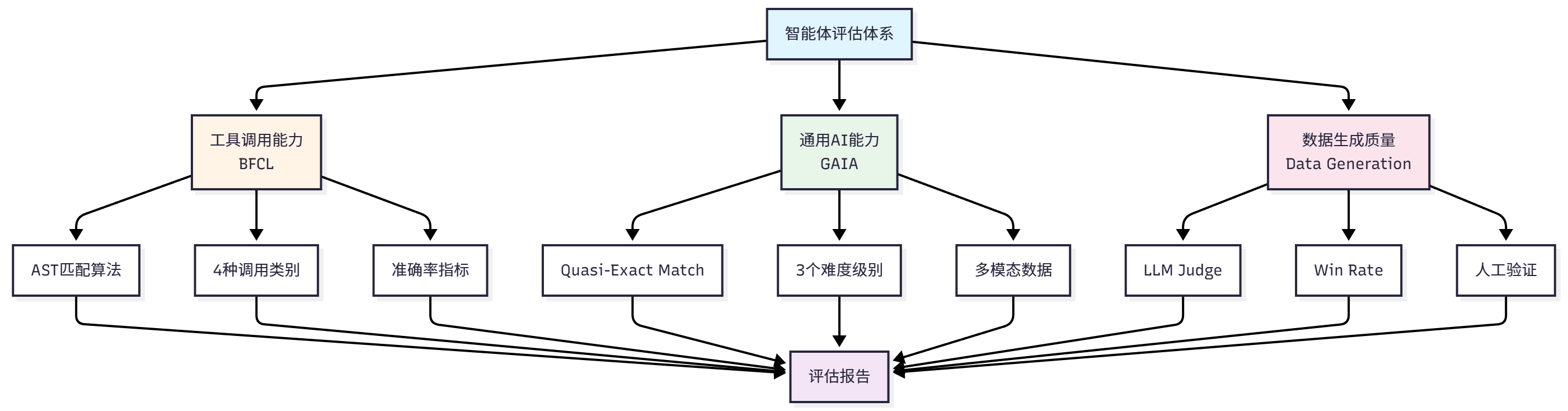
Considering learning curve and practicality, this chapter will focus on the following evaluation scenarios:
BFCL: Evaluate tool invocation capability
- Selection rationale: Moderate dataset size, clear evaluation metrics, active community
- Applicable scenarios: Evaluate agent function call accuracy
GAIA: Evaluate general AI assistant capability
- Selection rationale: Realistic tasks, difficulty grading, strong comprehensiveness
- Applicable scenarios: Evaluate agent comprehensive problem-solving capability
Data Generation Quality Evaluation: Evaluate LLM-generated data quality
- Selection rationale: Through this case, experience complete demonstration of using Agent to create data and evaluate data
- Applicable scenarios: Evaluate quality of generated training data and test data
- Evaluation methods: LLM Judge, Win Rate, manual verification
Through these three evaluation scenarios, we will build a complete evaluation system. Figure 12.1 shows our evaluation system construction approach.
12.1.4 Chapter Learning Objectives and Quick Experience
Let's first look at the learning content of Chapter 12:
hello_agents/
├── evaluation/                         # Evaluation module
│   └── benchmarks/                     # Evaluation benchmark implementation
│       ├── bfcl/                       # BFCL evaluation implementation
│       │   ├── dataset.py              # BFCL dataset loader
│       │   ├── evaluator.py            # BFCL evaluator (AST matching)
│       │   ├── metrics.py              # BFCL-specific metrics
│       │   └── ast_matcher.py          # AST matching algorithm
│       ├── gaia/                       # GAIA evaluation implementation
│       │   ├── dataset.py              # GAIA dataset loader
│       │   ├── evaluator.py            # GAIA evaluator (quasi exact match)
│       │   ├── metrics.py              # GAIA-specific metrics
│       │   └── quasi_exact_match.py    # Quasi exact match algorithm
│       └── data_generation/            # Data generation evaluation implementation
│           ├── dataset.py              # AIME dataset loader
│           ├── llm_judge.py            # LLM Judge evaluator
│           └── win_rate.py             # Win Rate evaluator
└── tools/builtin/                      # Built-in tools module
    ├── bfcl_evaluation_tool.py         # BFCL evaluation tool
    ├── gaia_evaluation_tool.py         # GAIA evaluation tool
    ├── llm_judge_tool.py               # LLM Judge tool
└── win_rate_tool.py # Win Rate toolFor this chapter's content, the learning objective is to master the ability to apply evaluation tools. Let's first prepare the development environment:
# Install HelloAgents framework (Chapter 12 version)
pip install "hello-agents[evaluation]==0.2.7"

# Set environment variables
export HF_TOKEN="your_huggingface_token"     # For GAIA dataset (setup steps will follow)

# Since the official `bfcl-eval` package requires numpy<=2.0.0, which conflicts with HelloAgents main dependencies, separate installation is needed
pip install "numpy==1.26.4" bfcl-evalIn the following sections, we will deeply learn the detailed usage and introduction of each evaluation method.
12.2 BFCL: Tool Invocation Capability Evaluation
12.2.1 BFCL Benchmark Introduction
BFCL (Berkeley Function Calling Leaderboard) is a function calling capability evaluation benchmark launched by UC Berkeley[1]. In agent systems, tool calling is one of the core capabilities. Agents need to complete the following tasks:
- Understand Task Requirements: Extract key information from user's natural language description
- Select Appropriate Tools: Choose the most suitable tool from available tool set
- Construct Function Calls: Correctly fill in function name and parameters
- Handle Complex Scenarios: Support advanced scenarios like multi-function calls, parallel calls
The BFCL benchmark contains four evaluation categories with increasing difficulty. Starting from the most basic single function call (Simple), gradually increasing to scenarios requiring multiple function calls (Multiple), then to complex scenarios requiring parallel calls of multiple functions (Parallel), and finally to scenarios requiring judgment of whether function calls are needed (Irrelevance). These four categories cover various tool calling scenarios that agents may encounter in practical applications, as shown in Table 12.1:
The BFCL evaluation process follows standard benchmark testing procedures: first load dataset and select evaluation category, then run agent to obtain prediction results, next parse prediction results into Abstract Syntax Tree (AST), and finally judge whether predictions are correct through AST matching algorithm. The entire process traverses all test samples, ultimately calculating evaluation metrics like accuracy and generating evaluation reports. The complete evaluation process is shown in Figure 12.2:

(1) BFCL Dataset Structure
The BFCL dataset uses JSON format, with each test sample containing the following fields:
{
  "id": "simple_001",
  "question": "What's the weather like in Beijing today?",
  "function": [
    {
      "name": "get_weather",
      "description": "Get the current weather for a location",
      "parameters": {
        "type": "object",
        "properties": {
          "location": {
            "type": "string",
            "description": "The city name"
          }
        },
        "required": ["location"]
      }
    }
  ],
  "ground_truth": [
    {
      "name": "get_weather",
      "arguments": {
        "location": "Beijing"
      }
    }
  ]
}Key Field Descriptions:
question: User's natural language requestfunction: List of available functions (including function signatures and descriptions)ground_truth: Standard answer (expected function call)
(2) AST Matching Explanation
BFCL uses AST Matching (Abstract Syntax Tree Matching) as the core evaluation algorithm, so let's understand the evaluation strategy below.
BFCL uses Abstract Syntax Tree (AST) for intelligent matching, rather than simple string matching. The core idea of AST matching is: Parse function calls into syntax trees, then compare tree structure and node values.
Given predicted function call
Where
Two syntax trees are equivalent if they satisfy three core conditions: function names must be completely identical (exact match), parameter key-value pair sets are equal (ignoring order), and each parameter value is semantically equivalent (e.g., 2+3 is equivalent to 5). In the specific matching process, function name matching requires exact string matching, for example get_weather and get_temperature are considered different functions. Parameter matching uses AST for intelligent comparison, allowing different parameter orders (f(a=1, b=2) is equivalent to f(b=2, a=1)), allowing equivalent expressions (f(x=2+3) is equivalent to f(x=5)), and also allowing different string representations (f(s="hello") is equivalent to f(s='hello')). For multi-function call scenarios, the matching algorithm requires calling the same number of functions, each function call must match, but call order can differ (using set matching).
AST Matching Examples:
# Example 1: Different parameter order (match successful)
Prediction: get_weather(city="Beijing", unit="celsius")
Standard: get_weather(unit="celsius", city="Beijing")
Result: ✅ Match successful

# Example 2: Equivalent expression (match successful)
Prediction: calculate(x=2+3)
Standard: calculate(x=5)
Result: ✅ Match successful

# Example 3: Wrong function name (match failed)
Prediction: get_temperature(city="Beijing")
Standard: get_weather(city="Beijing")
Result: ❌ Match failed

# Example 4: Wrong parameter value (match failed)
Prediction: get_weather(city="Shanghai")
Standard: get_weather(city="Beijing")
Result: ❌ Match failed(3) BFCL Evaluation Metrics
BFCL uses the following metrics to evaluate agent performance:
1. Accuracy
Accuracy is the most core metric, defined as the proportion of samples with successful AST matching:
Where:
is the total number of samples is the prediction result of the -th sample is the standard answer of the -th sample is the AST matching function
2. AST Match Rate
Same as accuracy, emphasizing use of AST matching algorithm:
3. Category-wise Accuracy
For each category
Where
4. Weighted Accuracy
Considering difficulty weights of different categories:
Where
5. Error Rate
Proportion of samples that failed to correctly call functions:
Metric Interpretation:
- Accuracy = 1.0: All samples are completely correct
- Accuracy = 0.8: 80% of samples correct, 20% of samples incorrect
- Accuracy = 0.0: All samples are incorrect
Category Accuracy Example:
# Assume evaluation results
simple_accuracy = 0.95      # Simple category: 95% correct
multiple_accuracy = 0.82    # Multiple category: 82% correct
parallel_accuracy = 0.68    # Parallel category: 68% correct

# Weighted accuracy (assuming equal weights)
weighted_accuracy = (0.95 + 0.82 + 0.68) / 3 = 0.817(4) BFCL Official Evaluation Tool
BFCL provides official CLI tool for evaluation:
# Install BFCL evaluation tool
pip install bfcl

# Run official evaluation
bfcl evaluate \
    --model-result-path ./results.json \
--test-category simple_pythonAdvantages of using the official evaluation tool: it uses the official AST matching algorithm, evaluation results are completely consistent with the leaderboard, supports all BFCL v4 categories, and can automatically generate detailed evaluation reports.
12.2.2 Obtaining BFCL Dataset
The BFCL dataset can be obtained through the following methods:
Method 1: Clone from Official GitHub Repository (Recommended)
This is the most reliable method, obtaining complete dataset and ground truth:
# Clone BFCL repository
git clone https://github.com/ShishirPatil/gorilla.git temp_gorilla
cd temp_gorilla/berkeley-function-call-leaderboard

# View BFCL v4 dataset
ls bfcl_eval/data/
# Output: BFCL_v4_simple_python.json  BFCL_v4_multiple.json  BFCL_v4_parallel.json  ...

# View ground truth
ls bfcl_eval/data/possible_answer/
# Output: BFCL_v4_simple_python.json BFCL_v4_multiple.json ...Reasons for recommending this method: it contains complete ground truth (standard answers), data format is completely consistent with official evaluation tool, can directly use official evaluation scripts, and supports BFCL v4 latest version.
Method 2: Load Official Data Using HelloAgents
After cloning repository, load data using HelloAgents:
from hello_agents.evaluation import BFCLDataset

# Load BFCL official data
dataset = BFCLDataset(
    bfcl_data_dir="./temp_gorilla/berkeley-function-call-leaderboard/bfcl_eval/data",
    category="simple_python"  # BFCL v4 category
)

# Load data (including test data and ground truth)
data = dataset.load()

print(f"✅ Loaded {len(data)} test samples")
print(f"✅ Loaded {len(dataset.ground_truth)} ground truth")
# Output:
# ✅ Loaded 400 test samples
# ✅ Loaded 400 ground truthThe working principle of this loader is: first load test data from bfcl_eval/data/, then load ground truth from bfcl_eval/data/possible_answer/, next automatically merge test data and ground truth, and finally preserve original BFCL data format. BFCL v4 dataset categories can be viewed in Table 12.2.
You can also view available categories through code:
# Get all supported categories
categories = dataset.get_available_categories()
print(f"Supported categories: {categories}")
# Output: ['simple_python', 'simple_java', 'simple_javascript', 'multiple', ...]12.2.3 Implementing BFCL Evaluation in HelloAgents
Now let's see how to implement BFCL evaluation in the HelloAgents framework. We provide three usage methods:
Method 1: Using BFCLEvaluationTool (Recommended)
This is the simplest method, completing evaluation, report generation, and official evaluation with one line of code:
from hello_agents import SimpleAgent, HelloAgentsLLM
from hello_agents.tools import BFCLEvaluationTool

# 1. Create agent to be evaluated
llm = HelloAgentsLLM()
agent = SimpleAgent(name="TestAgent", llm=llm)

# 2. Create BFCL evaluation tool
bfcl_tool = BFCLEvaluationTool()

# 3. Run evaluation (automatically complete all steps)
results = bfcl_tool.run(
    agent=agent,
    category="simple_python",  # Evaluation category
    max_samples=5              # Number of evaluation samples (0 means all)
)

# 4. View results
print(f"Accuracy: {results['overall_accuracy']:.2%}")
print(f"Correct: {results['correct_samples']}/{results['total_samples']}")Run Output:
============================================================
BFCL One-Click Evaluation
============================================================

Configuration:
   Evaluation category: simple_python
   Sample count: 5
   Agent: TestAgent

============================================================
Step 1: Run HelloAgents Evaluation
============================================================
✅ BFCL dataset loaded
   Data directory: ./temp_gorilla/berkeley-function-call-leaderboard/bfcl_eval/data
   Category: simple_python
   Sample count: 400
   Ground truth count: 400

🔧 Starting BFCL evaluation...
   Progress: 1/5
   Progress: 5/5

✅ BFCL evaluation complete
   Overall accuracy: 100.00%
   simple_python: 100.00% (5/5)

📊 Evaluation results:
   Accuracy: 100.00%
   Correct: 5/5

============================================================
Step 2: Export BFCL Format Results
============================================================
✅ BFCL format results exported
   Output file: ./evaluation_results/bfcl_official/BFCL_v4_simple_python_result.json

============================================================
Step 3: Run BFCL Official Evaluation
============================================================
✅ Result file copied to: ./result/Qwen_Qwen3-8B/BFCL_v4_simple_python_result.json

🔄 Running command: bfcl evaluate --model Qwen/Qwen3-8B --test-category simple_python --partial-eval

============================================================
BFCL Official Evaluation Results
============================================================
📊 Evaluation results summary:
Model,Overall Acc,simple_python
Qwen/Qwen3-8B,100.00,100.00

🎯 Final results:
   Accuracy: 100.00%
   Correct: 5/5

============================================================
Step 4: Generate Evaluation Report
============================================================
📄 Report generated: ./evaluation_reports/bfcl_report_20251011_005938.md

Accuracy: 100.00%
Correct: 5/5Auto-generated Markdown Report:
After evaluation completes, a detailed Markdown report is automatically generated, including:
# BFCL Evaluation Report
**Generated**: 2025-10-11 00:59:38

## 📊 Evaluation Overview

- **Agent**: TestAgent
- **Evaluation Category**: simple_python
- **Overall Accuracy**: 100.00%
- **Correct Samples**: 5/5

## 📈 Detailed Metrics

### Category Accuracy

- **simple_python**: 100.00% (5/5)

## 📝 Sample Details

| Sample ID | Question | Prediction | Ground Truth | Correct |
|-----------|----------|------------|--------------|---------|
| simple_python_0 | Find the area of a triangle... | [{'name': 'calculate_triangle_area'...}] | [{'function_name': {'base': [10]...}}] | ✅ |
| simple_python_1 | Calculate the factorial of 5... | [{'name': 'calculate_factorial'...}] | [{'function_name': {'number': [5]}}] | ✅ |
...

## 📊 Accuracy Visualization
Accuracy: ██████████████████████████████████████████████████ 100.00%

## 💡 Recommendations
- ✅ Excellent performance! Agent shows outstanding tool calling capabilities.Method 2: Using One-Click Evaluation Script
Suitable for quick command-line evaluation. In this chapter's accompanying code examples, we provide 04_run_bfcl_evaluation.py, supporting direct command-line evaluation:
# Run evaluation script
python chapter12/04_run_bfcl_evaluation.py --category simple_python --samples 10

# Specify model name (for BFCL official evaluation)
python examples/04_run_bfcl_evaluation.py \
    --category simple_python \
    --samples 10 \
--model-name "Qwen/Qwen3-8B"The script supports three parameters: --category specifies evaluation category (default simple_python), --samples specifies number of evaluation samples (default 5, 0 means all), --model-name specifies model name for BFCL official evaluation (default Qwen/Qwen3-8B).
Method 3: Directly Using Dataset and Evaluator
Suitable for scenarios requiring custom evaluation process:
from hello_agents import SimpleAgent, HelloAgentsLLM
from hello_agents.evaluation import BFCLDataset, BFCLEvaluator

# 1. Create agent
llm = HelloAgentsLLM()
agent = SimpleAgent(name="TestAgent", llm=llm)

# 2. Load dataset
dataset = BFCLDataset(
    bfcl_data_dir="./temp_gorilla/berkeley-function-call-leaderboard/bfcl_eval/data",
    category="simple_python"
)
data = dataset.load()

# 3. Create evaluator
evaluator = BFCLEvaluator(
    dataset=dataset,
    category="simple_python",
    evaluation_mode="ast"  # Use AST matching mode
)

# 4. Run evaluation
results = evaluator.evaluate(agent, max_samples=10)

# 5. View results
print(f"Accuracy: {results['overall_accuracy']:.2%}")
print(f"Correct: {results['correct_samples']}/{results['total_samples']}")

# 6. Export BFCL format results (optional)
evaluator.export_to_bfcl_format(
    results,
    output_path="./evaluation_results/my_results.json"
)Through these three methods, we can choose appropriate evaluation methods based on different needs. If you just want to quickly understand agent performance, using BFCLEvaluationTool's one-click evaluation is most convenient; if you need batch evaluation or integration into CI/CD pipeline, using command-line scripts is more suitable; if you need deep customization of evaluation process or integration into your own system, directly using Dataset and Evaluator provides maximum flexibility.
12.2.4 BFCL Official Evaluation Tool Integration
Previously we learned how to use HelloAgents' built-in evaluation functionality. In fact, BFCLEvaluationTool has automatically integrated BFCL official evaluation tool, allowing you to obtain authoritative, comparable evaluation results.
The entire evaluation process includes four steps: first load test data from BFCL v4 dataset, then use HelloAgents to run evaluation and obtain agent prediction results, next export results to BFCL official format (JSONL), and finally use official evaluation script to calculate final scores. This process ensures evaluation results are completely consistent with BFCL leaderboard, as shown in Figure 12.3:

When using BFCLEvaluationTool, official evaluation runs automatically (enabled by default):
from hello_agents import SimpleAgent, HelloAgentsLLM
from hello_agents.tools import BFCLEvaluationTool

# Create agent
llm = HelloAgentsLLM()
agent = SimpleAgent(name="TestAgent", llm=llm)

# Create evaluation tool
bfcl_tool = BFCLEvaluationTool()

# Run evaluation (automatically runs official evaluation)
results = bfcl_tool.run(
    agent=agent,
    category="simple_python",
    max_samples=5,
    # run_official_eval=True  # Default is True, can be omitted
    model_name="Qwen/Qwen3-8B"  # Optional, specify model name
)The tool automatically executes the complete evaluation process: first run HelloAgents evaluation to obtain prediction results, then export results to BFCL format and save to evaluation_results/bfcl_official/ directory, next copy result file to result/{model_name}/ directory to meet official evaluation tool requirements, then run BFCL official evaluation command to calculate scores, and finally display official evaluation results and generate Markdown format evaluation report.
Official Evaluation Output Example:
============================================================
Step 3: Run BFCL Official Evaluation
============================================================

✅ Result file copied to:
   ./result/Qwen_Qwen3-8B/BFCL_v4_simple_python_result.json

🔄 Running command: bfcl evaluate --model Qwen/Qwen3-8B --test-category simple_python --partial-eval

============================================================
BFCL Official Evaluation Results
============================================================

📊 Evaluation results summary:
Model,Overall Acc,simple_python
Qwen/Qwen3-8B,100.00,100.00

🎯 Final results:
   Accuracy: 100.00%
Correct: 5/5If you want to manually control the evaluation process, you can disable automatic official evaluation:
# Disable official evaluation
results = bfcl_tool.run(
    agent=agent,
    category="simple_python",
    max_samples=5,
    run_official_eval=False  # Disable official evaluation
)

# Then manually run official evaluation
import subprocess
subprocess.run([
    "bfcl", "evaluate",
    "--model", "Qwen/Qwen3-8B",
    "--test-category", "simple_python",
    "--partial-eval"
])You can also manually generate reports:
# Run evaluation
results = bfcl_tool.run(agent, category="simple_python", max_samples=5)

# Manually generate report
report = bfcl_tool.generate_report(
    results,
    output_file="./my_reports/custom_report.md"
)

# Print report content
print(report)12.2.5 Core Component Implementation Details
In previous sections, we learned how to use BFCL evaluation tools. Now let's dive into how HelloAgents evaluation system's core components are implemented. Understanding these implementation details not only helps you better use the evaluation system, but also allows you to customize and extend according to your own needs.
(1) BFCLDataset: Dataset Loader
BFCLDataset is responsible for loading and managing BFCL dataset:
class BFCLDataset:
    """BFCL dataset loader"""

    def __init__(self, category: str = "simple", local_data_path: Optional[str] = None):
        self.category = category
        self.local_data_path = local_data_path
        self.data = []

    def load(self) -> List[Dict[str, Any]]:
        """Load dataset"""
        # Load from local first
        if self.local_data_path:
            return self._load_from_local()
        # Otherwise load from Hugging Face
return self._load_from_huggingface()Because BFCL's dataset is in the official repository, the recommended approach here is to directly clone a local copy for evaluation. Only when not found will it load from Hugging Face.
(2) BFCLEvaluator: Evaluation Executor
BFCLEvaluator is responsible for executing the evaluation process. Its core is the evaluate() method, which coordinates the entire evaluation process:
class BFCLEvaluator:
    """BFCL evaluator"""

    def evaluate(self, agent: Any, max_samples: Optional[int] = None) -> Dict[str, Any]:
        """Execute evaluation"""
        results = []

        for item in self.dataset[:max_samples]:
            # 1. Construct prompt
            prompt = self._build_prompt(item)

            # 2. Call agent
            response = agent.run(prompt)

            # 3. Extract function calls
            predicted_calls = self._extract_function_calls(response)

            # 4. Compare with ground truth
            is_correct = self._compare_calls(predicted_calls, item["ground_truth"])

            results.append({
                "id": item["id"],
                "prediction": predicted_calls,
                "ground_truth": item["ground_truth"],
                "is_correct": is_correct
            })

return {"results": results, "total_samples": len(results)}This evaluator's design contains three core points: first is prompt construction, needing to convert questions and function definitions in dataset into prompts understandable by agent; second is function call extraction, needing to extract function calls from agent's response and support multiple formats (JSON, code blocks, etc.); finally is AST matching, using abstract syntax tree for function call comparison, which is more accurate than simple string matching.
Let's look at the implementation of function call extraction:
def _extract_function_calls(self, response: str) -> List[Dict[str, Any]]:
    """Extract function calls from response

    Supports multiple formats:
    1. JSON format: {"name": "func", "arguments": {...}}
    2. Code block format: ```python\nfunc(arg1=val1)\n```
    3. Plain text format: func(arg1=val1)
    """
    calls = []

    # Try JSON parsing
    try:
        json_match = re.search(r'\{.*\}', response, re.DOTALL)
        if json_match:
            data = json.loads(json_match.group())
            if isinstance(data, dict) and "name" in data:
                calls.append(data)
            elif isinstance(data, list):
                calls.extend(data)
    except json.JSONDecodeError:
        pass

    # Try code block extraction
    code_blocks = re.findall(r'```(?:python)?\n(.*?)\n```', response, re.DOTALL)
    for code in code_blocks:
        # Parse Python function calls
        parsed_calls = self._parse_python_calls(code)
        calls.extend(parsed_calls)

return calls(3) BFCLMetrics: Metrics Calculator
BFCLMetrics is responsible for calculating various evaluation metrics:
class BFCLMetrics:
    """BFCL metrics calculator"""

    def compute_metrics(self, results: List[Dict[str, Any]]) -> Dict[str, Any]:
        """Compute all metrics"""
        return {
            "accuracy": self._compute_accuracy(results),
            "ast_match_rate": self._compute_ast_match_rate(results),
            "parameter_accuracy": self._compute_parameter_accuracy(results),
            "f1_score": self._compute_f1_score(results),
            "category_statistics": self._compute_category_stats(results)
}AST Matching Implementation:
AST matching is the core technology of BFCL evaluation. It is more intelligent than simple string matching and can identify semantically equivalent function calls:
def _ast_match(self, pred_call: Dict, true_call: Dict) -> bool:
    """Match function calls using AST

    Advantages of AST matching:
    1. Ignore parameter order: func(a=1, b=2) equivalent to func(b=2, a=1)
    2. Recognize equivalent expressions: 2+3 equivalent to 5
    3. Ignore whitespace and format differences
    """
    # 1. Function name must match exactly
    if pred_call.get("name") != true_call.get("name"):
        return False

    # 2. Convert parameters to AST nodes
    pred_args = self._args_to_ast(pred_call.get("arguments", {}))
    true_args = self._args_to_ast(true_call.get("arguments", {}))

    # 3. Compare AST nodes
    return ast.dump(pred_args) == ast.dump(true_args)

def _args_to_ast(self, args: Dict[str, Any]) -> ast.AST:
    """Convert parameter dictionary to AST node"""
    # Construct a virtual function call
    code = f"func({', '.join(f'{k}={repr(v)}' for k, v in args.items())})"
    tree = ast.parse(code)
return tree.body[0].value # Return Call node(4) Tool Encapsulation: BFCLEvaluationTool
Finally, we encapsulate these components into a Tool so it can be directly called by agents:
class BFCLEvaluationTool(Tool):
    """BFCL evaluation tool"""

    def __init__(self, local_data_path: Optional[str] = None):
        super().__init__(
            name="bfcl_evaluation",
            description="Evaluate agent's tool calling capability"
        )
        self.dataset = None
        self.evaluator = None
        self.metrics_calculator = BFCLMetrics()

    def run(self, parameters: Dict[str, Any]) -> str:
        """Execute evaluation"""
        # 1. Load dataset
        self.dataset = BFCLDataset(...)

        # 2. Create evaluator
        self.evaluator = BFCLEvaluator(...)

        # 3. Run evaluation
        results = self.evaluator.evaluate(...)

        # 4. Calculate metrics
        metrics = self.metrics_calculator.compute_metrics(...)

        # 5. Return JSON results
return json.dumps(results, ensure_ascii=False)This tool's design follows three core principles: first inherit Tool base class to follow HelloAgents' tool specification, ensuring seamless integration with framework; second perform strict parameter validation, checking required parameters and providing friendly error prompts, improving user experience; finally format results, returning JSON string for easy parsing and display. Through this modular design, we implemented an evaluation system that is both easy to use and flexible. Users can directly use high-level Tool interface to quickly complete evaluation, or dive into low-level components for customization to meet special needs.
12.2.6 Extension and Optimization Recommendations
Through previous learning, we have mastered how to use HelloAgents for BFCL evaluation. It should be noted that our current implementation is a simple reproduction based on SimpleAgent, mainly completing basic BFCL evaluation functionality. In practical applications, BFCL benchmark contains multiple difficulty levels and scenarios. To achieve higher scores on the leaderboard, further optimization and extension are needed.
(1) Limitations of Current Implementation
Our current SimpleAgent implementation mainly focuses on building the evaluation process, with room for improvement in tool calling capabilities. SimpleAgent uses custom tool calling format [TOOL_CALL:tool_name:parameters], which requires LLM to actively learn and use. In complex scenarios, performance may not match agents using native function calling. Additionally, we currently only test basic categories like simple_python. For more complex scenarios like multiple, parallel, irrelevance, targeted optimization is still needed.
(2) Directions for Improving BFCL Scores
To further improve BFCL evaluation scores, you can start from the following directions. First is optimizing agent's tool calling capability - consider using LLMs that support native function calling (like GPT-4, Claude, etc.), or improve prompts to help LLM better understand tool calling format. Second is expanding tool library - BFCL tests involve various types of functions, you can pre-implement common tool types based on test dataset characteristics to improve agent's tool coverage. Third is designing different strategies for different difficulty levels - for example, in multiple scenarios agents need to plan multi-step tool calling sequences, in parallel scenarios they need to identify tool calls that can be executed in parallel, in irrelevance scenarios they need to judge whether tool calling is truly needed.
(3) Practice Recommendations
For developers wanting to achieve better results on BFCL, the following practice strategies are recommended. First, start from simple category, ensure basic single function calls work stably - this is the foundation for subsequent optimization. Then, gradually test more complex categories like multiple, parallel, analyze failure cases, find agent's weak points. During optimization, you can refer to high-scoring models on BFCL leaderboard, learn their design ideas and optimization techniques. Meanwhile, it's recommended to use official evaluation tools for validation, ensuring optimized results are consistent with leaderboard standards.
Here are some suggestions for further processing during evaluation:
1. Progressive Evaluation
Start from small samples, gradually increase sample count:
# Step 1: Quick test (5 samples)
results_quick = bfcl_tool.run(agent, category="simple_python", max_samples=5)

# Step 2: Medium-scale test (50 samples)
if results_quick['overall_accuracy'] > 0.8:
    results_medium = bfcl_tool.run(agent, category="simple_python", max_samples=50)

# Step 3: Full evaluation (all samples)
if results_medium['overall_accuracy'] > 0.8:
results_full = bfcl_tool.run(agent, category="simple_python", max_samples=0)2. Multi-Category Evaluation
Evaluate tasks of different difficulties:
categories = ["simple_python", "multiple", "parallel", "irrelevance"]

for category in categories:
    print(f"\nEvaluating category: {category}")
    results = bfcl_tool.run(agent, category=category, max_samples=10)
print(f"Accuracy: {results['overall_accuracy']:.2%}")3. Comparative Evaluation
Compare agents with different configurations:
# Configuration 1: Default prompt
agent1 = SimpleAgent(name="Agent-Default", llm=llm)
results1 = bfcl_tool.run(agent1, category="simple_python", max_samples=10)

# Configuration 2: Optimized prompt
agent2 = SimpleAgent(name="Agent-Optimized", llm=llm)
# ... Set optimized system prompt ...
results2 = bfcl_tool.run(agent2, category="simple_python", max_samples=10)

# Compare results
print(f"Default configuration accuracy: {results1['overall_accuracy']:.2%}")
print(f"Optimized configuration accuracy: {results2['overall_accuracy']:.2%}")If your evaluation results are good, consider submitting to BFCL official leaderboard!
Step 1: Prepare Submission Materials
- Model description document
- Evaluation result files (all categories)
- Model access method (API or open-source link)
Step 2: Submit to GitHub
Visit BFCL official repository and submit Pull Request according to instructions:
- Repository: https://github.com/ShishirPatil/gorilla
- Submission guide: Refer to
CONTRIBUTING.md
Step 3: Wait for Review
BFCL team will review your submission and verify result accuracy. After approval, your model will appear on the official leaderboard!
12.3 GAIA: General AI Assistant Capability Evaluation
12.3.1 GAIA Benchmark Introduction
GAIA (General AI Assistants) is an evaluation benchmark jointly launched by Meta AI and Hugging Face, focusing on evaluating AI assistants' general capabilities[2]. Unlike BFCL's focus on tool calling, GAIA evaluates agents' comprehensive performance in real-world tasks.
GAIA's design philosophy is: Real-world problems often require comprehensive application of multiple capabilities. An excellent AI assistant not only needs to call tools, but also needs to:
- Multi-step Reasoning: Decompose complex problems into multiple sub-problems
- Knowledge Application: Utilize built-in knowledge and external knowledge bases
- Multimodal Understanding: Process multiple inputs like text, images, files
- Web Browsing: Obtain latest information from the internet
- File Operations: Read and process files in various formats
(1) GAIA Dataset Structure
After understanding GAIA's evaluation philosophy, let's dive into the specific structure of GAIA dataset. GAIA contains 466 carefully designed real-world problems. These problems are divided into three difficulty levels based on complexity and required reasoning steps, from simple zero-step reasoning tasks to difficult tasks requiring multi-step complex reasoning, comprehensively covering various scenarios agents may encounter in practical applications, as shown in Table 12.3:
For GAIA dataset sample examples, refer to the code snippet below:
{
  "task_id": "gaia_001",
  "Question": "What is the total population of the top 3 most populous cities in California?",
  "Level": 2,
  "Final answer": "12847521",
  "file_name": "",
  "file_path": "",
  "Annotator Metadata": {
    "Steps": [
      "Search for most populous cities in California",
      "Get population data for top 3 cities",
      "Sum the populations"
    ],
    "Number of steps": 3,
    "How long did this take?": "5 minutes",
    "Tools": ["web_search", "calculator"]
  }
}Key Field Descriptions:
Question: Question descriptionLevel: Difficulty level (1-3)Final answer: Standard answer (may be number, text, or file)file_name/file_path: Attachment file (if any)Annotator Metadata: Metadata provided by annotator (reasoning steps, required tools, etc.)
(2) Quasi Exact Match Introduction
GAIA uses Quasi Exact Match evaluation algorithm, which is GAIA's officially defined evaluation standard. The core idea of this algorithm is: First normalize answers, then perform exact matching.
Given predicted answer
Where
The normalization function applies different rules based on answer type. For numeric types, remove comma separators (1,000 → 1000) and unit symbols ($100 → 100, 50% → 50), for example "$1,234.56" normalizes to "1234.56". For string types, convert to lowercase ("Apple" → "apple"), remove articles ("the apple" → "apple"), remove extra spaces ("hello world" → "hello world") and remove trailing punctuation ("hello." → "hello"), for example "The United States" normalizes to "united states". For list types, split elements by comma, apply string normalization to each element, sort alphabetically then rejoin, for example "Paris, London, Berlin" normalizes to "berlin,london,paris".
Normalization Examples:
# Numeric answer
Original answer: "$1,234.56"
Normalized: "1234.56"

# String answer
Original answer: "The United States of America"
Normalized: "united states of america"

# List answer
Original answer: "Paris, London, Berlin"
Normalized: "berlin, london, paris"(3) GAIA Evaluation Metrics
GAIA uses the following metrics to evaluate agent performance:
1. Exact Match Rate
Exact match rate is GAIA's core metric, defined as the proportion of samples with successful quasi exact matching:
Where:
is the total number of samples is the predicted answer of the -th sample is the standard answer of the -th sample is the quasi exact match function
2. Level-wise Accuracy
For each difficulty level
Where
3. Difficulty Progression Drop Rate
Measures agent's performance degradation as difficulty increases:
: Drop rate from Level 1 to Level 2 : Drop rate from Level 2 to Level 3
4. Average Reasoning Steps
Evaluates average number of steps required by agent to complete tasks:
Where
Metric Interpretation:
- Exact Match Rate = 1.0: All samples are completely correct
- Exact Match Rate = 0.5: 50% of samples correct, 50% of samples incorrect
- Drop Rate = 0.3: Difficulty increase causes 30% accuracy drop
- Drop Rate = 0.0: Difficulty increase doesn't affect accuracy (ideal case)
Evaluation Example:
Suppose we evaluated 10 samples, results can be referenced in Table 12.4:
To calculate metrics for this case, refer to the Python script below:
# 1. Exact match rate
total_samples = 10
correct_samples = 7  # Samples 1,2,3,5,6,8,9
exact_match_rate = correct_samples / total_samples = 0.70  # 70%

# 2. Level-wise accuracy
level_1_correct = 3  # Samples 1,2,3
level_1_total = 3
level_1_accuracy = 3 / 3 = 1.00  # 100%

level_2_correct = 2  # Samples 5,6
level_2_total = 3
level_2_accuracy = 2 / 3 = 0.67  # 67%

level_3_correct = 2  # Samples 8,9
level_3_total = 4
level_3_accuracy = 2 / 4 = 0.50  # 50%

# 3. Difficulty progression drop rate
drop_rate_1_to_2 = (1.00 - 0.67) / 1.00 = 0.33  # 33%
drop_rate_2_to_3 = (0.67 - 0.50) / 0.67 = 0.25  # 25%

print(f"Exact match rate: {exact_match_rate:.2%}")  # 70.00%
print(f"Level 1 accuracy: {level_1_accuracy:.2%}")  # 100.00%
print(f"Level 2 accuracy: {level_2_accuracy:.2%}")  # 66.67%
print(f"Level 3 accuracy: {level_3_accuracy:.2%}")  # 50.00%
print(f"Level 1→2 drop rate: {drop_rate_1_to_2:.2%}")  # 33.00%
print(f"Level 2→3 drop rate: {drop_rate_2_to_3:.2%}") # 25.00%Result Analysis:
- Overall Performance: 70% exact match rate, good performance
- Difficulty Sensitivity: 33% drop from Level 1 to Level 2, indicating significant degradation in medium difficulty tasks
- Capability Boundary: Level 3 accuracy is 50%, indicating room for improvement in complex tasks
The larger the drop rate, the more obvious the agent's capability degradation when handling complex tasks.
(4) GAIA Official System Prompt
GAIA requires using specific system prompt to ensure model output conforms to evaluation format:
GAIA_SYSTEM_PROMPT = """You are a general AI assistant. I will ask you a question. Report your thoughts, and finish your answer with the following template: FINAL ANSWER: [YOUR FINAL ANSWER].

YOUR FINAL ANSWER should be a number OR as few words as possible OR a comma separated list of numbers and/or strings.

If you are asked for a number, don't use comma to write your number neither use units such as $ or percent sign unless specified otherwise.

If you are asked for a string, don't use articles, neither abbreviations (e.g. for cities), and write the digits in plain text unless specified otherwise.

If you are asked for a comma separated list, apply the above rules depending of whether the element to be put in the list is a number or a string."""GAIA has strict requirements for answer format: answers must be given in FINAL ANSWER: [answer] format; for numeric answers, don't use comma separators and unit symbols; for string answers, don't use articles and abbreviations; for list answers, use comma separation and arrange alphabetically.
12.3.2 Obtaining GAIA Dataset
Important Note: GAIA is a Gated Dataset, requiring prior application for access permission on HuggingFace.
Step 1: Apply for Access Permission
- Visit https://huggingface.co/datasets/gaia-benchmark/GAIA
- Click "Request access" button
- Fill out application form (usually approved within seconds)
- Get your HuggingFace Token: https://huggingface.co/settings/tokens
Step 2: Configure Environment Variables
Add your HuggingFace Token to .env file:
# HuggingFace API configuration
HF_TOKEN=hf_your_token_hereMethod 1: Automatic Download Using HelloAgents (Recommended)
HelloAgents automatically handles GAIA dataset download and caching:
from hello_agents.evaluation import GAIADataset
import os

# Ensure HF_TOKEN is set, this line is not needed if .env is configured
os.environ["HF_TOKEN"] = "hf_your_token_here"

# Automatically download to ./data/gaia/
dataset = GAIADataset(
    dataset_name="gaia-benchmark/GAIA",
    split="validation",  # or "test"
    level=1  # Optional: 1, 2, 3, None(all)
)
items = dataset.load()

print(f"Loaded {len(items)} test samples")
# Output: Loaded 53 test samples (Level 1)Working Principle:
- On first run, uses
snapshot_downloadto download entire dataset to./data/gaia/ - Dataset contains 114 files (questions, images, PDFs, etc.)
- Subsequent uses load directly from local, very fast
Dataset Directory Structure:
./data/gaia/
├── 2023/
│   ├── validation/
│   │   ├── metadata.jsonl  (165 questions)
│   │   ├── *.png, *.pdf, *.csv, *.xlsx  (attachment files)
│   └── test/
│       ├── metadata.jsonl  (301 questions)
│       └── ... (attachment files)
├── GAIA.py
└── README.mdMethod 2: Manual Download
If you want to manually download the dataset:
from huggingface_hub import snapshot_download
import os

# Set Token
os.environ["HF_TOKEN"] = "hf_your_token_here"

# Download dataset
snapshot_download(
    repo_id="gaia-benchmark/GAIA",
    repo_type="dataset",
    local_dir="./data/gaia",
    token=os.getenv("HF_TOKEN")
)View Dataset Statistics:
# View dataset statistics
stats = dataset.get_statistics()
print(f"Total samples: {stats['total_samples']}")
print(f"Level distribution: {stats['level_distribution']}")
# Output:
# Total samples: 165
# Level distribution: {1: 53, 2: 62, 3: 50}12.3.3 Implementing GAIA Evaluation in HelloAgents
Similar to BFCL, we provide two evaluation methods, Method 1 is recommended.
Method 1: One-Click Evaluation Using GAIAEvaluationTool
This is the simplest method, automatically completing dataset download, evaluation execution, result export, and report generation:
from hello_agents import SimpleAgent, HelloAgentsLLM
from hello_agents.tools import GAIAEvaluationTool

# GAIA official system prompt (from paper)
GAIA_SYSTEM_PROMPT = """You are a general AI assistant. I will ask you a question. Report your thoughts, and finish your answer with the following template: FINAL ANSWER: [YOUR FINAL ANSWER].

YOUR FINAL ANSWER should be a number OR as few words as possible OR a comma separated list of numbers and/or strings.

If you are asked for a number, don't use comma to write your number neither use units such as $ or percent sign unless specified otherwise.

If you are asked for a string, don't use articles, neither abbreviations (e.g. for cities), and write the digits in plain text unless specified otherwise.

If you are asked for a comma separated list, apply the above rules depending of whether the element to be put in the list is a number or a string."""

# 1. Create agent (using GAIA official system prompt)
llm = HelloAgentsLLM()
agent = SimpleAgent(
    name="TestAgent",
    llm=llm,
    system_prompt=GAIA_SYSTEM_PROMPT  # Key: Use GAIA official prompt
)

# 2. Create GAIA evaluation tool
gaia_tool = GAIAEvaluationTool()

# 3. One-click run evaluation
results = gaia_tool.run(
    agent=agent,
    level=1,  # Level 1: Simple tasks
    max_samples=5,  # Evaluate 5 samples
    export_results=True,  # Export GAIA format results
    generate_report=True  # Generate evaluation report
)

# 4. View results
print(f"Exact match rate: {results['exact_match_rate']:.2%}")
print(f"Partial match rate: {results['partial_match_rate']:.2%}")
print(f"Correct: {results['exact_matches']}/{results['total_samples']}")Run Results:
============================================================
GAIA One-Click Evaluation
============================================================

Configuration:
   Agent: TestAgent
   Difficulty level: 1
   Sample count: 5

============================================================
Step 1: Run HelloAgents Evaluation
============================================================
   Downloading from HuggingFace: gaia-benchmark/GAIA
   📥 Downloading GAIA dataset...
   ✓ Dataset download complete
   ✓ Loaded 165 samples
✅ GAIA dataset loaded
   Data source: gaia-benchmark/GAIA
   Split: validation
   Level: 1
   Sample count: 53

🌟 Starting GAIA evaluation...
   Sample count: 5
   Progress: 5/5
✅ GAIA evaluation complete
   Exact match rate: 80.00%
   Partial match rate: 80.00%

============================================================
Step 2: Export GAIA Format Results
============================================================
✅ GAIA format results exported
   Output file: evaluation_results\gaia_official\gaia_level1_result_20251011_012648.jsonl
   Sample count: 5
   Includes reasoning trace: True
📄 Submission guide generated: evaluation_results\gaia_official\SUBMISSION_GUIDE_20251011_012648.md

============================================================
Step 3: Generate Evaluation Report
============================================================
📄 Report generated: evaluation_reports\gaia_report_20251011_012648.md

============================================================
🎯 Final Results
============================================================
   Exact match rate: 80.00%
   Partial match rate: 80.00%
Correct: 4/5After evaluation completes, three types of files are automatically generated: first is GAIA format result file (evaluation_results/gaia_official/gaia_level1_result_*.jsonl), using JSONL format (one JSON object per line), can be directly used for submission to GAIA leaderboard; second is submission guide file (evaluation_results/gaia_official/SUBMISSION_GUIDE_*.md), containing detailed submission steps, result file format description, and notes; finally is evaluation report (evaluation_reports/gaia_report_*.md), containing evaluation result summary, detailed metrics, sample details, and visualization charts.
Note: If you find generated evaluation results unsatisfactory (e.g., low accuracy), this is normal. Although Level 1 is one-step reasoning tasks, agents still need tool calling capabilities (like search engine, calculator, etc.) to correctly answer questions. Our current SimpleAgent is mainly used to demonstrate evaluation process, with room for improvement in tool calling capabilities.
Method 2: Using Dataset + Evaluator (Flexible Customization)
If you need more fine-grained control, you can directly use low-level components:
from hello_agents.evaluation import GAIADataset, GAIAEvaluator

# 1. Load dataset
dataset = GAIADataset(level=1)
items = dataset.load()
print(f"Loaded {len(items)} samples")

# 2. Create evaluator
evaluator = GAIAEvaluator(dataset=dataset, level=1)

# 3. Run evaluation
results = evaluator.evaluate(agent, max_samples=5)

# 4. Export GAIA format results
evaluator.export_to_gaia_format(
    results,
    "gaia_results.jsonl",
    include_reasoning=True
)Generated evaluation report (gaia_report_*.md) can reference the file below:
# GAIA Evaluation Report

**Generated**: 2025-10-11 01:26:48

## 📊 Evaluation Overview

- **Agent**: TestAgent
- **Difficulty Level**: 1
- **Total Samples**: 2
- **Exact Matches**: 1
- **Partial Matches**: 1
- **Exact Match Rate**: 50.00%
- **Partial Match Rate**: 50.00%

## 📈 Detailed Metrics

### Level-wise Accuracy

- **Level 1**: 50.00% exact / 50.00% partial (1/2)

## 📝 Sample Details (First 10)

| Task ID | Level | Predicted Answer | Correct Answer | Exact Match | Partial Match |
|---------|-------|------------------|----------------|-------------|---------------|
| e1fc63a2-da7a-432f-be78-7c4a95598703 | 1 | 24000 | 17 | ❌ | ❌ |
| 8e867cd7-cff9-4e6c-867a-ff5ddc2550be | 1 | 3 | 3 | ✅ | ✅ |

## 📊 Accuracy Visualization

Exact match: █████████████████████████░░░░░░░░░░░░░░░░░░░░░░░░░ 50.00%
Partial match: █████████████████████████░░░░░░░░░░░░░░░░░░░░░░░░░ 50.00%


## 💡 Recommendations

- ⚠️ Average performance, needs improvement.
- 💡 Suggest checking tool usage and multi-step reasoning capabilities.Generated GAIA Format Results (gaia_level1_result_*.jsonl):
{"task_id": "e1fc63a2-da7a-432f-be78-7c4a95598703", "model_answer": "24000", "reasoning_trace": "24000"}
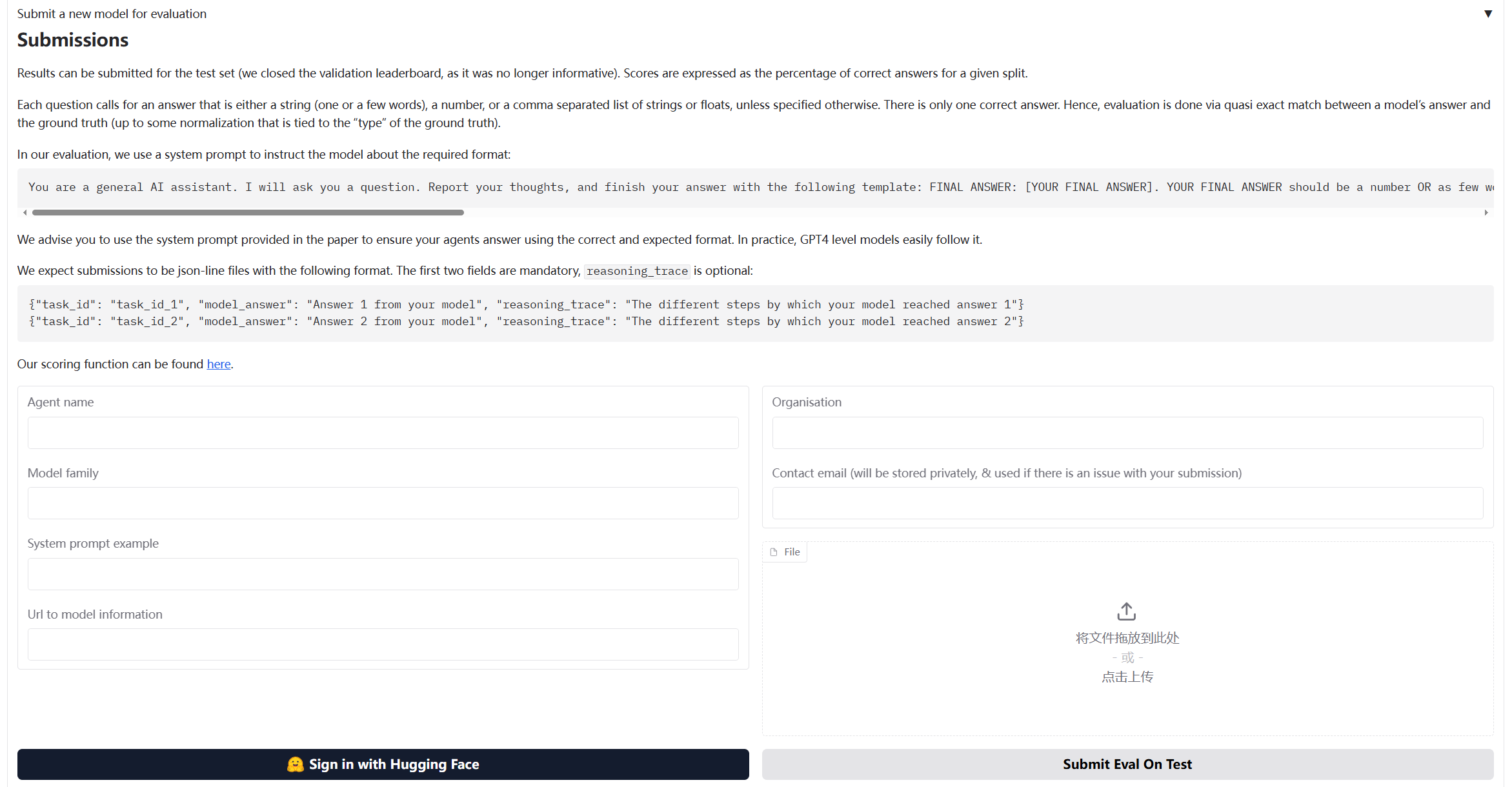
{"task_id": "8e867cd7-cff9-4e6c-867a-ff5ddc2550be", "model_answer": "3", "reasoning_trace": "3"}12.3.4 Submitting Results to GAIA Official Leaderboard
After running evaluation using GAIAEvaluationTool, files required for submission and detailed submission instructions are generated in evaluation_results/gaia_official/ directory.
GAIA Format Result File:
gaia_level1_result_*.jsonljson{"task_id": "xxx", "model_answer": "answer", "reasoning_trace": "reasoning process"} {"task_id": "yyy", "model_answer": "answer", "reasoning_trace": "reasoning process"}Submission Guide File:
SUBMISSION_GUIDE_*.md
Open the automatically generated SUBMISSION_GUIDE_*.md file, which contains complete submission guide:
Specifically, open browser and visit:
https://huggingface.co/spaces/gaia-benchmark/leaderboardAs shown in Figure 12.4, fill in information in submission form:
Before submission, you can manually check the generated JSONL file:
import json

# Read result file
with open("evaluation_results/gaia_official/gaia_level1_result_*.jsonl", "r") as f:
    for line in f:
        result = json.loads(line)
        print(f"Task ID: {result['task_id']}")
        print(f"Answer: {result['model_answer']}")
        print(f"Reasoning: {result['reasoning_trace']}")
print("-" * 50)12.3.5 Core Component Implementation Details
GAIA evaluation system implementation is similar to BFCL, but has some special designs for general capability evaluation.
(1) GAIADataset: Multimodal Data Loader
The special feature of GAIA dataset is that it contains multimodal data (text, files, images, etc.):
class GAIADataset:
    """GAIA dataset loader

    Supports loading GAIA dataset from HuggingFace (gated dataset)
    """

    def __init__(
        self,
        level: Optional[int] = None,
        split: str = "validation",
        local_data_dir: Optional[str] = None
    ):
        self.level = level
        self.split = split
        self.local_data_dir = local_data_dir or "./data/gaia"
        self.data = []

    def load(self) -> List[Dict[str, Any]]:
        """Load dataset"""
        # Download from HuggingFace
        items = self._load_from_huggingface()

        # Filter by level
        if self.level:
            items = [item for item in items if item.get("level") == self.level]

        self.data = items
        return items

    def _load_from_huggingface(self) -> List[Dict[str, Any]]:
        """Download GAIA dataset from HuggingFace"""
        from huggingface_hub import snapshot_download
        import json

        # Download dataset
        repo_id = "gaia-benchmark/GAIA"
        local_dir = snapshot_download(
            repo_id=repo_id,
            repo_type="dataset",
            local_dir=self.local_data_dir,
            local_dir_use_symlinks=False
        )

        # Load JSONL file
        data_file = Path(local_dir) / "2023" / self.split / "metadata.jsonl"
        items = []
        with open(data_file, 'r', encoding='utf-8') as f:
            for line in f:
                item = json.loads(line)
                items.append(self._standardize_item(item))

return items(2) GAIAEvaluator: Implementing GAIA Official Evaluation Algorithm
GAIA evaluation uses Quasi Exact Match algorithm, requiring special answer normalization and matching logic:
class GAIAEvaluator:
    """GAIA evaluator

    Implements GAIA official Quasi Exact Match evaluation algorithm
    """

    def evaluate(self, agent: Any, max_samples: Optional[int] = None) -> Dict[str, Any]:
        """Execute evaluation"""
        dataset_items = self.dataset.load()

        if max_samples:
            dataset_items = dataset_items[:max_samples]

        results = []
        for i, item in enumerate(dataset_items, 1):
            # 1. Construct prompt
            prompt = self._build_prompt(item["question"], item)

            # 2. Call agent
            response = agent.run(prompt)

            # 3. Extract answer (GAIA format: FINAL ANSWER: [answer])
            predicted_answer = self._extract_answer(response)

            # 4. Normalize answer (GAIA official rules)
            normalized_pred = self._normalize_answer(predicted_answer)
            normalized_truth = self._normalize_answer(item["final_answer"])

            # 5. Quasi exact match
            exact_match = (normalized_pred == normalized_truth)

            results.append({
                "task_id": item["task_id"],
                "predicted": predicted_answer,
                "expected": item["final_answer"],
                "exact_match": exact_match,
                "level": item.get("level", 0)
            })

return self._format_results(results)GAIA uses specific normalization rules to handle different types of answers:
def _normalize_answer(self, answer: str) -> str:
    """Normalize answer string (GAIA official normalization rules)

    Rules:
    1. Numbers: Remove comma separators and unit symbols
    2. Strings: Remove articles, convert to lowercase, remove extra spaces
    3. Lists: Comma-separated, sorted alphabetically
    """
    if not answer:
        return ""

    answer = answer.strip()

    # Check if it's a comma-separated list
    if ',' in answer:
        parts = [self._normalize_single_answer(p.strip()) for p in answer.split(',')]
        parts.sort()  # GAIA requires alphabetical sorting
        return ','.join(parts)
    else:
        return self._normalize_single_answer(answer)

def _normalize_single_answer(self, answer: str) -> str:
    """Normalize single answer (answer without commas)"""
    answer = answer.strip().lower()

    # Remove common articles
    articles = ['the', 'a', 'an']
    words = answer.split()
    if words and words[0] in articles:
        words = words[1:]
        answer = ' '.join(words)

    # Remove currency symbols and percent signs
    answer = answer.replace('$', '').replace('%', '').replace('€', '').replace('£', '')

    # Remove comma separators in numbers
    answer = re.sub(r'(\d),(\d)', r'\1\2', answer)

    # Remove extra spaces
    answer = ' '.join(answer.split())

    # Remove trailing punctuation
    answer = answer.rstrip('.,;:!?')

return answerGAIA requires model output format to be FINAL ANSWER: [answer]:
def _extract_answer(self, response: str) -> str:
    """Extract answer from response (GAIA format)

    GAIA requires answer format: FINAL ANSWER: [answer]
    """
    # First try to extract GAIA official format answer
    final_answer_pattern = r'FINAL ANSWER:\s*(.+?)(?:\n|$)'
    match = re.search(final_answer_pattern, response, re.IGNORECASE | re.MULTILINE)
    if match:
        answer = match.group(1).strip()
        # Remove possible brackets
        answer = answer.strip('[]')
        return answer

    # Fallback: Look for other answer markers
    answer_patterns = [
        r'答案[::]\s*(.+)',
        r'最终答案[::]\s*(.+)',
        r'Final answer[::]\s*(.+)',
        r'Answer[::]\s*(.+)',
    ]

    for pattern in answer_patterns:
        match = re.search(pattern, response, re.IGNORECASE)
        if match:
            return match.group(1).strip()

    # If no marker found, return last non-empty line
    lines = response.strip().split('\n')
    for line in reversed(lines):
        line = line.strip()
        if line and not line.startswith('#'):
            return line

return response.strip()After evaluation completes, can export to JSONL format required by GAIA official:
def export_to_gaia_format(
    self,
    results: Dict[str, Any],
    output_path: Union[str, Path],
    include_reasoning: bool = True
) -> None:
    """Export to GAIA official format (JSONL)

    GAIA required format:
    {"task_id": "xxx", "model_answer": "answer", "reasoning_trace": "reasoning process"}
    """
    output_path = Path(output_path)
    output_path.parent.mkdir(parents=True, exist_ok=True)

    with open(output_path, 'w', encoding='utf-8') as f:
        for result in results.get("detailed_results", []):
            entry = {
                "task_id": result["task_id"],
                "model_answer": result["predicted"]
            }

            if include_reasoning:
                entry["reasoning_trace"] = result.get("response", result["predicted"])

f.write(json.dumps(entry, ensure_ascii=False) + '\n')(3) GAIAEvaluationTool: One-Click Evaluation Tool
GAIAEvaluationTool encapsulates complete evaluation process, providing one-click evaluation functionality:
class GAIAEvaluationTool(Tool):
    """GAIA evaluation tool

    Provides one-click evaluation functionality:
    1. Run HelloAgents evaluation
    2. Export GAIA format results
    3. Generate evaluation report
    4. Generate submission guide
    """

    def run(
        self,
        agent: Any,
        level: Optional[int] = None,
        max_samples: Optional[int] = None,
        local_data_dir: Optional[str] = None,
        export_results: bool = True,
        generate_report: bool = True
    ) -> Dict[str, Any]:
        """Execute GAIA one-click evaluation"""
        # Step 1: Run HelloAgents evaluation
        results = self._run_evaluation(agent, level, max_samples, local_data_dir)

        # Step 2: Export GAIA format results
        if export_results:
            self._export_results(results)

        # Step 3: Generate evaluation report
        if generate_report:
            self.generate_report(results)

return resultsGAIAEvaluationTool automatically generates evaluation report:
def generate_report(
    self,
    results: Dict[str, Any],
    output_file: Optional[Union[str, Path]] = None
) -> str:
    """Generate evaluation report"""
    report = f"""# GAIA Evaluation Report

**Generated**: {datetime.now().strftime("%Y-%m-%d %H:%M:%S")}

## 📊 Evaluation Overview

- **Agent**: {results.get("agent_name", "Unknown")}
- **Difficulty Level**: {results.get("level_filter") or 'All'}
- **Total Samples**: {results.get("total_samples", 0)}
- **Exact Matches**: {results.get("exact_matches", 0)}
- **Exact Match Rate**: {results.get("exact_match_rate", 0):.2%}

## 📈 Detailed Metrics

### Level-wise Accuracy

{self._format_level_metrics(results.get("level_metrics", {}))}

## 📝 Sample Details (First 10)

{self._format_sample_details(results.get("detailed_results", [])[:10])}

## 📊 Accuracy Visualization

{self._format_visualization(results.get("exact_match_rate", 0))}

## 💡 Recommendations

{self._format_suggestions(results.get("exact_match_rate", 0))}
"""

    # Save report
    if output_file is None:
        output_dir = Path("./evaluation_reports")
        output_dir.mkdir(parents=True, exist_ok=True)
        output_file = output_dir / f"gaia_report_{datetime.now().strftime('%Y%m%d_%H%M%S')}.md"

    with open(output_file, 'w', encoding='utf-8') as f:
        f.write(report)

return report12.4 Data Generation Quality Evaluation
In AI system development, high-quality training data is the foundation of system performance. This section introduces how to use the HelloAgents framework to evaluate the quality of generated data, using AIME (American Invitational Mathematics Examination)[9] style mathematics problem generation as an example.
AIME is a medium-difficulty mathematics competition hosted by the Mathematical Association of America (MAA), positioned between AMC 10/12 and the USA Mathematical Olympiad (USAMO). AIME problems have distinctive characteristics: each problem's answer is an integer between 0 and 999, problems cover multiple mathematical domains including algebra, geometry, number theory, combinatorics, and probability, require multi-step reasoning but don't involve advanced theory, and have moderate difficulty (equivalent to AIME problems 6-9). These characteristics make AIME problems an ideal benchmark for evaluating mathematics problem generation quality: unified answer format facilitates automated evaluation, and moderate difficulty is suitable for large-scale generation. We use the TianHongZXY/aime-1983-2025 dataset on HuggingFace as reference, which contains over 900 AIME real problems from 1983 to 2025, providing rich reference samples for our generation and evaluation.
12.4.1 Evaluation Methods Overview
In data generation quality evaluation, we adopt three complementary evaluation methods: LLM Judge, Win Rate, and Manual Verification. There are two important reasons for choosing these three methods. First, from a methodological perspective, these are commonly used automated evaluation schemes in the current agent field and mainstream practices in many academic papers, with broad recognition and practical foundation. Second, from an applicability perspective, these three methods are naturally suitable for our evaluation scenario: LLM Judge and Win Rate are used to evaluate problem generation quality (multi-dimensional evaluation from correctness, clarity, difficulty matching, etc.), while Manual Verification is used to evaluate answer generation quality (verifying answer accuracy through human experts), this division of labor is very reasonable and easy to understand.
Below we introduce the specific implementation of these three evaluation methods in detail. The implementation flow of the entire case is shown in Figure 12.5:

(1) LLM Judge Evaluation
Design Motivation: In data generation quality evaluation, we need to quickly and consistently evaluate the quality of a large number of generated problems. Traditional manual evaluation, although accurate, is costly and inefficient, making it difficult to meet the demands of large-scale data generation. LLM Judge, by using large language models as judges, can automatically evaluate the quality of generated data from multiple dimensions, not only greatly improving evaluation efficiency but also maintaining consistency in evaluation standards. More importantly, LLM Judge can provide detailed scoring reasons and improvement suggestions, helping us understand the strengths and weaknesses of generated data and providing direction for subsequent optimization.
In our implementation, LLM Judge evaluates AIME problem quality from four key dimensions:
After obtaining scores from four dimensions, we need to aggregate these scores into overall evaluation metrics. We define three key metrics to measure the quality level of generated problems:
Evaluation Metrics:
1. Average Score: Calculate the average score of all problems across four dimensions, reflecting the overall quality level of generated problems.
2. Pass Rate: Count the proportion of problems with average score of 3.5 or above, reflecting basic quality assurance of generated problems.
3. Excellent Rate: Count the proportion of problems with average score of 4.5 or above, reflecting the high-quality proportion of generated problems.
Where:
is the total number of problems evaluated is the score of the -th problem on the -th dimension (1-5 points) is the average score of the -th problem (average of four dimension scores)
These three metrics reflect generation quality from different angles: average score gives overall level, pass rate ensures basic quality, excellent rate measures high-quality output capability.
(2) Win Rate Evaluation
Design Motivation: Although LLM Judge can provide multi-dimensional absolute scoring, we also need a relative evaluation metric to measure the quality gap between generated problems and real problems. Win Rate evaluation, through pairwise comparison, lets LLM directly judge which is better between generated problems and real problems. This relative comparison is more in line with human judgment habits than absolute scoring, and can more easily discover the relative advantages and disadvantages of generated problems. Ideally, if the quality of generated problems is close to real problems, Win Rate should be around 50% (i.e., generated problems and real problems each have 50% win rate). This metric is simple and intuitive, allowing quick judgment of the overall quality level of the generation system.
In our implementation, Win Rate evaluation is conducted through the flow shown in Figure 12.6:

In pairwise comparison evaluation, each comparison produces three possible results: generated problem wins (Win), real problem wins (Loss), or tie (Tie). We evaluate the quality of generated problems by counting the proportions of these three results:
Evaluation Metrics:
1. Win Rate: Proportion of generated problems judged as better, reflecting advantages of generated problems relative to real problems.
2. Loss Rate: Proportion of real problems judged as better, reflecting disadvantages of generated problems relative to real problems.
3. Tie Rate: Proportion judged as equivalent quality, reflecting similarity between generated problems and real problems.
Where Total Comparisons is the total number of comparisons, Wins, Losses, and Ties are the numbers of generated problem wins, losses, and ties respectively. These three metrics satisfy: Win Rate + Loss Rate + Tie Rate = 100%.
Ideal Result: Win Rate ≈ 50% (indicating generation quality is close to real problems). If Win Rate is significantly lower than 50%, it indicates generated problem quality is inferior to real problems and generation strategy needs optimization; if Win Rate is significantly higher than 50%, it may indicate generated problems surpass real problems in some aspects, or there is bias in evaluation standards.
(3) Manual Verification
Design Motivation: Although LLM Judge and Win Rate can automatically evaluate problem quality, for mathematical problems that require strict logical reasoning, manual verification is still indispensable. Especially when evaluating answer generation quality, human experts are needed to verify answer accuracy, solution step completeness, and mathematical reasoning rigor. Additionally, manual verification can discover issues that automated evaluation might miss, such as subjective factors like problem innovation and interest. To improve manual verification efficiency and experience, we developed a Gradio-based Web interface, allowing verifiers to conveniently browse problems, score, annotate status, and add comments, greatly lowering the barrier to manual verification.
In our implementation, manual verification is conducted through the following steps:
- Read problem, answer, solution
- Score (1-5 points): correctness, clarity, difficulty matching, completeness
- Annotate status:
- ✅ approved (passed)
- ❌ rejected (rejected)
- 🔄 needs_revision (needs revision)
- Add comments
12.4.2 System Architecture
Data generation and evaluation system adopts modular design:
data_generation/
├── aime_generator.py              # AIME problem generator
├── human_verification_ui.py       # Manual verification interface
├── run_complete_evaluation.py     # Complete evaluation flow
│
├── generated_data/                # Generated data
│   ├── aime_generated_XXXXXX.json
│   └── generation_report_XXXXXX.md
│
└── evaluation_results/            # Evaluation results
    └── XXXXXX/
        ├── llm_judge/
        ├── win_rate/
└── comprehensive_report.mdThe system contains four core components: First is AIMEGenerator (problem generator), using HelloAgents framework to generate AIME-style problems, supporting batch generation and progress saving, and automatically handling API rate limits; second is LLMJudgeTool (LLM Judge evaluation tool), providing 4-dimensional quality evaluation, automatically generating JSON results and Markdown reports; third is WinRateTool (Win Rate evaluation tool), calculating win rate, loss rate, and tie rate through pairwise comparison evaluation; finally is HumanVerificationUI (manual verification interface), based on Gradio Web interface, supporting scoring and status annotation.
12.4.3 AIME Problem Generator Implementation
class AIMEGenerator:
    """AIME Problem Generator"""

    def __init__(
        self,
        llm: HelloAgentsLLM = None,
        delay_seconds: float = 1.0,
        use_reference_examples: bool = True,
        reference_dataset: str = "TianHongZXY/aime-1983-2025"
    ):
        self.llm = llm or HelloAgentsLLM()
        self.agent = SimpleAgent(
            name="AIME Generator",
            llm=self.llm,
            system_prompt="You are a professional mathematics competition problem designer."
        )
        self.delay_seconds = delay_seconds
        self.use_reference_examples = use_reference_examples

        # Load reference examples from 900+ AIME problems (1983-2025)
        if use_reference_examples:
            dataset = load_dataset(reference_dataset, split="test")
self.reference_examples = list(dataset)Our goal is to generate a similar style dataset, so we randomly select reference examples from 900+ AIME real problems (1983-2025)
Generation prompt design (English):
GENERATION_PROMPT = """You are a professional mathematics competition problem designer, skilled in creating AIME (American Invitational Mathematics Examination) style problems.

【Reference Example】(For style reference only, please generate a completely different problem)
Problem: {example_problem}
Answer: {example_answer}

AIME Problem Characteristics:
1. Answer: An integer between 0 and 999
2. Topics: Algebra, Geometry, Number Theory, Combinatorics, Probability, etc.
3. Style: Requires multi-step reasoning, but no advanced theory
4. Difficulty: Medium to hard (similar to AIME problems 6-9)

Please generate a **completely different** AIME-style mathematics problem, including:
1. Problem statement (clear and complete, different from the reference)
2. Answer (an integer between 0 and 999, different from the reference)
3. Detailed solution (including all reasoning steps)
4. Topic classification (Algebra/Geometry/Number Theory/Combinatorics/Probability)

Please output in the following JSON format:
{
    "problem": "Problem statement in English",
    "answer": 123,
    "solution": "Detailed solution steps in English",
    "topic": "Algebra"
}
"""We choose to generate problems in English for four important reasons: first is consistency with AIME real problems (AIME is an English competition, generating English problems is more reasonable), second is ensuring evaluation fairness (LLM Judge evaluation is fairer when English vs English), third is facilitating internationalization (English problems can be more widely used), and finally is avoiding translation issues (no need to worry about accuracy of Chinese-English translation).
Batch generation implementation:
def generate_and_save(self, num_problems: int = 30, output_dir: str = "data_generation/generated_data"):
    """Generate and save problems with intelligent delay"""
    # Clean old checkpoints
    for file in os.listdir(output_dir):
        if file.startswith("checkpoint_") and file.endswith(".json"):
            os.remove(os.path.join(output_dir, file))

    # Generate with tqdm progress bar
    with tqdm(total=num_problems, desc="Generating AIME problems", unit="problem") as pbar:
        last_call_time = 0

        for i in range(num_problems):
            # Ensure minimum delay between API calls
            if last_call_time > 0:
                elapsed = time.time() - last_call_time
                if elapsed < self.delay_seconds:
                    wait_time = self.delay_seconds - elapsed
                    time.sleep(wait_time)

            # Generate problem (randomly select reference example)
            start_time = time.time()
            problem = self.generate_single()
            last_call_time = time.time()
            generation_time = last_call_time - start_time

            # Update progress bar
            pbar.set_postfix({
                "topic": problem.get('topic', 'N/A'),
                "answer": problem.get('answer', 'N/A'),
                "time": f"{generation_time:.1f}s"
            })
            pbar.update(1)

return generated_data_pathLaTeX mathematical formula support:
Generated AIME problems contain LaTeX mathematical formulas (such as $\frac{a}{b}$, $\sqrt{x}$), requiring special JSON parsing handling:
def _parse_response(self, response: str) -> Dict[str, Any]:
    """Parse LLM response (supports LaTeX mathematical formulas)"""
    import re

    # Extract JSON part
    if "```json" in response:
        json_str = response.split("```json")[1].split("```")[0].strip()
    else:
        json_str = response.strip()

    try:
        problem_data = json.loads(json_str)
    except json.JSONDecodeError:
        # Fix LaTeX escape issue: convert \frac to \\frac
        # Regular expression: find unescaped backslashes
        fixed_json_str = re.sub(r'(?<!\\)\\(?!["\\/bfnrtu])', r'\\\\', json_str)
        problem_data = json.loads(fixed_json_str)

return problem_dataBackslashes in LaTeX formulas (such as \frac, \sqrt) are illegal escape characters in JSON, causing parsing failure:
Invalid \escape: line 4 column 185 (char 375)By using regular expressions to replace unescaped backslashes with double backslashes, making them legal in JSON.
12.4.4 LLM Judge Evaluation Tool
LLM Judge tool uses LLM as judge to conduct multi-dimensional evaluation of generated problems.
class LLMJudgeTool(Tool):
    """LLM Judge evaluation tool"""

    def run(self, params: Dict[str, Any]) -> str:
        """Run LLM Judge evaluation"""
        # 1. Load generated data
        gen_dataset = AIDataset(dataset_type="generated", data_path=params["generated_data_path"])
        gen_problems = gen_dataset.load()

        # 2. Load reference data (AIME 2025)
        ref_dataset = AIDataset(dataset_type="real", year=2025)
        ref_problems = ref_dataset.load()

        # 3. Create evaluator
        evaluator = LLMJudgeEvaluator(llm=self.llm, judge_model=params.get("judge_model", "gpt-4o"))

        # 4. Run evaluation
        results = evaluator.evaluate_batch(gen_problems, max_samples=params.get("max_samples"))

        # 5. Save results
        evaluator.export_results(results, result_file)

        # 6. Generate report
        self._generate_report(results, report_file)

return json.dumps({"status": "success", "metrics": results["metrics"]})Evaluation Prompt:
EVALUATION_PROMPT = """Please evaluate the quality of the following AIME mathematics problem.

Problem:
{problem}

Answer: {answer}

Solution:
{solution}

Please score from the following 4 dimensions (1-5 points):

1. **Correctness**: Is the mathematical logic correct, is the answer accurate
2. **Clarity**: Is the problem statement clear, is the solution easy to understand
3. **Difficulty Match**: Does the difficulty match AIME standards (medium to hard)
4. **Completeness**: Are the solution steps complete, does it include necessary reasoning

Please output in the following JSON format:
{
    "correctness": 5,
    "clarity": 4,
    "difficulty_match": 4,
    "completeness": 5,
    "comments": "Evaluation reason"
}
"""Evaluation Report Example:
# LLM Judge Evaluation Report

## Overall Score

- **Average Total Score**: 4.2/5.0
- **Pass Rate**: 85.0% (≥3.5 points)
- **Excellent Rate**: 40.0% (≥4.5 points)

## Dimension Scores

| Dimension | Average Score | Rating |
|------|--------|------|
| Correctness | 4.3/5.0 | Good ⭐⭐⭐⭐ |
| Clarity | 4.1/5.0 | Good ⭐⭐⭐⭐ |
| Difficulty Match | 4.0/5.0 | Good ⭐⭐⭐⭐ |
| Completeness | 4.4/5.0 | Good ⭐⭐⭐⭐ |12.4.5 Win Rate Evaluation Tool
Win Rate tool evaluates the quality of generated data relative to real problems through pairwise comparison.
class WinRateTool(Tool):
    """Win Rate evaluation tool"""

    def run(self, params: Dict[str, Any]) -> str:
        """Run Win Rate evaluation"""
        # 1. Load generated data
        gen_dataset = AIDataset(dataset_type="generated", data_path=params["generated_data_path"])
        gen_problems = gen_dataset.load()

        # 2. Load reference data (AIME 2025)
        ref_dataset = AIDataset(dataset_type="real", year=2025)
        ref_problems = ref_dataset.load()

        # 3. Create evaluator
        evaluator = WinRateEvaluator(llm=self.llm, judge_model=params.get("judge_model", "gpt-4o"))

        # 4. Run evaluation
        results = evaluator.evaluate_win_rate(gen_problems, ref_problems, num_comparisons=params.get("num_comparisons"))

        # 5. Save results and report
        evaluator.export_results(results, result_file)
        self._generate_report(results, report_file)

return json.dumps({"status": "success", "metrics": results["metrics"]})AIDataset is responsible for loading generated data and AIME real problem data, supporting two data types:
class AIDataset:
    """AI dataset loader

    Supports two data types:
    1. generated: Generated data (JSON format)
    2. real: AIME real problems (loaded from HuggingFace)
    """

    def __init__(
        self,
        dataset_type: str = "generated",
        data_path: Optional[str] = None,
        year: Optional[int] = None
    ):
        self.dataset_type = dataset_type
        self.data_path = data_path
        self.year = year  # Only for real type, default 2025

    def load(self) -> List[Dict[str, Any]]:
        """Load dataset"""
        if self.dataset_type == "generated":
            return self._load_generated_data()
        elif self.dataset_type == "real":
            return self._load_real_data()

    def _load_real_data(self) -> List[Dict[str, Any]]:
        """Load AIME 2025 real problems from HuggingFace"""
        from huggingface_hub import snapshot_download

        # Use AIME 2025 dataset
        repo_id = "math-ai/aime25"

        # Download dataset
        local_dir = snapshot_download(
            repo_id=repo_id,
            repo_type="dataset"
        )

        # Read JSONL file
        data_file = list(Path(local_dir).glob("*.jsonl"))[0]
        data = []
        with open(data_file, 'r', encoding='utf-8') as f:
            for line in f:
                if line.strip():
                    data.append(json.loads(line))

        # Unify data format (AIME 2025 uses lowercase field names)
        problems = []
        for idx, item in enumerate(data):
            problem = {
                "problem_id": item.get("id", f"aime_2025_{idx}"),
                "problem": item.get("problem", ""),
                "answer": item.get("answer", ""),
                "solution": item.get("solution", ""),  # AIME 2025 has no solution field
            }
            problems.append(problem)

return problemsWe choose to use only AIME 2025 dataset for four reasons: first is data timeliness (2025 is the latest AIME competition data), second is simplified maintenance (maintaining only one dataset, code is more concise), third is unified format (JSONL format, field names unified to lowercase), and finally is sufficient representativeness (30 problems are enough to evaluate generation quality).
Comparison Prompt:
COMPARISON_PROMPT = """Please compare the quality of the following two AIME mathematics problems and judge which is better.

【Problem A - Generated Problem】
Problem: {problem_a}
Answer: {answer_a}
Solution: {solution_a}

【Problem B - AIME Real Problem】
Problem: {problem_b}
Answer: {answer_b}
Solution: {solution_b}

Please compare from the following aspects:
1. Rigor of mathematical logic
2. Clarity of problem statement
3. Reasonableness of difficulty
4. Completeness of solution

Please output in the following JSON format:
{
    "winner": "A" or "B" or "Tie",
    "reason": "Judgment reason"
}
"""Evaluation Report Example:
# Win Rate Evaluation Report

## Win Rate Statistics

| Metric | Value | Percentage |
|------|------|--------|
| Generated Data Wins | 9 times | 45.0% |
| AIME Real Problems Win | 8 times | 40.0% |
| Tie | 3 times | 15.0% |

**Win Rate**: 45.0%

✅ **Good**: Generated data quality is close to reference data (gap <10%).12.4.6 Manual Verification Interface
Use Gradio to create Web interface, supporting manual verification of generated problems.
class HumanVerificationUI:
    """Manual verification interface"""

    def launch(self, share: bool = False):
        """Launch Gradio interface"""
        with gr.Blocks(title="AIME Problem Manual Verification") as demo:
            gr.Markdown("# 🎯 AIME Problem Manual Verification System")

            with gr.Row():
                with gr.Column(scale=2):
                    # Problem display area
                    problem_text = gr.Textbox(label="Problem Description", lines=5, interactive=False)
                    answer_text = gr.Textbox(label="Answer", interactive=False)
                    solution_text = gr.Textbox(label="Solution Process", lines=10, interactive=False)

                with gr.Column(scale=1):
                    # Scoring area
                    correctness_slider = gr.Slider(1, 5, value=3, step=1, label="Correctness")
                    clarity_slider = gr.Slider(1, 5, value=3, step=1, label="Clarity")
                    difficulty_slider = gr.Slider(1, 5, value=3, step=1, label="Difficulty Match")
                    completeness_slider = gr.Slider(1, 5, value=3, step=1, label="Completeness")

                    # Status selection
                    status_radio = gr.Radio(
                        choices=["approved", "rejected", "needs_revision"],
                        value="approved",
                        label="Status"
                    )

                    # Verification button
                    verify_btn = gr.Button("✅ Submit Verification", variant="primary")

demo.launch(share=share, server_name="127.0.0.1", server_port=7860)Usage Method:
# Launch manual verification interface
python data_generation/human_verification_ui.py data_generation/generated_data/aime_generated_XXXXXX.json

# Open browser and visit
http://127.0.0.1:7860The final effect can be referenced in Figure 12.7. For problem correctness, manual review is best:
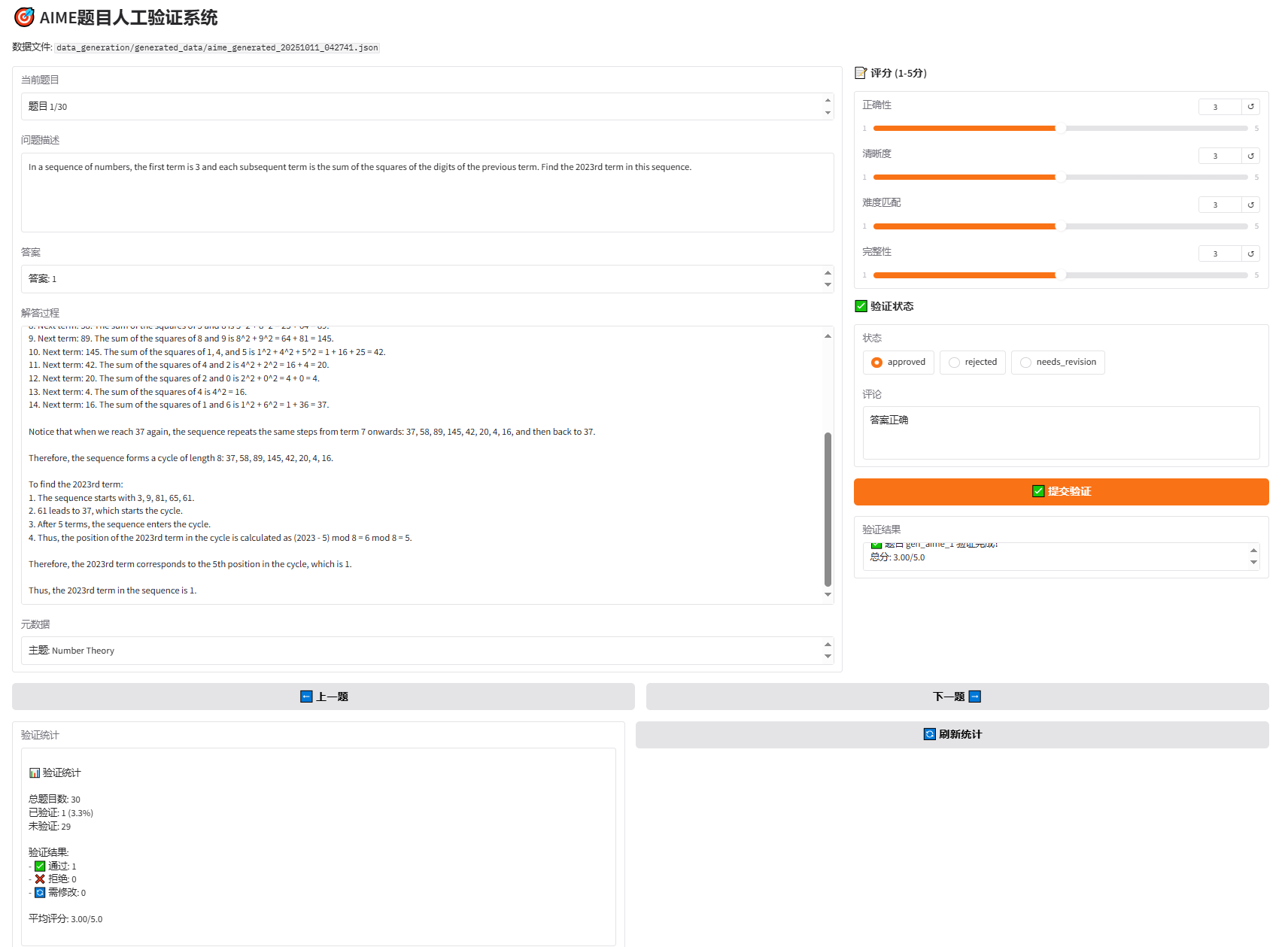
Verification Process:
- Open verification interface in browser
- Read problem, answer, solution
- Score from 4 dimensions (1-5 points)
- Select verification status (approved/rejected/needs_revision)
- Add comments (optional)
- Click "Submit Verification"
- View next problem
Verification Result Saving:
Verification results are automatically saved as _verifications.json:
{
  "gen_aime_1": {
    "problem_id": "gen_aime_1",
    "scores": {
      "correctness": 5,
      "clarity": 4,
      "difficulty_match": 4,
      "completeness": 5
    },
    "total_score": 4.5,
    "status": "approved",
    "comments": "Problem quality is very good, logic is rigorous",
    "verified_at": "2025-01-10T12:00:00"
  }
}12.4.7 Complete Evaluation Flow
Integrate all evaluation methods into a complete flow.
def run_complete_evaluation(
    num_problems: int = 30,
    delay_seconds: float = 3.0
):
    """
    Run complete evaluation flow

    Args:
        num_problems: Number of problems to generate
        delay_seconds: Delay between each generation (seconds), avoid API rate limit
    """
    # Step 1: Generate AIME problems
    generator = AIMEGenerator(delay_seconds=delay_seconds)
    generated_data_path = generator.generate_and_save(
        num_problems=num_problems,
        output_dir="data_generation/generated_data"
    )

    # Step 2: Evaluation
    # Create evaluation result directory
    timestamp = datetime.now().strftime("%Y%m%d_%H%M%S")
    evaluation_dir = f"data_generation/evaluation_results/{timestamp}"
    os.makedirs(evaluation_dir, exist_ok=True)
    os.makedirs(os.path.join(evaluation_dir, "llm_judge"), exist_ok=True)
    os.makedirs(os.path.join(evaluation_dir, "win_rate"), exist_ok=True)

    # Create LLM
    llm = HelloAgentsLLM()

    # Step 2.1: LLM Judge evaluation
    llm_judge_result = None
    try:
        llm_judge_tool = LLMJudgeTool(llm=llm)
        llm_judge_result_json = llm_judge_tool.run({
            "generated_data_path": generated_data_path,
            "reference_year": 2025,
            "max_samples": num_problems,
            "output_dir": os.path.join(evaluation_dir, "llm_judge"),
            "judge_model": "gpt-4o"
        })
        llm_judge_result = json.loads(llm_judge_result_json)
    except Exception as e:
        print(f"❌ LLM Judge evaluation failed: {e}")

    # Step 2.2: Win Rate evaluation
    win_rate_result = None
    try:
        win_rate_tool = WinRateTool(llm=llm)
        win_rate_result_json = win_rate_tool.run({
            "generated_data_path": generated_data_path,
            "reference_year": 2025,
            "num_comparisons": min(num_problems, 20),
            "output_dir": os.path.join(evaluation_dir, "win_rate"),
            "judge_model": "gpt-4o"
        })
        win_rate_result = json.loads(win_rate_result_json)
    except Exception as e:
        print(f"❌ Win Rate evaluation failed: {e}")

    # Step 3: Generate comprehensive report
    comprehensive_report_path = None
    if llm_judge_result or win_rate_result:
        comprehensive_report_path = os.path.join(evaluation_dir, "comprehensive_report.md")
        report = generate_comprehensive_report(
            generated_data_path,
            llm_judge_result,
            win_rate_result
        )
        with open(comprehensive_report_path, 'w', encoding='utf-8') as f:
            f.write(report)

    return {
        "generated_data_path": generated_data_path,
        "llm_judge_result": llm_judge_result,
        "win_rate_result": win_rate_result,
        "comprehensive_report_path": comprehensive_report_path
}Run Method:
# Basic usage (default 3 second delay)
python data_generation/run_complete_evaluation.py 30

# Custom delay (recommended 3-5 seconds, avoid API rate limit)
python data_generation/run_complete_evaluation.py 30 3.0

# Parameter explanation:
# - 30: Number of problems to generate
# - 3.0: Delay between each generation (seconds)

# Explanation:
# - Generation phase: Randomly select reference examples from 900+ AIME real problems (1983-2025)
# - Evaluation phase: Quality comparison with AIME 2025 real problems
# - Dataset source: math-ai/aime25 (JSONL format)Output Example:
================================================================================
🚀 AIME Data Generation and Evaluation Complete Flow
================================================================================

Configuration:
  - Number of problems to generate: 30
  - API delay: 3.0 seconds/problem
  - Generation reference data: TianHongZXY/aime-1983-2025 (900+ problems)
  - Evaluation reference: AIME 2025 real problems

================================================================================
📝 Step 1: Generate AIME Problems
================================================================================
📚 Load AIME real problem dataset: TianHongZXY/aime-1983-2025
   ✓ Loaded 963 reference problems

🎯 Start generating AIME problems
   Target quantity: 30
   Generation model: gpt-4o
   Delay setting: 3.0 seconds/problem

Generating AIME problems:  100%|██████████| 30/30 [01:30<00:00, 3.00s/problem, topic=Algebra, answer=123, time=3.0s]

✅ Step 1 complete! Generated data saved at: data_generation/generated_data/aime_generated_20250110_120000.json

🎯 Step 2.1: LLM Judge Evaluation (vs AIME 2025)

✅ LLM Judge evaluation complete!
   Average total score: 4.2/5.0
   Pass rate: 85.0%

🏆 Step 2.2: Win Rate Evaluation (vs AIME 2025)

✅ Win Rate evaluation complete!
   Win Rate: 45.0%

================================================================================
📊 Step 3: Generate Comprehensive Report
================================================================================

✅ Comprehensive report saved: data_generation/evaluation_results/20250110_120000/comprehensive_report.md

================================================================================
🎉 Complete Evaluation Flow Finished!
================================================================================

📁 Output Files:
   - Generated data: data_generation/generated_data/aime_generated_20250110_120000.json
   - Evaluation result directory: data_generation/evaluation_results/20250110_120000
   - LLM Judge report: data_generation/evaluation_results/20250110_120000/llm_judge/llm_judge_report_20250110_120000.md
   - Win Rate report: data_generation/evaluation_results/20250110_120000/win_rate/win_rate_report_20250110_120000.md
   - Comprehensive report: data_generation/evaluation_results/20250110_120000/comprehensive_report.md

💡 Next Steps:
   1. View comprehensive report: data_generation/evaluation_results/20250110_120000/comprehensive_report.md
2. Run manual verification: python data_generation/human_verification_ui.py data_generation/generated_data/aime_generated_20250110_120000.json12.4.8 Comprehensive Evaluation Report
The system automatically generates comprehensive evaluation reports, summarizing all evaluation results. Below is an example report:
# AIME Data Generation and Evaluation Comprehensive Report

## 1. Basic Information

- **Generation Time**: 2025-01-10 12:00:00
- **Number of Generated Problems**: 30
- **Reference AIME Year**: 2025

## 2. Data Generation Statistics

### Topic Distribution

| Topic | Quantity | Proportion |
|------|------|------|
| Algebra | 10 | 33.3% |
| Geometry | 8 | 26.7% |
| Number Theory | 7 | 23.3% |
| Combinatorics | 3 | 10.0% |
| Probability | 2 | 6.7% |

## 3. LLM Judge Evaluation Results

### Overall Score

- **Average Total Score**: 4.2/5.0
- **Pass Rate**: 85.0% (≥3.5 points)
- **Excellent Rate**: 40.0% (≥4.5 points)

### Dimension Scores

| Dimension | Average Score | Rating |
|------|--------|------|
| Correctness | 4.3/5.0 | Good ⭐⭐⭐⭐ |
| Clarity | 4.1/5.0 | Good ⭐⭐⭐⭐ |
| Difficulty Match | 4.0/5.0 | Good ⭐⭐⭐⭐ |
| Completeness | 4.4/5.0 | Good ⭐⭐⭐⭐ |

## 4. Win Rate Evaluation Results

### Win Rate Statistics

| Metric | Value | Percentage |
|------|------|--------|
| Generated Data Wins | 9 times | 45.0% |
| AIME Real Problems Win | 8 times | 40.0% |
| Tie | 3 times | 15.0% |

**Win Rate**: 45.0%

✅ **Good**: Generated data quality is close to reference data (gap <10%).

## 5. Comprehensive Conclusion

Based on the results of LLM Judge and Win Rate evaluation methods:

1. **LLM Judge Evaluation**: Average quality of generated data is **4.2/5.0**
2. **Win Rate Evaluation**: Win rate of generated data relative to AIME 2025 real problems is **45.0%**

✅ **Conclusion**: Generated data quality is **excellent**, reaching or exceeding AIME real problem level. Can be used for practical applications.

## 6. Improvement Suggestions

- ✅ Continue maintaining current generation strategy
- ✅ Can consider increasing generation quantity
- ✅ Recommend manual verification to ensure quality

## 7. Next Steps

1. **Manual Verification**: Run `python data_generation/human_verification_ui.py ` for manual verification
2. **View Detailed Results**:
   - LLM Judge detailed report
   - Win Rate detailed report
3. **Data Usage**: If quality is satisfactory, generated data can be used for training or testingBased on practical usage experience, summarize the following content:
In data generation, use appropriate delay time (2-3 seconds) to avoid API rate limits, enable checkpoint saving to avoid interruption losses, first test with small batches (10) to confirm no issues before large-scale generation, and regularly check generation quality to adjust prompts in time. In evaluation strategy, recommend combining LLM Judge and Win Rate methods, where LLM Judge is used for absolute quality evaluation, Win Rate for relative quality comparison, and manual verification for final quality control. For quality standards, recommend LLM Judge average score above 4.0/5.0, Win Rate above 45% (close to 50%), pass rate above 80%, and manual verification pass rate above 90%. In iterative optimization, adjust generation prompts based on evaluation results, analyze common issues in low-scoring problems, reference advantages of high-scoring problems, and continuously improve generation strategy.
Through learning this section, we have mastered how to use the HelloAgents framework for data generation quality evaluation, including three methods: LLM Judge evaluation, Win Rate evaluation, and manual verification. This complete evaluation system can ensure high quality of generated data, providing reliable data support for AI system training and testing.
For LLM Judge and Win Rate evaluation, HelloAgents has also integrated tools and provided complete example code. If you are interested in the specific implementation details of these two evaluation methods, you can also refer to the example code.
12.5 Chapter Summary
In this chapter, we built a complete performance evaluation system for the HelloAgents framework. Let's review the core content learned:
(1) Evaluation System Overview
We established a three-tier evaluation system, comprehensively covering different capability dimensions of agents. First is tool calling capability evaluation (BFCL), focusing on evaluating agent function calling accuracy, including simple, multiple, parallel, irrelevance four categories, using AST matching technology for precise evaluation. Second is general capability evaluation (GAIA), evaluating agent comprehensive problem-solving capabilities, including three difficulty levels with 466 real-world problems, focusing on multi-step reasoning, tool usage, file processing and other capabilities. Third is data generation quality evaluation (AIME), evaluating LLM-generated data quality, using LLM Judge and Win Rate methods, supporting manual verification and comprehensive report generation, ensuring generated data reaches reference data quality standards.
(2) Core Technical Points
In technical implementation, we adopted six core technical points. First is modular design, evaluation system adopts three-tier architecture: data layer (Dataset responsible for data loading and management), evaluation layer (Evaluator responsible for executing evaluation flow), and metrics layer (Metrics responsible for calculating various evaluation metrics). Second is tool encapsulation, all evaluation functions are encapsulated as Tools, can be directly called by agents, integrated into workflows, or used through unified interface. Third is AST matching technology, using abstract syntax tree matching for function calls, more intelligent than simple string matching, able to ignore parameter order, recognize equivalent expressions, and ignore format differences. Fourth is multimodal support, GAIA evaluation supports text questions, attachment files, image inputs and other multimodal data. Fifth is LLM Judge evaluation, using LLM as judge to evaluate generated data quality, providing multi-dimensional scoring (correctness, clarity, difficulty matching, completeness), automated evaluation flow, detailed evaluation reports, and supporting custom evaluation dimensions and standards. Sixth is Win Rate comparison evaluation, evaluating generation quality through pairwise comparison (generated data vs reference data), LLM judges which is better and calculates win rate statistics, close to 50% indicates equivalent quality.
(3) Extension Directions
Based on this chapter's evaluation system, you can extend in four directions. First is adding new evaluation benchmarks, can refer to BFCL and GAIA implementation patterns, implement Dataset, Evaluator, Metrics three components, and encapsulate as Tool for use. Second is custom evaluation metrics, add new metric calculation methods in Metrics class, design metrics according to specific application scenarios. Third is integration into CI/CD flow, automatically run evaluation on code commits, set performance thresholds to prevent performance degradation, generate evaluation reports and archive. Fourth is extending data generation evaluation, support more data types (code, dialogue, documents, etc.), add more evaluation dimensions (innovation, diversity, etc.), integrate more reference datasets, support multi-model comparison evaluation.
Congratulations on completing Chapter 12! 🎉
Evaluation is an important part of agent development, it allows us to:
- Objectively measure agent capabilities
- Discover and fix issues
- Continuously improve systems
In the next chapter, we will explore how to apply the HelloAgents framework to actual projects.
Keep going! 💪
Exercises
Hint: Some exercises have no standard answers, focusing on cultivating learners' comprehensive understanding and practical ability in agent performance evaluation.
This chapter introduced multiple agent evaluation benchmarks. Please analyze:
- In Section 12.1.2, BFCL, GAIA, AgentBench and other evaluation benchmarks were introduced. Please compare BFCL and GAIA: What core capabilities of agents do they evaluate respectively? Why does BFCL use AST matching algorithm while GAIA uses Quasi Exact Match? What are the advantages and disadvantages of these two evaluation methods?
- Suppose you want to build an "intelligent customer service system" that needs to evaluate the following capabilities: (1) accuracy of understanding user intent; (2) correctness of calling backend APIs; (3) friendliness and professionalism of responses; (4) robustness in handling exceptional situations. Please select or design appropriate evaluation metrics and methods for each capability.
- In Section 12.1.1, it was mentioned that agent evaluation faces three major challenges: "output uncertainty", "evaluation standard diversity", and "high evaluation cost". Please propose specific solutions for each challenge and analyze the feasibility and limitations of the solutions.
BFCL (Berkeley Function Calling Leaderboard) is an important benchmark for evaluating tool calling capabilities. Based on Section 12.2 content, please think deeply:
Hint: This is a hands-on practice question, actual operation is recommended
- In the AST matching algorithm in Section 12.2.3, we judge whether function calls are correct by comparing abstract syntax trees. Please analyze: Why is AST matching more suitable than simple string matching? In what situations might AST matching produce misjudgments (false positives or false negatives)? How to improve the AST matching algorithm to increase accuracy?
- BFCL dataset contains four categories: simple, multiple, parallel, irrelevance. Please design 2-3 new test samples for each category, requiring ability to test boundary cases or error-prone scenarios under that category.
- Please extend the BFCL evaluator based on the code in Section 12.2.4, adding the following functions: (1) support evaluating execution order of tool calls (for multiple tool calls with dependencies); (2) evaluate tool calling efficiency (such as whether minimum number of calls was used); (3) generate detailed error analysis report (such as which types of errors are most common).
GAIA (General AI Assistants) evaluates agent comprehensive capabilities. Based on Section 12.3 content, please complete the following extension practice:
Hint: This is a hands-on practice question, actual operation is recommended
- In Section 12.3.2, three difficulty levels of GAIA (Level 1/2/3) were introduced. Please analyze: What are the differences between these three levels in task complexity, required capabilities, evaluation standards, etc.? If designing Level 4 (ultra-high difficulty), what types of tasks should it include?
- GAIA uses "Quasi Exact Match" algorithm to evaluate answer correctness. Please analyze: How does this method handle answer diversity (such as "42", "forty-two", "42.0" should all be considered correct)? In what situations might quasi exact match not be sufficient? Please design a more intelligent answer matching algorithm that can handle semantically equivalent answers.
- Please implement a "custom GAIA evaluation set" based on the code in Section 12.3.4: select a specific domain (such as medical, legal, financial), design 10 real-world questions, and implement complete evaluation flow. Require questions to cover different difficulty levels, and provide standard answers and scoring criteria.
LLM Judge is an emerging method of using large language models for evaluation. Based on Section 12.4 content, please analyze in depth:
- In Section 12.4.2, we used GPT-4 as judge to evaluate agent response quality. Please analyze: What advantages does LLM Judge have compared to traditional rule matching or metric calculation? What potential biases or limitations does it have (such as preference for certain response styles, sensitivity to length)?
- LLM Judge scoring criteria design is crucial. Please design detailed scoring criteria (including scoring dimensions, weights, examples) for the following three different evaluation scenarios: (1) code generation quality evaluation; (2) creative writing quality evaluation; (3) technical documentation quality evaluation.
- In Section 12.4.3, it was mentioned that multiple LLM Judges can be used for "jury-style" evaluation. Please design a "multi-judge evaluation system": using 3-5 different LLMs (such as GPT-4, Claude, Qwen) as judges, how to aggregate their scores? How to handle disagreements between judges? How to detect and filter abnormal scores?
Practical application of agent evaluation needs to consider multiple aspects. Please think:
- In actual projects, evaluation often needs to balance between "evaluation cost" and "evaluation quality". Please design a "tiered evaluation strategy": (1) quick evaluation (low cost, for daily development iteration); (2) standard evaluation (medium cost, for pre-release); (3) comprehensive evaluation (high cost, for major updates or public release). What evaluation items should each tier include? How to design evaluation flow?
- Agent performance may change over time (such as changes in dependent external APIs, changes in user needs). Please design a "continuous evaluation system": able to periodically automatically run evaluation, monitor agent performance change trends, and alert in time when performance declines. What components should this system include? How to design alert rules?
- Evaluation results need to be presented clearly to different audiences (such as developers, product managers, users). Please design an "evaluation report generation system": able to automatically generate reports with different levels of detail based on audience type. What technical details should developer reports include? What business metrics should product manager reports highlight? How should user reports be simplified and visualized?
References
[1] Patil, S. G., Zhang, T., Wang, X., & Gonzalez, J. E. (2023). Gorilla: Large Language Model Connected with Massive APIs. arXiv preprint arXiv:2305.15334.
[2] Qin, Y., Liang, S., Ye, Y., Zhu, K., Yan, L., Lu, Y., ... & Sun, M. (2023). ToolLLM: Facilitating Large Language Models to Master 16000+ Real-world APIs. arXiv preprint arXiv:2307.16789.
[3] Li, M., Zhao, Y., Yu, B., Song, F., Li, H., Yu, H., ... & Li, Y. (2023). Api-bank: A comprehensive benchmark for tool-augmented llms. arXiv preprint arXiv:2304.08244.
[4] Mialon, G., Dessì, R., Lomeli, M., Nalmpantis, C., Pasunuru, R., Raileanu, R., ... & Scialom, T. (2023). GAIA: a benchmark for General AI Assistants. arXiv preprint arXiv:2311.12983.
[5] Liu, X., Yu, H., Zhang, H., Xu, Y., Lei, X., Lai, H., ... & Zhang, D. (2023). AgentBench: Evaluating LLMs as Agents. arXiv preprint arXiv:2308.03688.
[6] Zhou, S., Xu, F. F., Zhu, H., Zhou, X., Lo, R., Sridhar, A., ... & Neubig, G. (2023). WebArena: A Realistic Web Environment for Building Autonomous Agents. arXiv preprint arXiv:2307.13854.
[7] Chan, C. M., Chen, W., Su, Y., Yu, J., Xue, W., Zhang, S., ... & Liu, Z. (2023). ChatEval: Towards Better LLM-based Evaluators through Multi-Agent Debate. arXiv preprint arXiv:2308.07201.
[8] Zhou, X., Zhu, H., Mathur, L., Zhang, R., Yu, H., Qi, Z., ... & Neubig, G. (2023). SOTOPIA: Interactive Evaluation for Social Intelligence in Language Agents. arXiv preprint arXiv:2310.11667.
[9] Mathematical Association of America. (2024). American Invitational Mathematics Examination (AIME). Retrieved from https://www.maa.org/math-competitions/invitational-competitions/aime