Chapter 5: Building Agents with Low-Code Platforms
In the previous chapter, by writing Python code, we implemented various classic agent workflows from scratch, including ReAct, Plan-and-Solve, and Reflection. This process laid a solid technical foundation for us and gave us a deep understanding of the internal mechanisms of agents. However, for a rapidly developing field, pure code development is not always the most efficient choice, especially in scenarios where ideas need to be quickly validated or non-professional developers want to participate in building.
5.1 The Rise of Platform-Based Construction
As technology matures, we see more and more capabilities being "platformized." Just as website development has evolved from hand-writing HTML/CSS/JS to using website building platforms like WordPress and Wix, agent construction has also ushered in a wave of platformization. This chapter will focus on how to use graphical, modular low-code platforms to quickly and intuitively build, debug, and deploy agent applications, shifting our focus from "implementation details" to "business logic."
5.1.1 Why Low-Code Platforms Are Needed
"Reinventing the wheel" is crucial for deep learning, but in practical work pursuing engineering efficiency and innovation, we often need to stand on the shoulders of giants. Although we encapsulated reusable classes like ReActAgent and PlanAndSolveAgent in Chapter 4, when business logic becomes complex, the maintenance cost and development cycle of pure code will rise sharply. The emergence of low-code platforms is precisely to solve these pain points.
Their core value is mainly reflected in the following aspects:
- Lowering Technical Barriers: Low-code platforms encapsulate complex technical details (such as API calls, state management, concurrency control) into easy-to-understand "nodes" or "modules." Users don't need to be proficient in programming; they only need to drag and connect these nodes to build powerful workflows. This enables non-technical personnel such as product managers, designers, and business experts to participate in the design and creation of agents, greatly expanding the boundaries of innovation.
- Improving Development Efficiency: For professional developers, platforms can also bring huge efficiency improvements. In the early stages of a project, when an idea needs to be quickly validated or a prototype needs to be built, using a low-code platform can complete work that would originally take days of coding in hours or even minutes. Developers can invest more energy in business logic organization and prompt engineering optimization rather than low-level engineering implementation.
- Providing Better Visualization and Observability: Compared to printing logs in the terminal, graphical platforms naturally provide end-to-end visualization of agent running trajectories. You can clearly see how data flows between each node, which link takes the longest time, and which tool call fails. This intuitive debugging experience is incomparable to pure code development.
- Standardization and Best Practice Accumulation: Excellent low-code platforms usually have many industry best practices built in. For example, they provide preset ReAct templates, optimized knowledge base retrieval engines, standardized tool integration specifications, etc. This not only prevents developers from "stepping on landmines" but also makes team collaboration smoother because everyone develops based on the same set of standards and components.
In short, low-code platforms are not meant to replace code but provide a higher level of abstraction. They allow us to free ourselves from tedious low-level implementation and focus more on the logic of agent "thinking" and "action" itself, thereby turning ideas into reality faster and better.
5.1.2 Choosing a Low-Code Platform
Currently, the low-code platform market for agents and LLM applications presents a flourishing situation, with each platform having its unique positioning and advantages. Which platform to choose often depends on your core needs, technical background, and the ultimate goal of the project. In the subsequent content of this chapter, we will focus on introducing and practicing three representative platforms: Coze, Dify, and n8n. Before that, let's give them a brief introduction.
Coze
- Core Positioning: Launched by ByteDance, Coze[1] focuses on zero-code/low-code Agent building experience, allowing users without programming backgrounds to easily create.
- Feature Analysis: Coze has an extremely friendly visual interface. Users can create agents by dragging and dropping plugins, configuring knowledge bases, and setting workflows, just like building LEGO blocks. It has a very rich plugin library built in and supports one-click publishing to mainstream platforms such as Douyin, Feishu, and WeChat Official Accounts, greatly simplifying the distribution process.
- Target Audience: Entry-level users of AI applications, product managers, operations personnel, and individual creators who want to quickly turn ideas into interactive products.
Dify
- Core Positioning: Dify is an open-source, full-featured LLM application development and operation platform[2], aiming to provide developers with a one-stop solution from prototype construction to production deployment.
- Feature Analysis: It integrates the concepts of backend services and model operations, supporting multiple capabilities such as Agent workflows, RAG Pipeline, data annotation, and fine-tuning. For enterprise-level applications pursuing professionalism, stability, and scalability, Dify provides a solid foundation.
- Target Audience: Developers with some technical background, teams that need to build scalable enterprise-level AI applications.
n8n
Core Positioning: n8n is essentially an open-source workflow automation tool[3], not a pure LLM platform. In recent years, it has actively integrated AI capabilities.
Feature Analysis: n8n's strength lies in "connection." It has hundreds of preset nodes that can easily connect various SaaS services, databases, and APIs into complex automated business processes. You can embed LLM nodes in this process, making it part of the entire automation chain. Although it is not as specialized in LLM functionality as the first three, its general automation capability is unique. However, its learning curve is also relatively steep.
Target Audience: Developers and enterprises that need to deeply integrate AI capabilities into existing business processes and achieve highly customized automation.
In the following subsections, we will get hands-on experience with these platforms one by one, and more intuitively feel their respective charms through actual operations.
5.2 Platform One: Coze
Coze is a super cool AI agent creation tool! It is also currently the most widely used agent platform on the market. With its intuitive visual interface and rich functional modules, the platform allows users to easily create various types of agent applications, such as chatbots that can chat with you, creative machines that automatically write stories, and even directly help you turn stories into movie MVs! One of its highlights is its powerful ecosystem integration capability. Developed agents can be published to mainstream platforms such as WeChat, Feishu, and Doubao with one click, achieving seamless cross-platform deployment. For enterprise users, Coze also provides flexible API interfaces, supporting the integration of agent capabilities into existing business systems, achieving "building block-style" AI application construction.
5.2.1 Functional Modules of Coze
(1) Platform Interface Overview
Overall layout introduction: Recently, Coze has updated its UI interface again, as shown in Figure 5.1. Now the leftmost sidebar is the development workspace of the Coze platform homepage, including core project development, resource library, effect evaluation, and space configuration. The area below is the supporting material space for Coze development, including official templates for one-click copying, Coze's biggest advantage - a rich and diverse plugin store, the largest agent community with a dazzling array, API management for API testing, as well as detailed tutorial documentation and general management for enterprises. On the right side, there are four templates. At the top is Coze's latest update announcement, telling you about Coze's latest progress so you can learn about the latest tools and features. Below that is the beginner tutorial. Click on it and you'll find the beginner tutorial documentation, and you can start building agents in minutes. Next are your follows and agent recommendations. Here you can also follow your favorite AI developers and bookmark their agents for your own use.
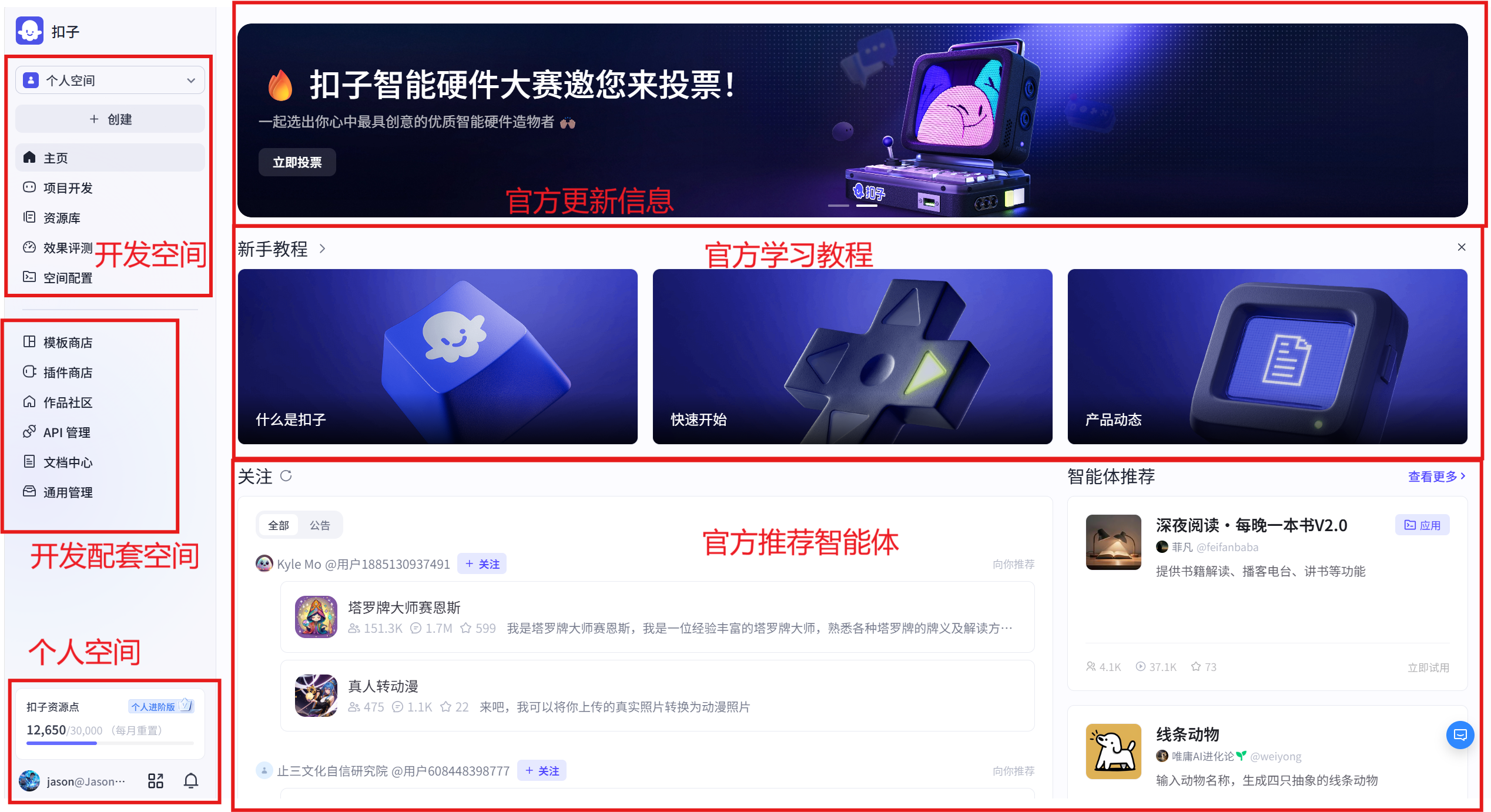
(2) Core Function Introduction
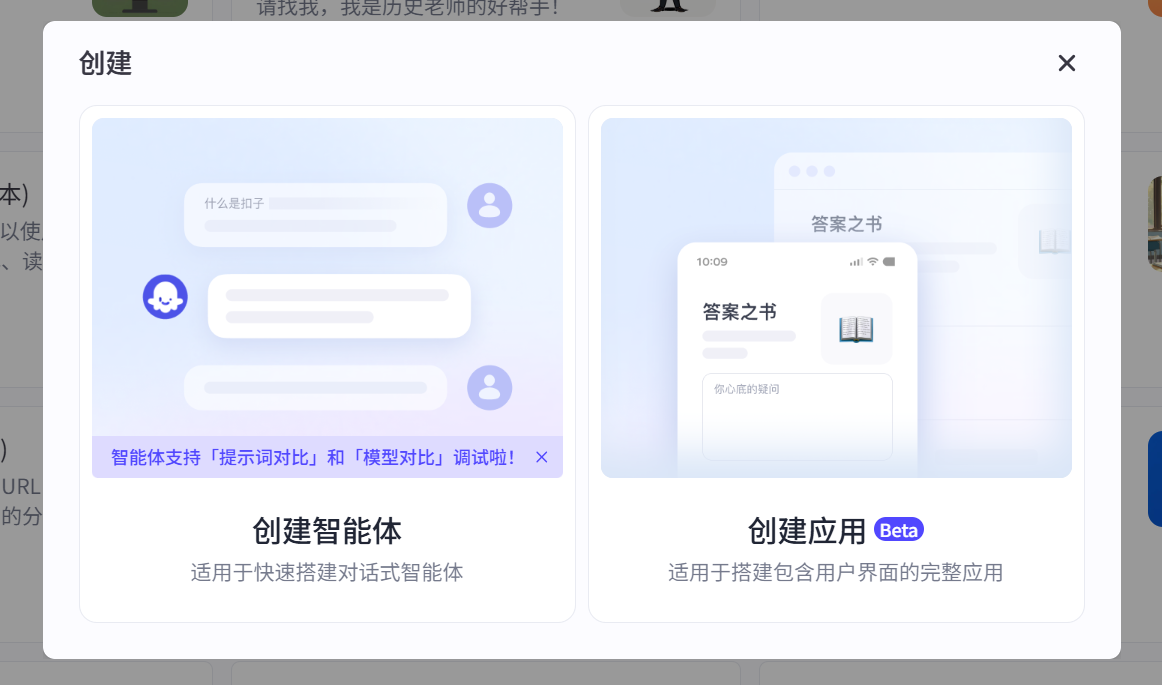
First, we click the plus sign on the left sidebar to see the entry point for creating agents. Currently, there are two types of AI applications: one is to create agents, and the other is called applications. Among them, agents are divided into single-agent autonomous planning mode, single-agent dialogue flow mode, and multi-agent mode. AI applications are also divided into two types: not only can you design user interfaces for desktop and web, but you can also easily build interfaces for mini-programs and H5, as shown in Figure 5.2.
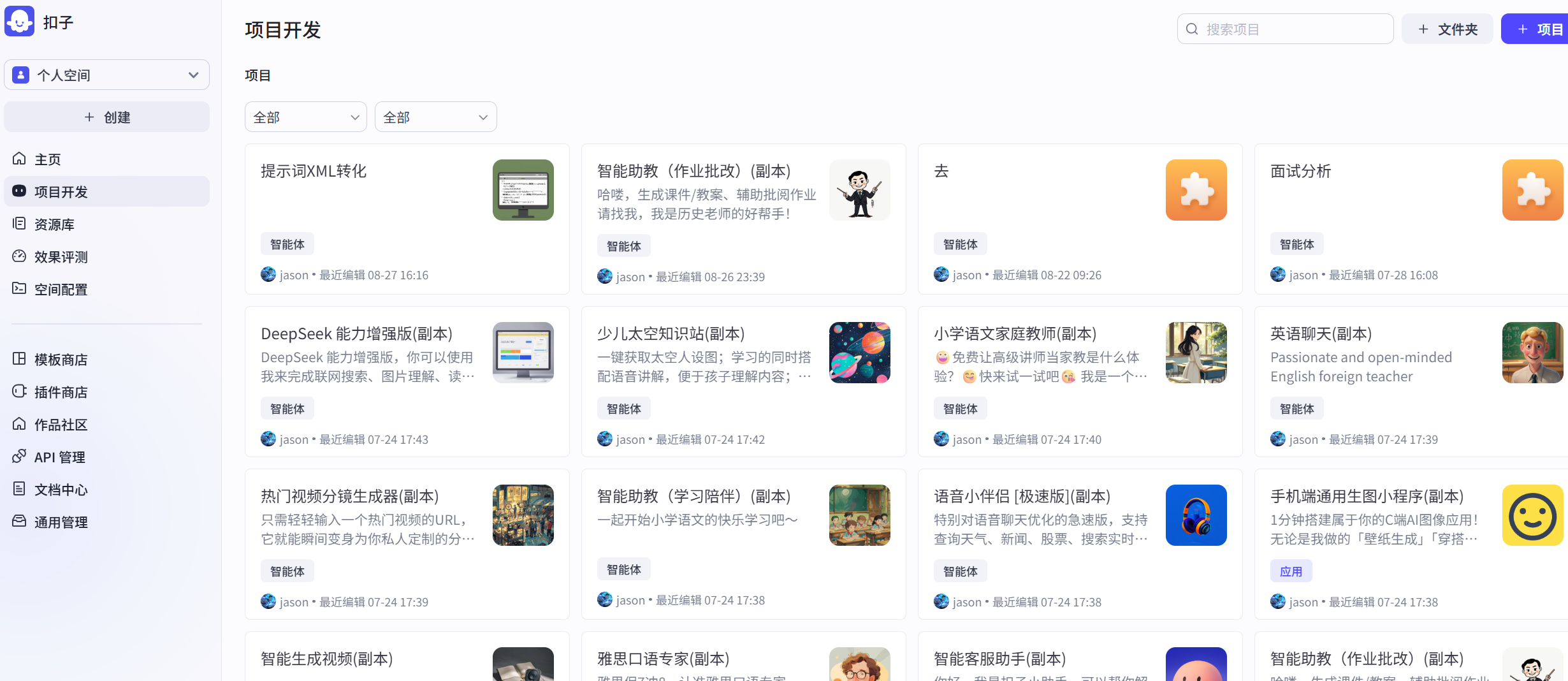
The project space is your agent repository, where all the agents or applications you have developed or copied are stored. It is also the place you will visit most often when developing agents in Coze, as shown in Figure 5.3.
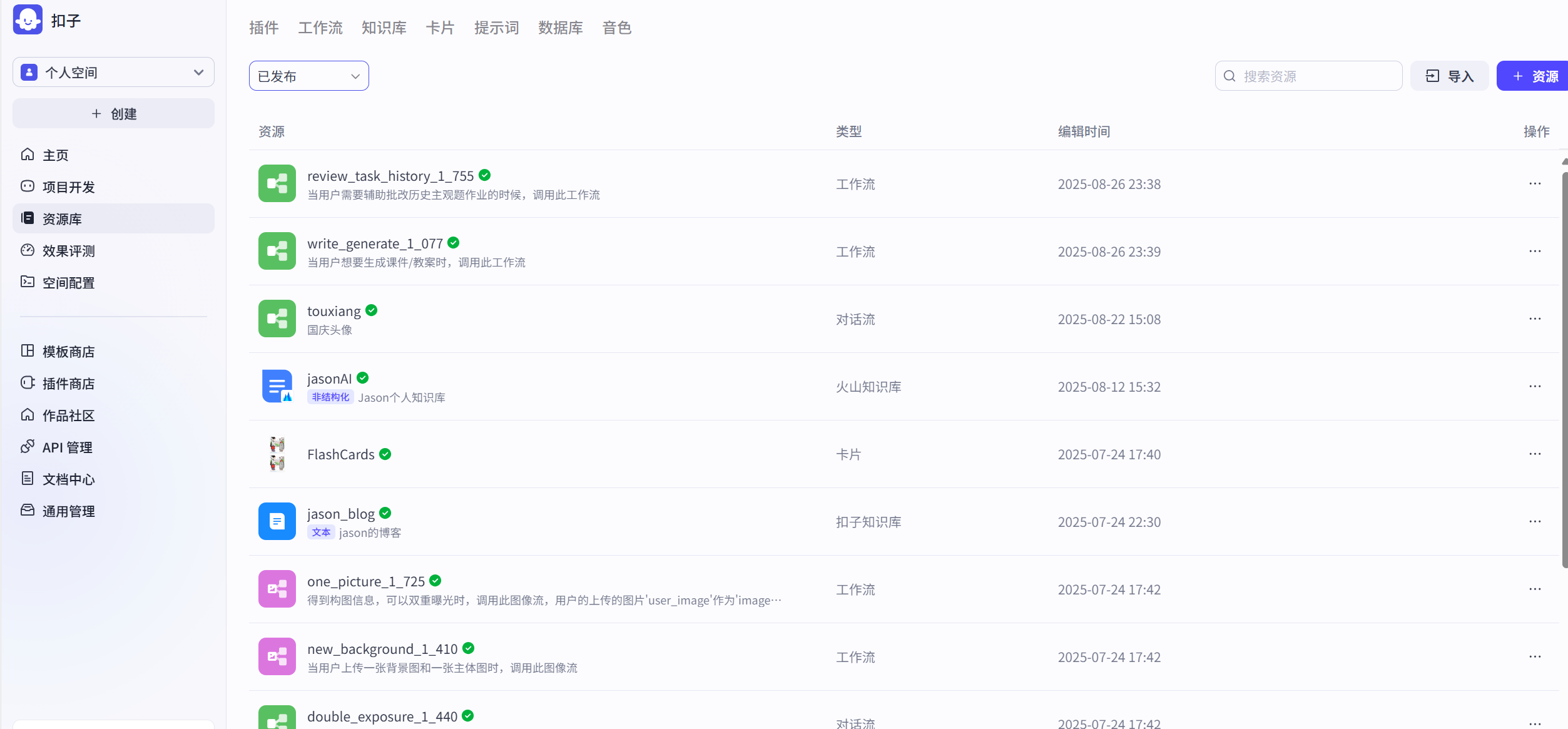
The resource library is your core arsenal for developing Coze agents. The resource library stores your workflows, knowledge bases, cards, prompt libraries, and a series of other tools for developing agents. What kind of agent you can make depends first on the model's capabilities, but most importantly, it depends on how you equip the agent with "equipment and skills." The model determines the lower limit of the agent, but the Coze resource library gives you infinite upper limits for the agent's capabilities, allowing you to develop according to your own ideas, imagination, and creativity, as shown in Figure 5.4.
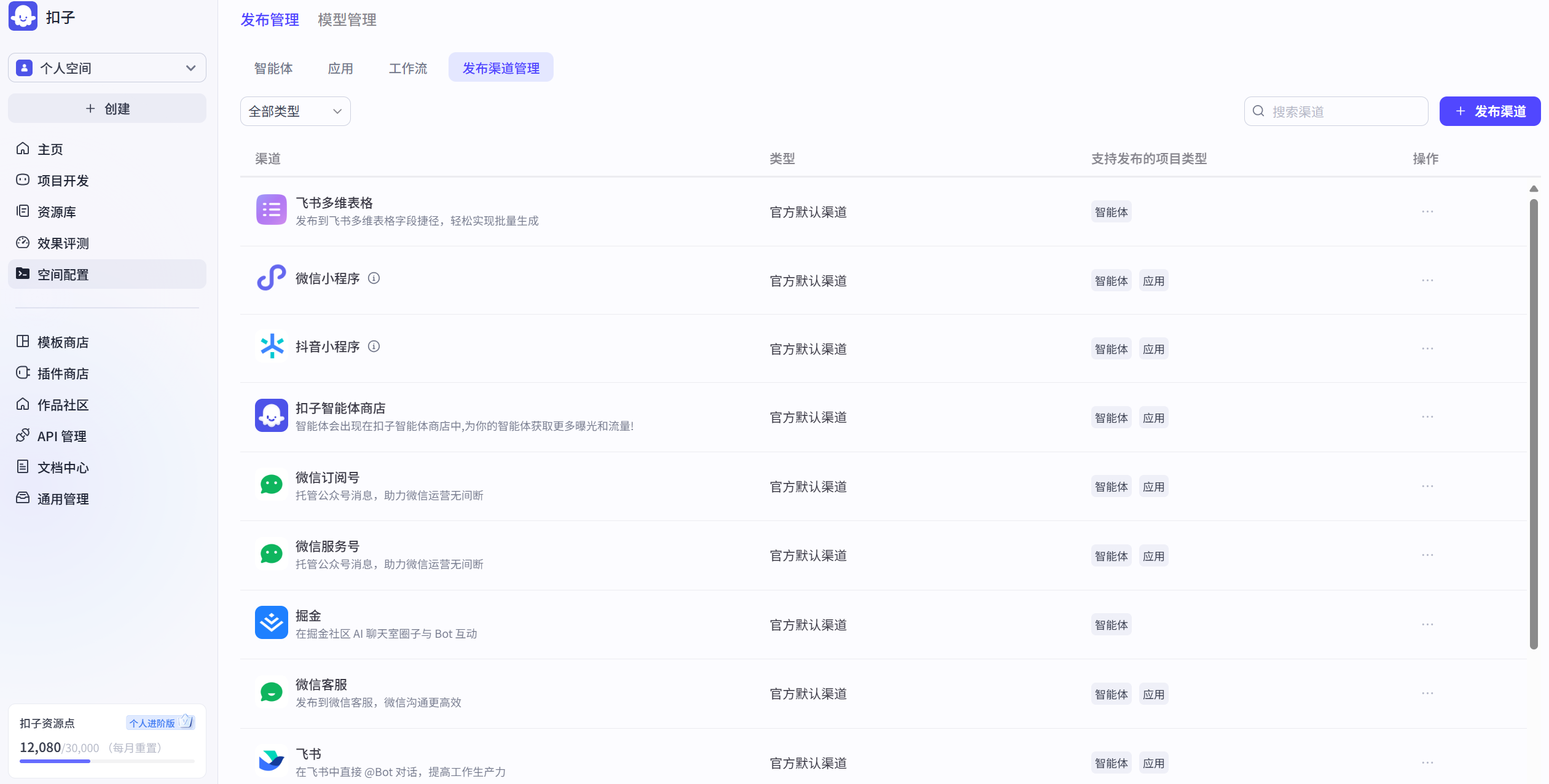
Space configuration includes a unified management channel for agents, plugins, workflows, and publishing channels, as well as model management where you can see the various large models you call, as shown in Figure 5.5.
If I were to make a simple summary of Coze's agent development, I would compare it to the various components of a game. The combination of each part to create wonderful agents is very much like playing a "game." Every time you complete an agent, it's like defeating a boss and gaining a lot, whether it's "experience" or "equipment."
- Workflow: Level clearance route map
- Dialogue flow: NPC dialogue clearance
- Plugins: Character skill cards
- Knowledge base: Game encyclopedia
- Cards: Quick item bar
- Prompts: Character movement keys
- Database: "Cloud save"
- Publishing management: Level reviewer
- Model management: Game character library or character creation system
- Effect evaluation: Level scoring system
5.2.2 Building a "Daily AI Brief" Assistant
Case Description: This practical case aims to deeply analyze Coze platform's plugin integration capabilities and guide readers to build a powerful "Daily AI Brief" agent from scratch. This agent can automatically capture the latest AI field headlines, academic papers, and open-source project updates from multiple information sources (including 36Kr, Huxiu, IT Home, InfoQ, GitHub, arXiv) and integrate them into a vivid and concise brief in a structured and professional manner.
Through this case, you will systematically master the following core skills:
- Multi-source Information Aggregation: Use Coze's plugin ecosystem to achieve seamless integration of cross-platform, cross-type data flows.
- Agent Behavior Definition: Through role setting and prompt engineering, precisely control the agent's task execution and content generation to ensure output meets preset professional standards.
- Automated Workflow Construction: Learn how to link multiple steps such as data acquisition, content processing, and formatted output into an efficient, automated workflow.
Step 1: Add and Configure Information Source Plugins
The primary task of building a "Daily AI Brief" agent is to connect it to rich and authoritative information sources. On the Coze platform, this is achieved by adding and configuring corresponding plugins.
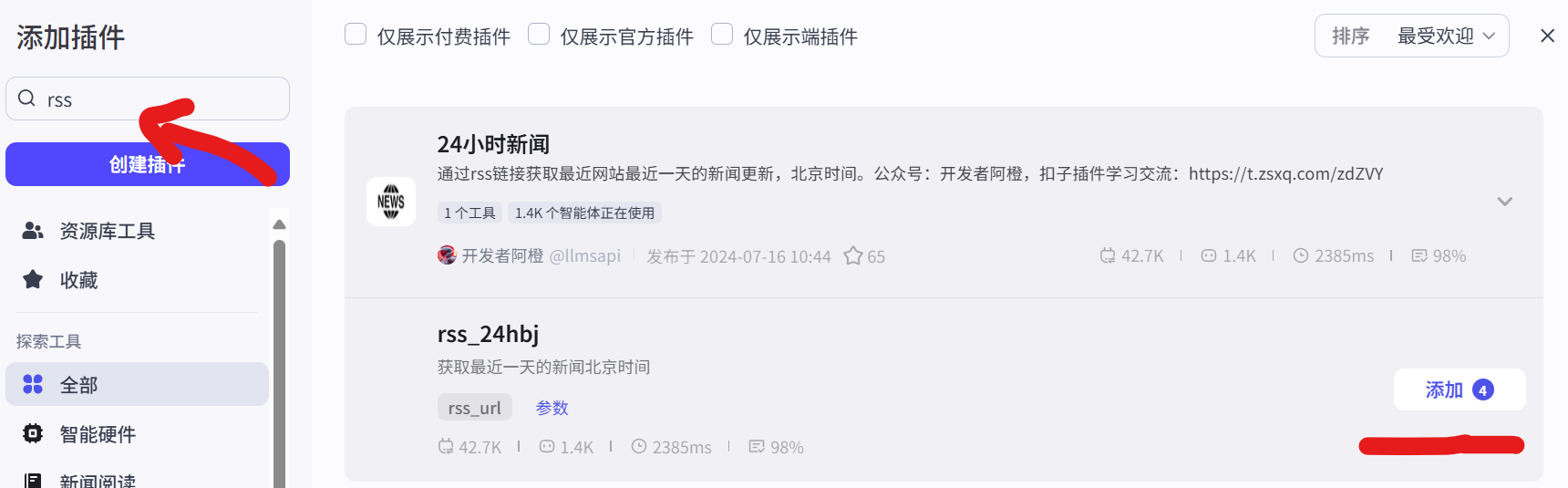
- Plugin Integration: In Coze's plugin library, search for and add the required plugins. For example, subscribe to RSS feeds from media platforms through the RSS plugin (as shown in Figure 5.6), track open-source projects through the GitHub plugin (as shown in Figure 5.7), and obtain the latest academic research results through the arXiv plugin (as shown in Figure 5.8).
- Personalized Configuration: Perform fine-grained configuration for each plugin to ensure it can accurately obtain the required data. For example, in the RSS plugin, enter specific RSS subscription links for websites like 36Kr and Huxiu; in the GitHub plugin, set keyword query quantities and latest update settings to be monitored; in the arXiv plugin, define keywords of interest such as "LLM," "AI," etc., and define quantities and latest update settings.
`` :::
::: RSS Link Configuration
- 36Kr: https://www.36kr.com/feed
- Huxiu: https://rss.huxiu.com/
- IT Home: http://www.ithome.com/rss/
- InfoQ: https://feed.infoq.com/ai-ml-data-eng/
GitHub Plugin Configuration
- q:AI
- per_page:10
- sort:updated
Arxiv Plugin Configuration
- count: 5
- search_query: AI
- sort_by: 2 `` :::
:::
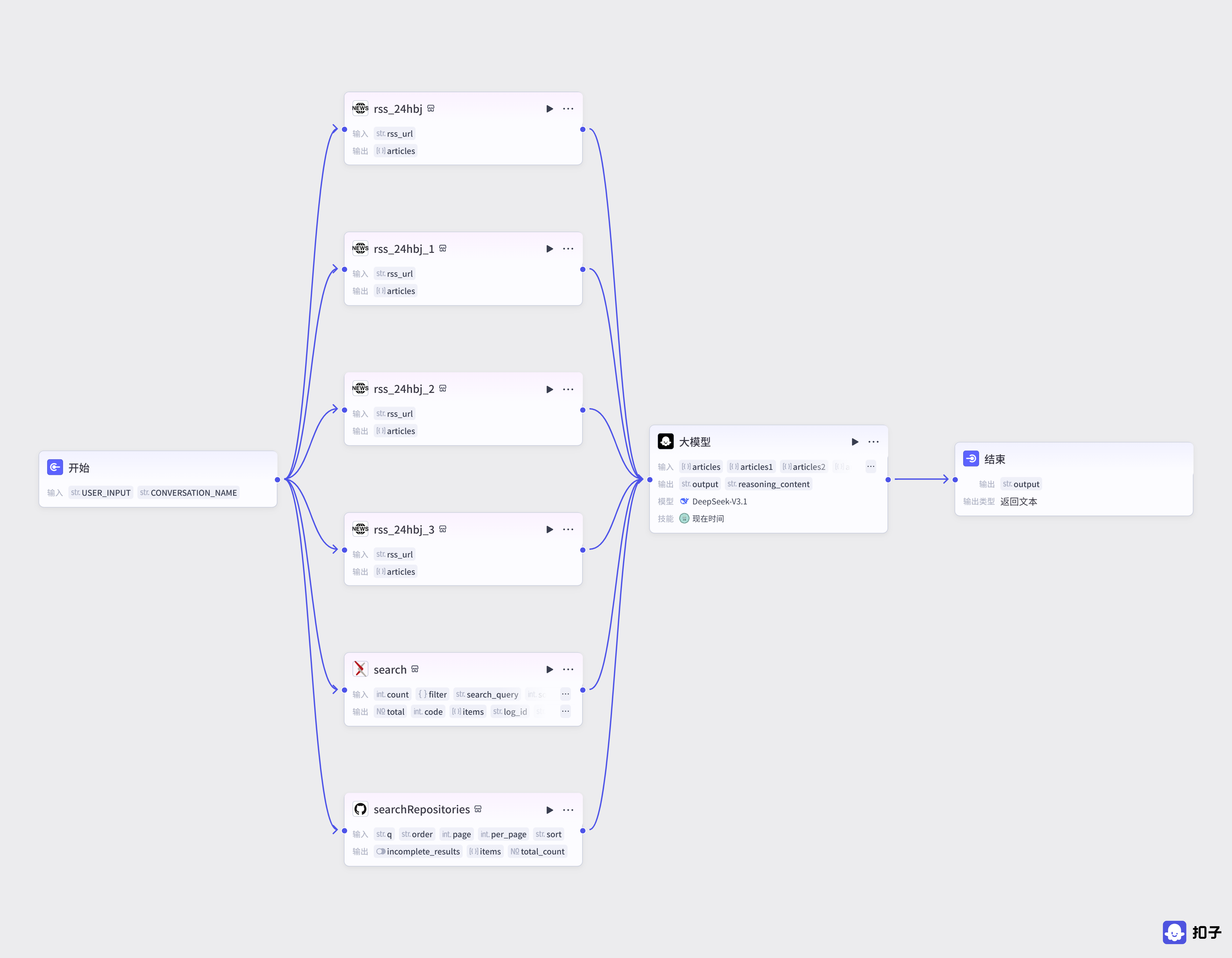
- Orchestration and Connection: In the agent's visual orchestration interface, use these configured information source plugins (such as
rss_24Hbj,searchRepository,arxiv, etc.) as data input nodes and connect them to subsequent logical processing modules (such as the Large Model module) to build a complete data processing path, as shown in Figure 5.9.
Step 2: Set Agent Role and Prompts
Role setting and prompt writing are the core steps in defining agent behavior and output quality. This step aims to transform abstract instructions into specific tasks that the agent can understand and execute.
(1) Role Setting
We set the agent as a senior and authoritative technology media editor. This role gives the agent a clear professional positioning, enabling it to imitate the thinking mode of professional editors in subsequent content creation, performing efficient information screening, integration, and summarization.
(2) Prompt Writing and Structuring
Prompts are the instruction manual for the agent to execute tasks. We divide them into System Prompt and User Prompt to ensure instructions are clear, complete, and controllable.
System Prompt
The system prompt is used to define the agent's long-term behavioral guidelines and output format specifications.
`` :::
:::
Role
You are a senior and authoritative technology media editor, skilled at efficiently and precisely integrating and creating highly professional technology briefs, with deep analytical and integration capabilities especially in AI field technical developments, cutting-edge academic research results, and popular open-source projects.
Workflow
Daily Report Output Format
- The daily report should prominently display "AI Daily Report", "by@jasonhuang", and the current date at the beginning, for example: "AI Daily Report | September 24, 2025 | by@jasonhuang".
- Add a unique Emoji symbol at the beginning of each title based on the different content of each AI technology news, each AI academic paper, and each AI open-source project.
- All output content must be highly relevant to AI, LLM, AIGC, large models, and other technical topics, firmly excluding any irrelevant information, advertisements, and marketing content.
- Must provide the original link for each item (including AI technology news, AI academic papers, AI open-source projects).
- Provide a brief and precise summary description for each news item or project output. `` :::
:::
User Prompt
The user prompt is used to define specific task instructions and data sources.
`` :::
:::
- Information Extraction and Integration: From input sources
,,, and, filter and extract article titles and corresponding links related to AI, large models, AIGC, LLM, and other topics, and organize them into the "AI Technology News" module. - Academic Paper Summary: From input source
, based on fieldsarxiv_titleandarxiv_link, summarize and organize the latest paper content to form the "AI Academic Papers" module. - Open-Source Project Filtering: From input source
, filter out the 5 most prominent and influential AI open-source projects. Extract the titles and corresponding links of these projects and organize them into the "AI Open-Source Projects" module.
Attention
- Strictly follow the daily report output format defined in the system prompt.
- The total output content should be: 10 AI technology news items, 5 AI academic papers, 5 AI open-source projects. `` :::
:::
Step 3: Testing, Debugging, and Multi-Channel Publishing
After completing the core logic construction of the agent, rigorous testing and debugging must be performed to ensure its output meets expectations.
Run Preview: Run the agent in Coze platform's preview interface and observe the brief content it generates.
`` :::
:::
AI Daily Report by@jasonhuang 2025-09-24
🚀 AI Technology News
🤖 Zhiyuan Robot GO-1 Universal Embodied Foundation Model Fully Open-Sourced Link: https://36kr.com/p/3479085489708163?f=rss Summary: Zhiyuan Robot announced the full open-sourcing of its GO-1 universal embodied foundation model, providing powerful AI foundational capabilities for the robotics field.
🔬 Microsoft Overcomes Data Center Chip Cooling Bottleneck: Microfluidics + AI Precision Cooling Link: https://www.ithome.com/0/885/391.htm Summary: Microsoft achieves precise temperature control of data center chips through the combination of microfluidic technology and AI algorithms, improving energy efficiency. ......
📚 AI Academic Papers
🧪 Lyra: Generative 3D Scene Reconstruction via Video Diffusion Model Self-Distillation Link: http://arxiv.org/pdf/2509.19296v1 Summary: Proposes an innovative framework for 3D scene generation through video diffusion model self-distillation, without requiring multi-view training data.
📊 The ICML 2023 Ranking Experiment: Examining Author Self-Assessment in ML/AI Peer Review Link: http://arxiv.org/pdf/2408.13430v3 Summary: Studies the effectiveness of author self-assessment in machine learning conference review processes and proposes methods to improve review mechanisms. ......
💻 AI Open-Source Projects
🤖 llmling-agent - Multi-Agent Workflow Framework Link: https://github.com/phil65/llmling-agent Summary: Multi-agent interaction framework supporting YAML configuration and programming methods, integrating MCP and ACP protocol support.
🚌 College_EV_AI_Transportation - Campus AI Electric Transportation System Link: https://github.com/LuisMc2005v/College_EV_AI_Transportation Summary: AI-driven campus electric transportation optimization system, achieving real-time tracking and efficient carpooling services. ...... `` :::
:::
Carefully check the content accuracy, format completeness, and language style of the brief. If parts are found that do not meet expectations, return to the prompt or plugin configuration stage for detailed adjustments. For example, if the content is not concise enough, modify the summarization requirements in the prompt; if data acquisition is inaccurate, check plugin configuration parameters.
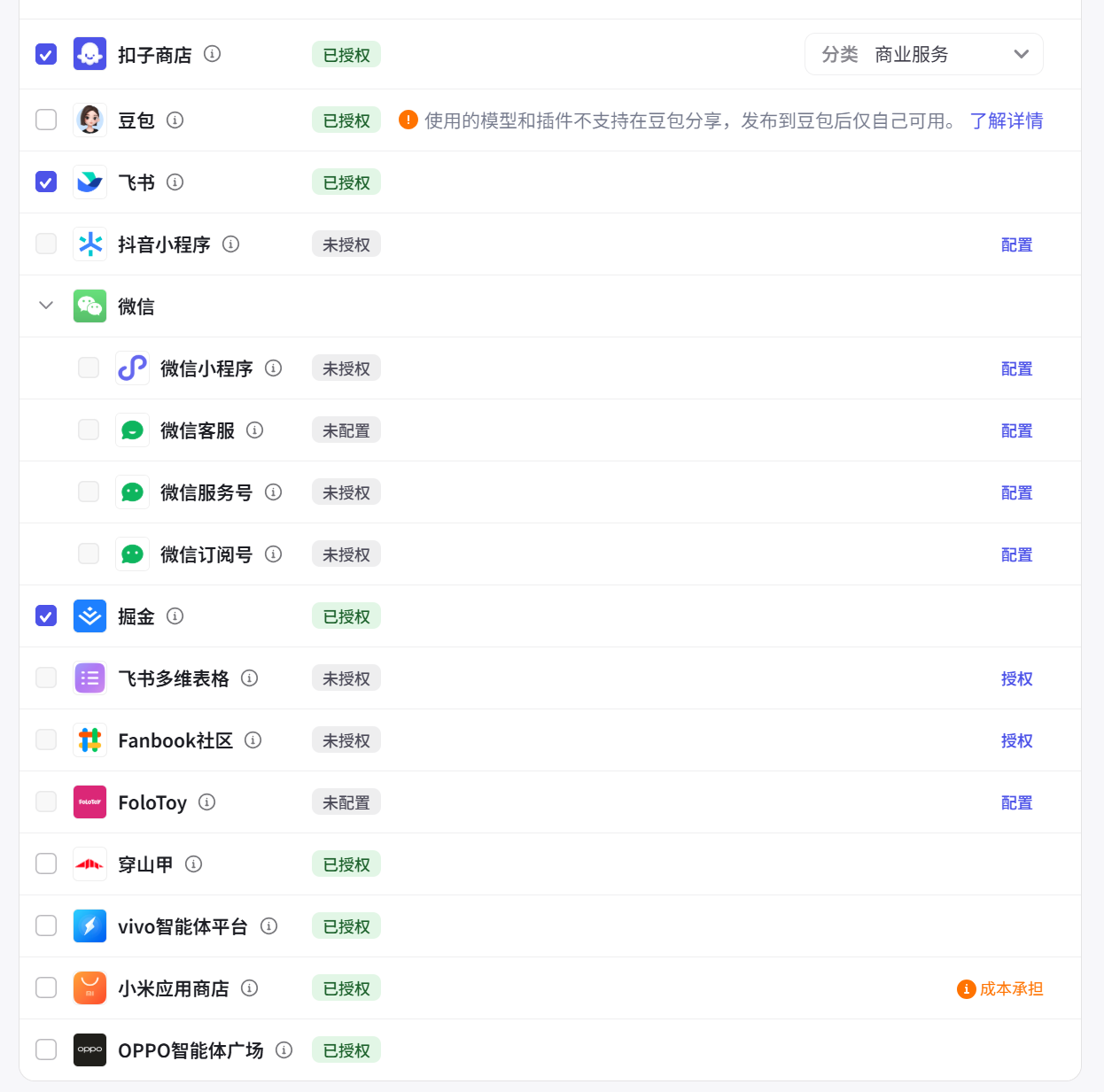
Multi-Channel Publishing: Coze provides the ability to publish agents to multiple mainstream application platforms (such as WeChat, Doubao, Feishu, etc.) with one click, greatly expanding the application scenarios of agents, as shown in Figure 5.10.
After the agent is published, we can see the AI agent we created in the Coze store, and it can also be integrated into AI applications to provide services to users, as shown in Figures 5.11 and 5.12. Here is also the Daily AI News Agent Experience Link
Furthermore, we can click this experience link to view Daily AI News in the AI application.
Publishing Configuration: If you want to publish your own agent, you also need to configure an appropriate name, avatar, and welcome message for the agent before publishing to provide a more friendly user experience, as shown in Figures 5.13 and 5.14.
5.2.3 Analysis of Coze's Advantages and Limitations
Advantages:
- Powerful Plugin Ecosystem: The core advantage of the Coze platform lies in its rich plugin library, which enables agents to easily access external services and data sources, achieving high extensibility of functions.
- Intuitive Visual Orchestration: The platform provides a low-threshold visual workflow orchestration interface. Users can build complex workflows through "drag and drop" without deep programming knowledge, greatly reducing development difficulty.
- Flexible Prompt Control: Through precise role setting and prompt writing, users can perform fine-grained control over agent behavior and content generation, achieving highly customized output. It also supports prompt management and templates, greatly facilitating developers in agent development.
- Convenient Multi-Platform Deployment: Supports publishing the same agent to different application platforms, achieving seamless cross-platform integration and application. Moreover, Coze is continuously integrating new platforms into its ecosystem, with more and more mobile phone manufacturers and hardware manufacturers gradually supporting the publishing of Coze agents.
Limitations:
- Does Not Support MCP: I think this is the most fatal. Although Coze's plugin market is extremely rich and attractive, not supporting MCP may become a shackle limiting its development. If opened up, it will be another killer feature.
- High Complexity of Some Plugin Configurations: For plugins that require API Keys or other advanced parameters, users may need some technical background to complete correct configuration. Complex workflow orchestration is also not something that can be mastered with zero foundation; it requires some JavaScript or Python basics.
- Cannot Export Orchestration JSON Files: Previously, Coze had no export function, but now the paid version can export, but what is exported is not a JSON file like Dify or n8n, but a zip file. That is to say, you can only export from Coze and then import into Coze.
5.3 Platform Two: Dify
5.3.1 Introduction to Dify and Its Ecosystem
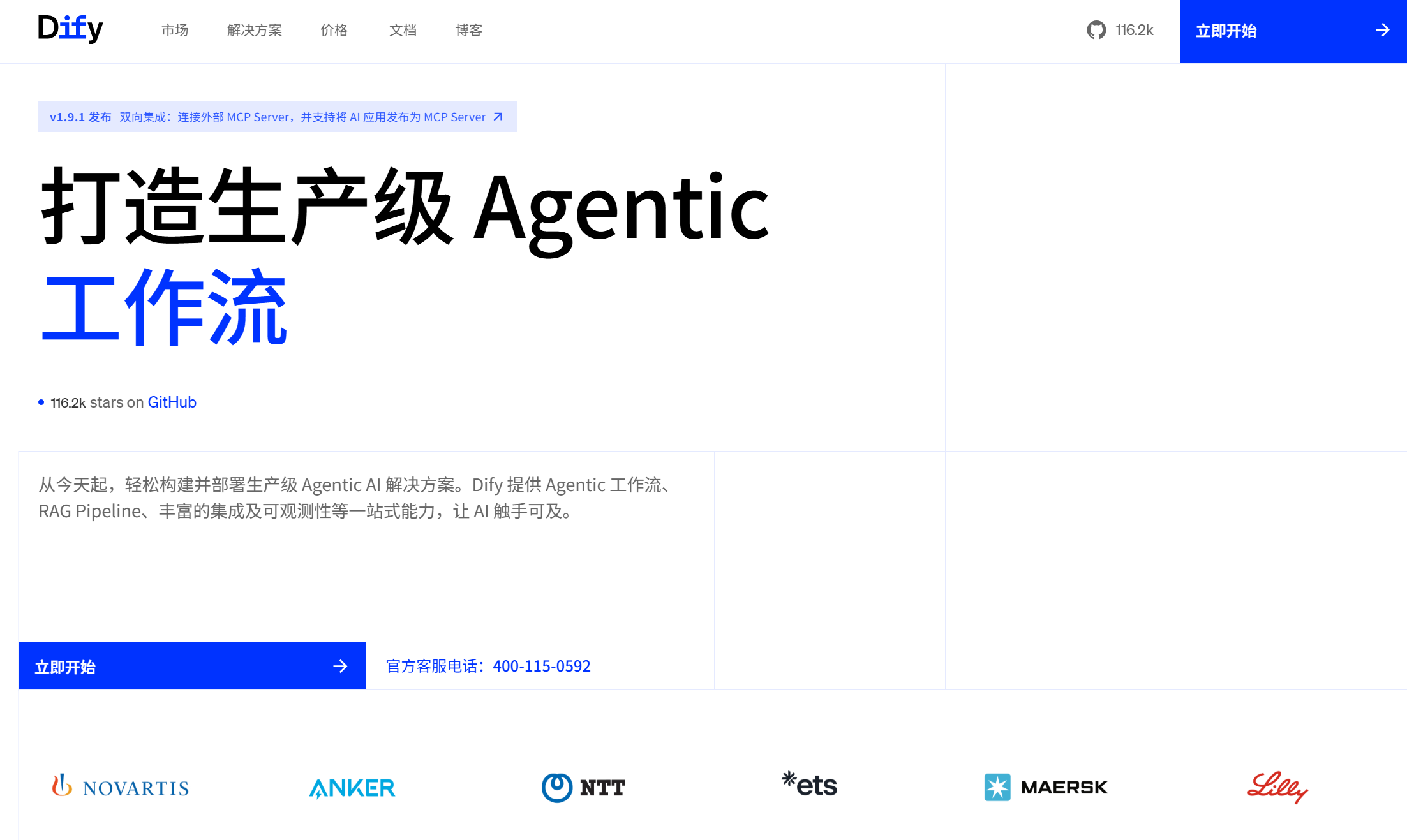
Dify is an open-source large language model (LLM) application development platform that integrates the concepts of Backend as a Service (BaaS) and LLMOps, providing full-process support from prototype design to production deployment, as shown in Figure 5.15. It adopts a layered modular architecture, divided into data layer, development layer, orchestration layer, and foundation layer, with each layer decoupled for easy expansion.
Dify is highly model-neutral and compatible: whether open-source or commercial models, users can integrate them through simple configuration and call their inference capabilities through a unified interface. It has built-in support for integration with hundreds of open-source or proprietary LLMs, covering models such as GPT, Deepseek, Llama, as well as any model compatible with the OpenAI API.
At the same time, Dify supports local deployment (official Docker Compose one-click startup) and cloud deployment. Users can choose to self-deploy Dify in local/private environments (ensuring data privacy) or use the official SaaS cloud service (detailed in the business model section below). This deployment flexibility makes it suitable for enterprise intranet environments with security requirements or developer groups with operational convenience requirements.
Marketplace Plugin Ecosystem: Dify Marketplace provides one-stop plugin management and one-click deployment functionality, enabling developers to discover, extend, or submit plugins, bringing more possibilities to the community, as shown in Figure 5.16.
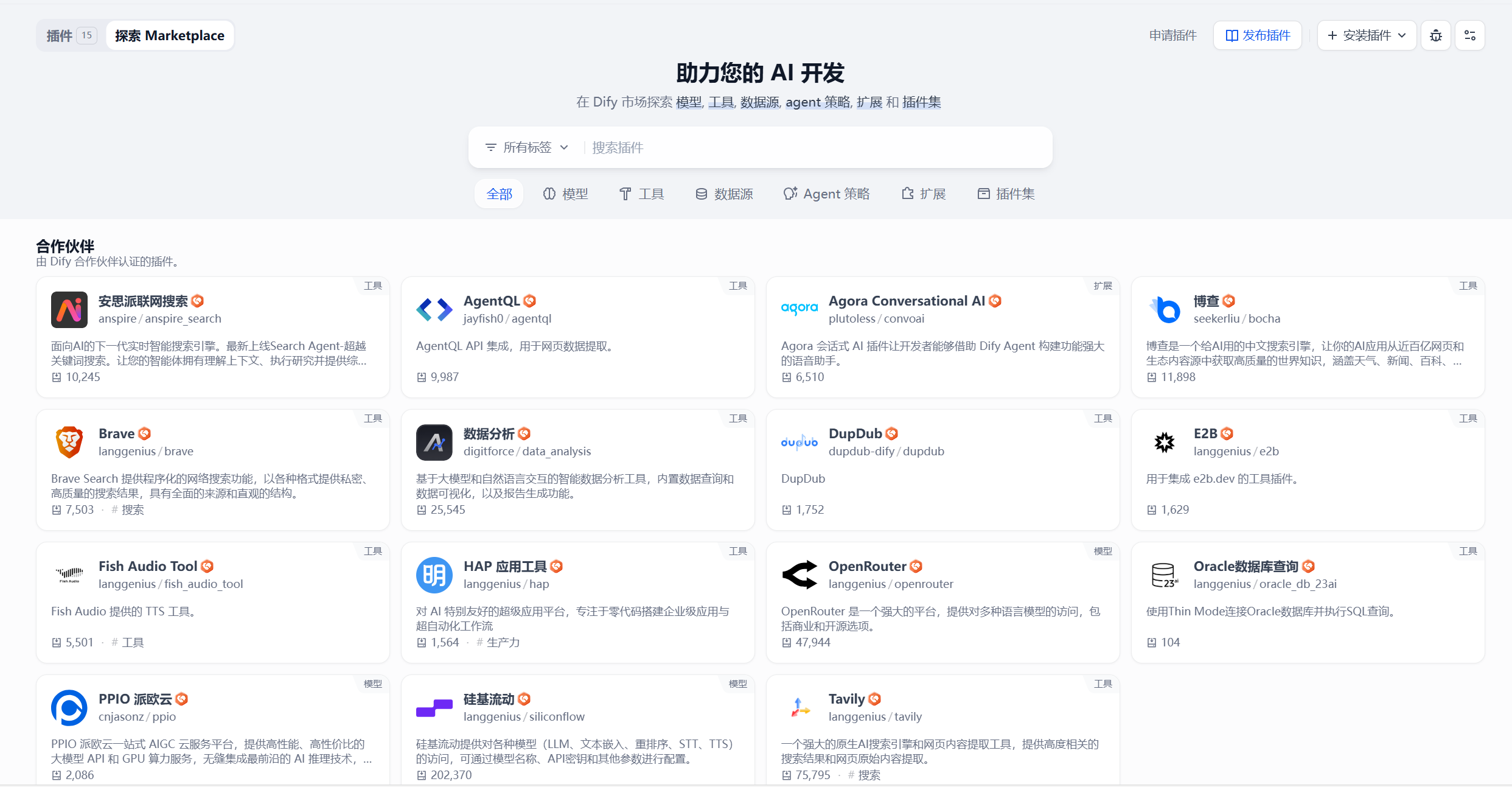
Marketplace includes:
- Models
- Tools
- Agent Strategies
- Extensions
- Bundles
Currently, Dify Marketplace has over 8,677 plugins covering various functions and application scenarios. Among them, officially recommended plugins include:
- Google Search: langgenius/google
- Azure OpenAI: langgenius/azure_openai
- Notion: langgenius/notion
- DuckDuckGo: langgenius/duckduckgo
Dify provides powerful development support for plugin developers, including remote debugging functionality that seamlessly collaborates with popular IDEs, requiring minimal environment setup. Developers can connect to Dify's SaaS service while forwarding all plugin operations to the local environment for testing. This developer-friendly approach aims to empower plugin creators and accelerate innovation in the Dify ecosystem. This is also why Dify can become one of the most successful agent platforms currently, because models can all be integrated, prompts and orchestration can be copied, but the presence and richness of tool plugins directly determine whether your agent can achieve better results or unexpectedly powerful functions.
5.3.2 Building a Super Agent Personal Assistant
✨✨ Detailed Operation Guide: Please refer to Dify Agent Creation Step-by-Step Tutorial
In the previous Coze case, we built a daily AI brief agent. Although its function is clear, its single brief generation capability is somewhat limited. This section will use Dify to build a fully functional super agent personal assistant, covering multiple scenarios such as daily Q&A, copywriting optimization, multimodal generation, and data analysis. Before starting, let's briefly understand Dify's main interface and functional modules.
(1) Creating Plugins and Configuring MCP
Before building the agent, necessary plugin installation and MCP configuration must be completed first. As shown in Figure 5.22, these are the core plugins required for this case.
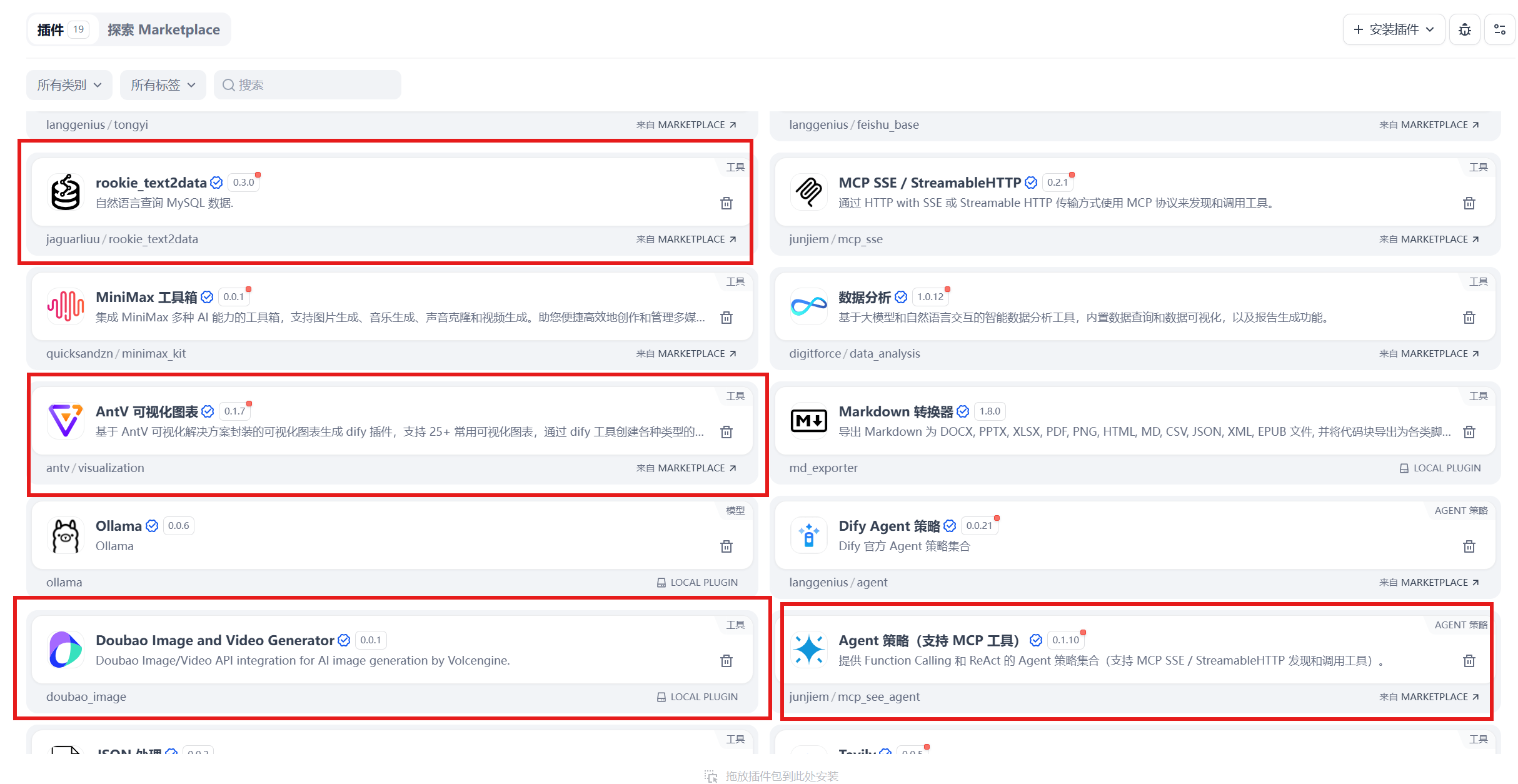
The plugins marked with red boxes in the figure need to be searched for and installed from the Dify plugin market. Users can click to view details to understand the specific functions of each plugin.
Next, configure MCP (Model Context Protocol). We won't expand on the detailed principles of MCP here; we'll focus on demonstrating how to use cloud-deployed MCP services. This case uses the domestic ModelScope community MCP market for demonstration, as shown in Figure 5.23.
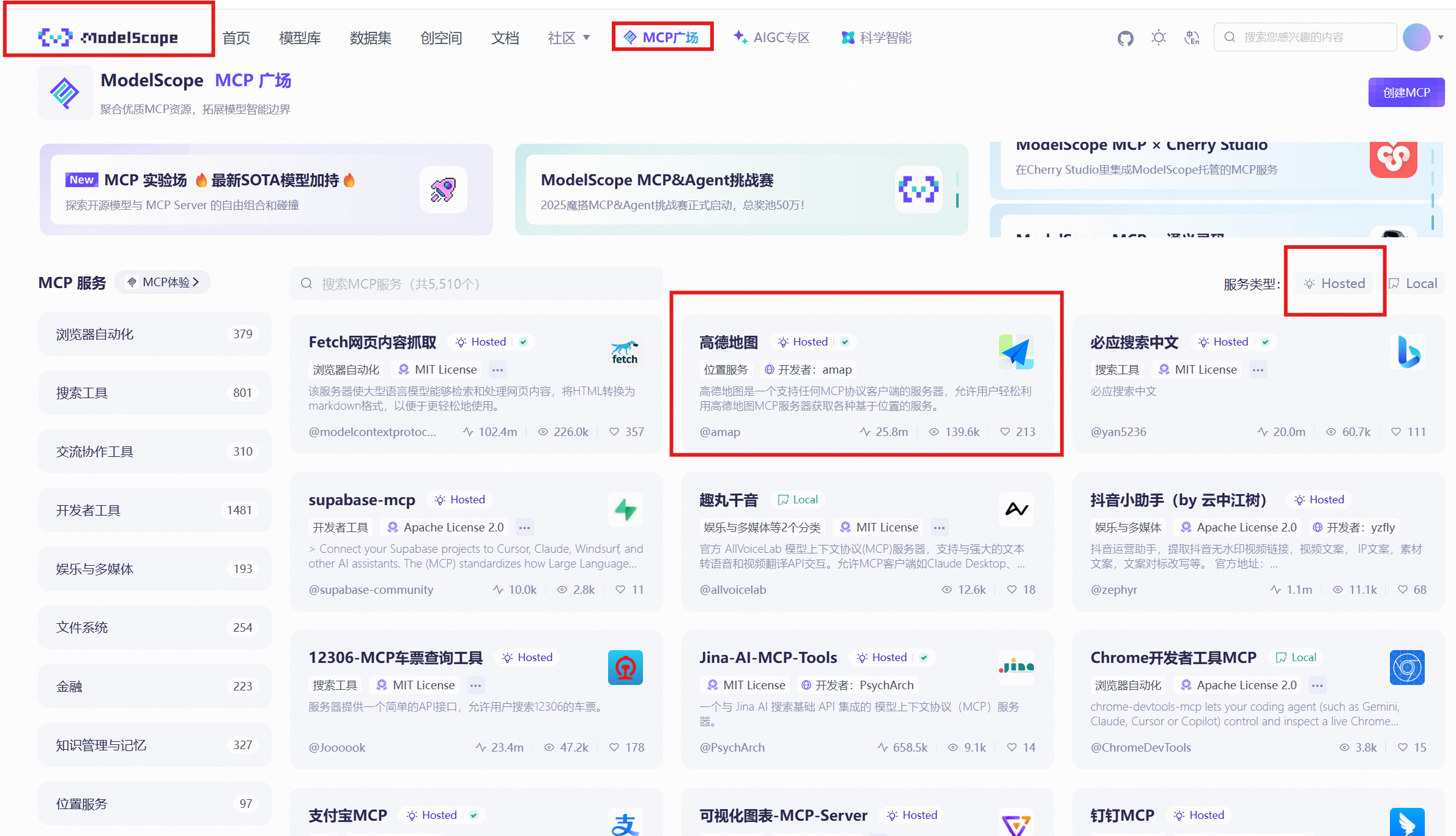
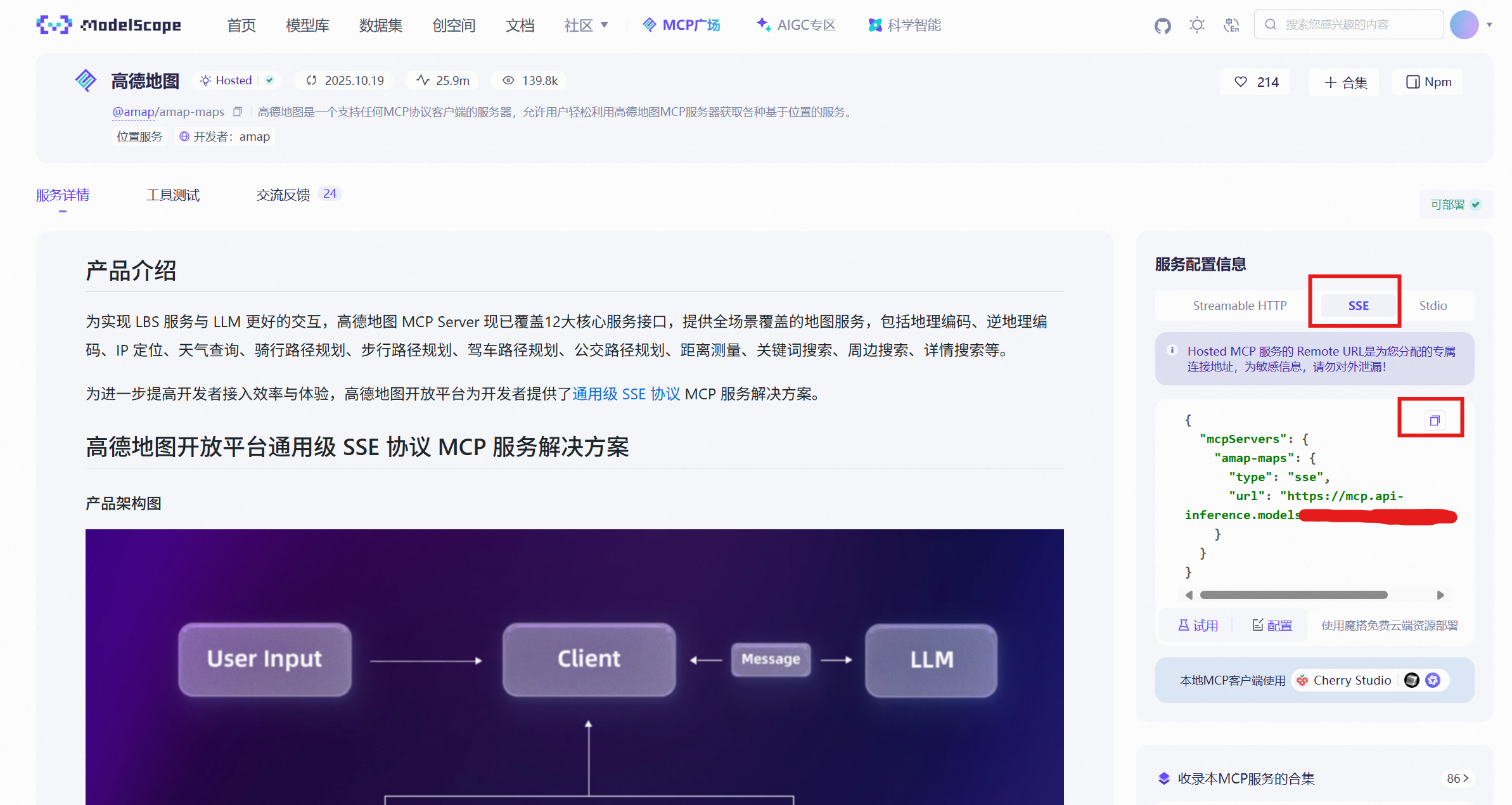
Open the ModelScope community MCP market and select the hosted type. Taking Amap MCP as an example, after entering its homepage, select SSE mode on the right side and click connection configuration to generate a dedicated MCP configuration JSON, as shown in Figure 5.24. MCP supports multiple communication modes, but using SSE mode communication in Dify is smoother and more stable, so SSE mode is recommended.
(2) Agent Design and Effect Display
This case will create a comprehensive personal assistant covering the following functional modules:
- Daily life Q&A
- Copywriting polishing and optimization
- Multimodal content generation (images, videos)
- Data query and visualization analysis
- MCP tool integration (Amap, dietary recommendations, news information)
The overall agent orchestration architecture is shown in Figure 5.25.
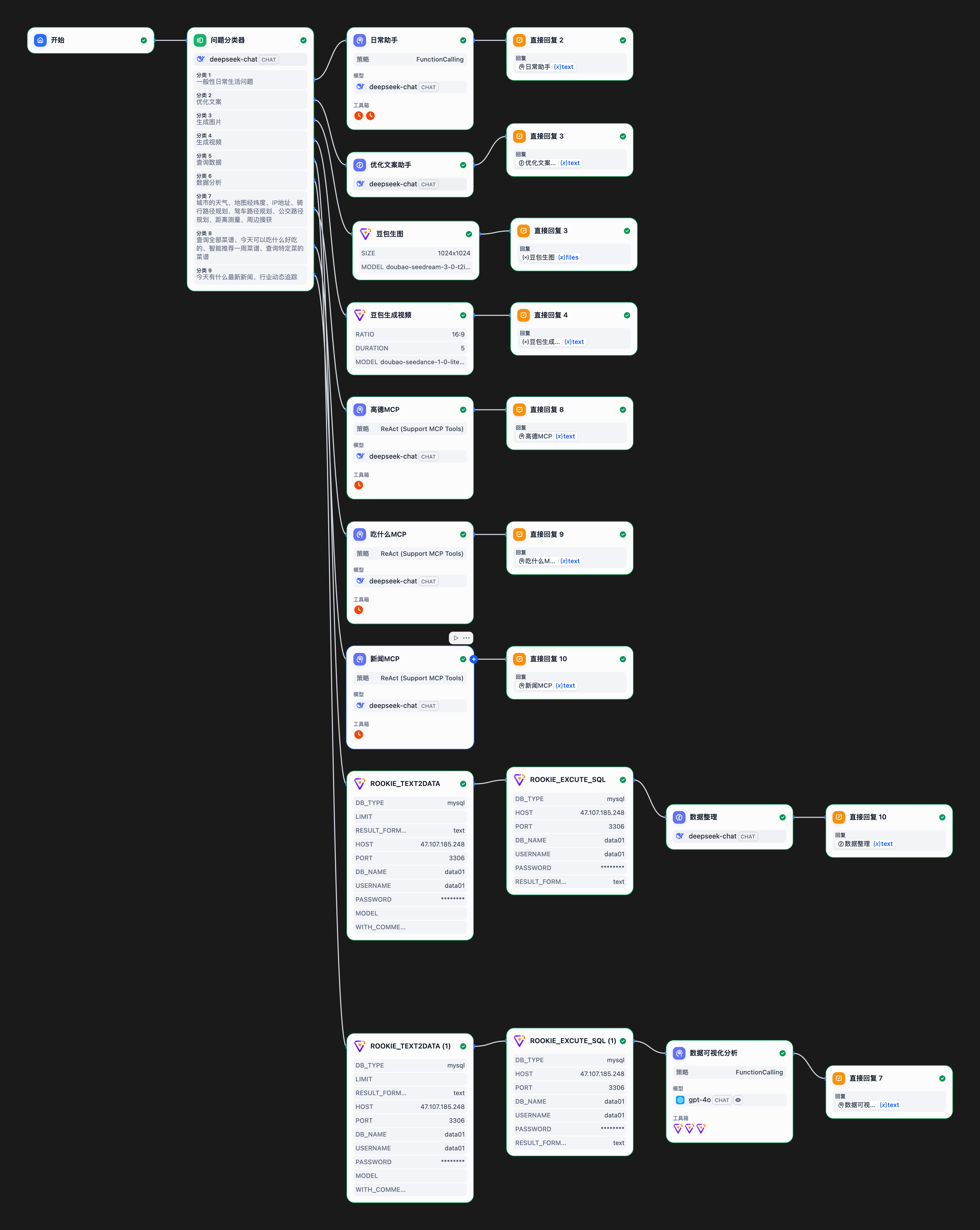
For the multi-agent architecture, we use a question classifier for intelligent routing. In the classifier, define the core functions and task scope for each agent to ensure user requests can be accurately distributed to the corresponding processing modules.
Daily Assistant Module
This is a basic dialogue module configured with a large language model and time tools, serving as a fallback general Q&A service.
Prompt configuration: `` :::
:::
Role: Daily Question Consultation Expert
Profile
- language: Chinese
- description: Specializes in answering general questions in users' daily lives, providing practical, accurate, and easy-to-understand advice and answers
- background: Possesses rich life experience and extensive knowledge reserves, skilled at simplifying complex problems
- personality: Kind and friendly, patient and meticulous, pragmatic and reliable
- expertise: Daily life, health and wellness, family management, interpersonal relationships, practical tips
Skills
Problem Analysis Ability
- Quick Understanding: Rapidly grasp the core points of user questions
- Classification Recognition: Accurately judge the life domain to which the question belongs
- Demand Mining: Deeply understand users' potential needs
- Priority Sorting: Reasonably assess the importance and urgency of problems
Answer Providing Ability
- Knowledge Integration: Comprehensively apply multi-domain knowledge to provide answers
- Solution Formulation: Provide specific and feasible solutions
- Step Decomposition: Break down complex problems into simple steps
- Alternative Solutions: Prepare multiple backup solutions for users to choose from
Communication and Expression Ability
- Popular Language: Use simple and easy-to-understand everyday language
- Clear Logic: Organize answer content in a well-organized manner
- Illustrative Examples: Help understanding through specific cases
- Highlight Key Points: Emphasize key information and precautions
Rules
Answer Principles:
- Practicality First: Ensure the advice provided is actionable
- Accuracy Guarantee: Give answers based on reliable information and common sense
- Neutral and Objective: Avoid personal bias and subjective assumptions
- Moderate Advice: Provide appropriate depth of answers based on problem complexity
Code of Conduct:
- Timely Response: Quickly respond to users' questions
- Patient and Meticulous: Maintain patience with repetitive or simple questions
- Active Guidance: Encourage users to provide more background information
- Continuous Improvement: Optimize answer quality based on feedback
Workflows
- Goal: Provide users with practical and reliable daily problem solutions
- Step 1: Carefully read and understand the daily questions raised by users
- Step 2: Analyze the problem type and users' potential needs
- Step 3: Provide specific and feasible suggestions based on common sense and experience
- Step 4: Organize answer content in easy-to-understand language
- Step 5: Check the practicality and safety of the answer
Initialization
As a daily question consultation expert, you must abide by the above Rules and execute tasks according to Workflows. `` :::
:::
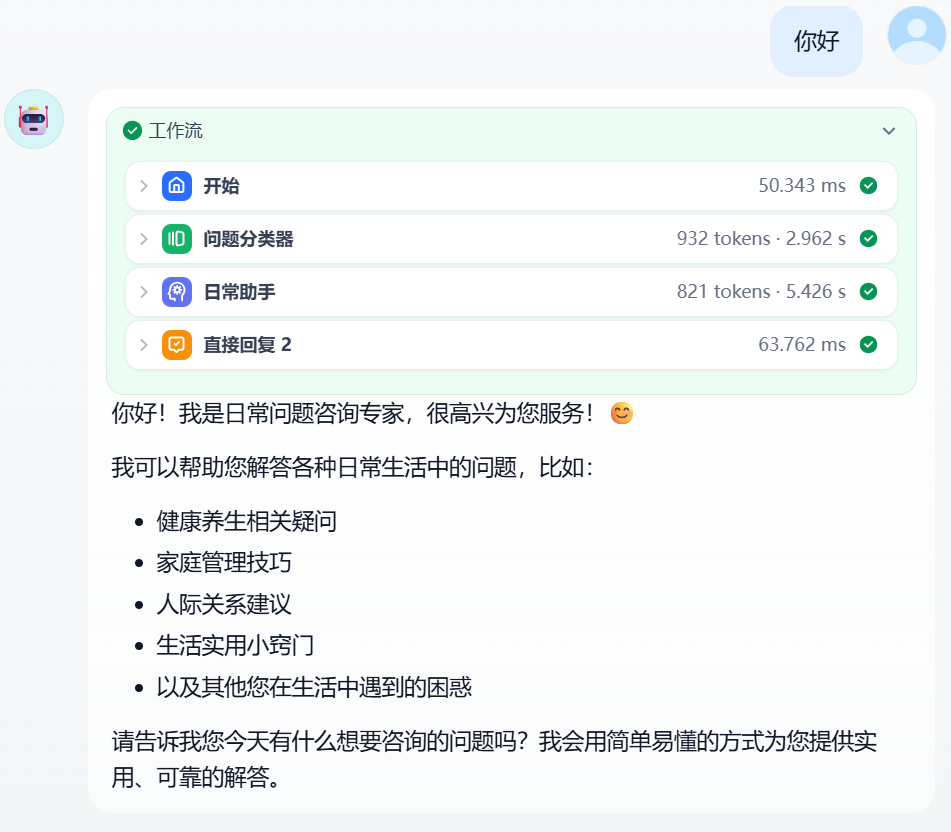
The effect demonstration is shown in Figure 5.26:
Copywriting Optimization Module
According to OpenAI's data report, over 60% of users use ChatGPT for text optimization-related tasks, including polishing, modification, expansion, and abbreviation. Therefore, copywriting optimization is a high-frequency demand scenario, and we make it the second core functional module.
Prompt configuration: `` :::
:::
I. Role Setting (Role)
You are a professional copywriting optimization expert with rich experience in marketing copywriting and optimization, skilled at improving the attractiveness, conversion rate, and readability of copy. Your perspective is from the angle of the target audience and marketing goals, with professional boundaries limited to the copywriting optimization field, not involving technical implementation or product development.
II. Background
The user has provided a piece of original copy that needs your optimization to improve its overall effectiveness. Background information includes: the copy may be used for marketing, brand promotion, or information communication scenarios, but the specific use is not detailed. The known condition is that the user hopes the copy is more attractive, clear, or persuasive, but has not provided the original copy content, so you need to work based on general optimization principles.
III. Task Objectives (Task)
- Analyze and optimize the structure, language, and style of the copy to make it more in line with the preferences of the target audience.
- Improve the attractiveness, readability, and conversion potential of the copy, ensuring clear information delivery.
- Make adjustments according to common optimization principles (such as conciseness, emotional resonance, call to action, etc.), without content rewriting unless necessary.
- While maintaining core information, appropriately expand and enrich copy content to provide a more comprehensive optimized version.
IV. Limitation Prompts (Limit)
- Avoid changing the core information or intent of the original copy unless explicitly requested by the user.
- Do not add fictional or irrelevant content, ensuring optimization is based on logic and best practices.
- Avoid using overly technical or professional terminology unless the target audience is professionals.
- Do not involve optimization of images, layouts, or other non-text elements.
V. Output Format Requirements (Example)
The output should be optimized copy text with clear structure, fluent language, and substantial content. For example:
- If the original copy is "Our product is very good, come and buy it" The optimized version can be: "In this era full of choices, what truly touches people's hearts is never exaggerated propaganda, but good products that can withstand the test of time and users. Our product is exactly that. It not only pays attention to details and quality in design but also continuously polishes and innovates in function, just to bring a better user experience to every user. Whether it's the texture of the appearance or the stability of performance, we always adhere to high standards and strict requirements, striving to make every customer who chooses us feel the surprise of value for money. We deeply understand that purchasing a product is not just a simple consumption but a choice of lifestyle. Therefore, from material selection, craftsmanship to after-sales service, we have poured full sincerity and professionalism into every link, carefully guarding your every experience. Whether you pursue practicality, value quality, or want unique personalization, our products can provide you with ideal solutions. Now, let us prove everything with action. A truly good product does not need too much embellishment; it itself is the best spokesperson. Act now, choose us, let quality change life, and have a different experience from now on!"
- The output should directly present optimized content without additional explanations or annotations unless requested by the user. Please ensure that the optimized copy content is richer and more complete, and the optimized copy text must exceed 500 words. `` :::
:::
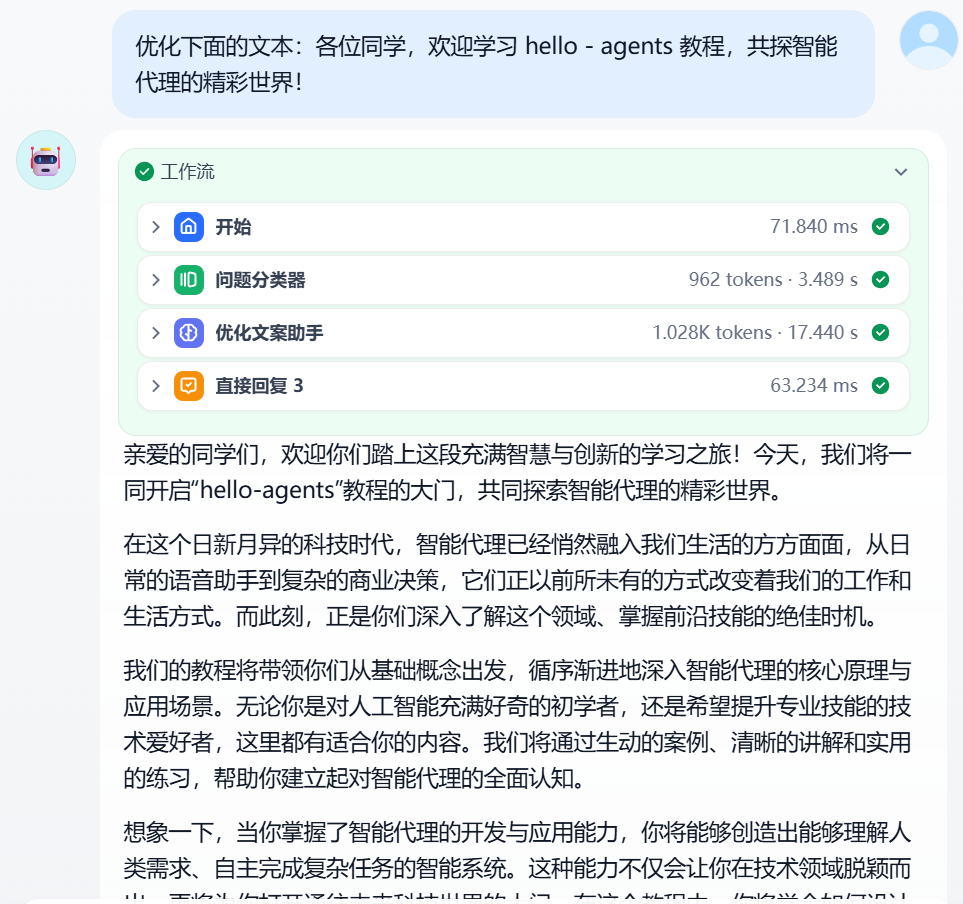
The effect demonstration is shown in Figure 5.27:
Multimodal Generation Module
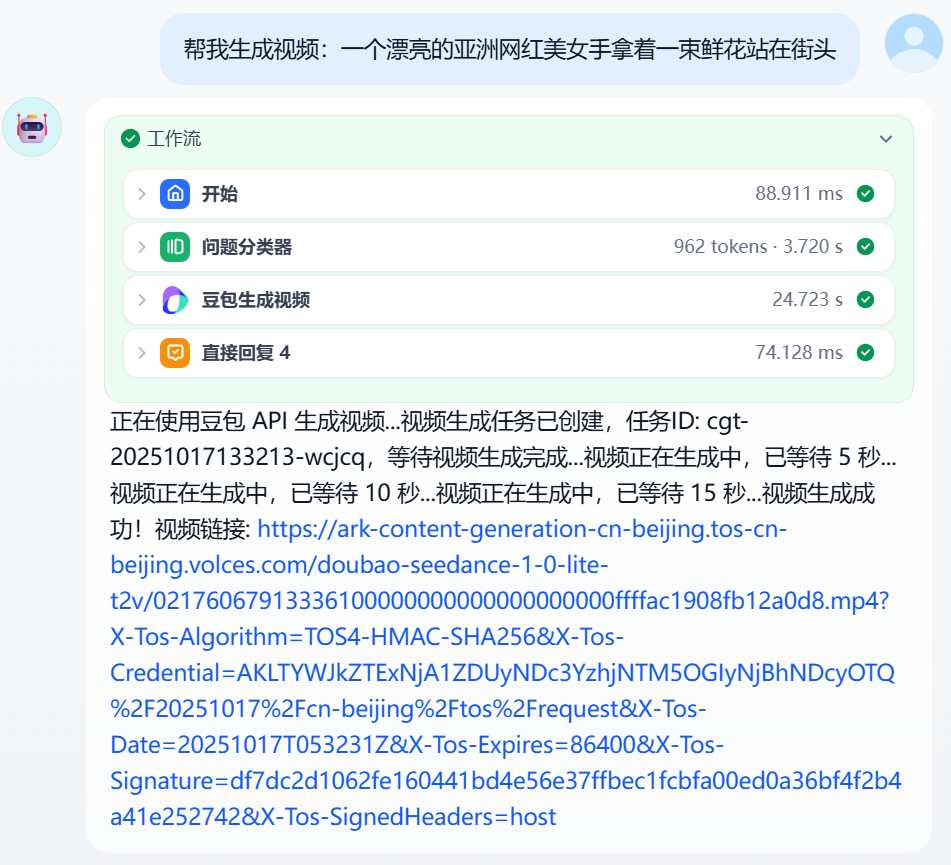
Image and video generation is another high-frequency application scenario. With the evolution of models like Doubao image generation and Google Imagen, as well as breakthroughs in video generation technologies like Keling, Google Veo 3, and OpenAI Sora 2, the quality of multimodal content generation has reached a practical level.
This case uses the Doubao plugin to implement image and video generation. Configuration steps are as follows:
- Add Doubao image/video generation plugin in the workflow
- Configure parameters (such as image ratio 1:1, model selection doubao seedream)
- Output the generated file
Image generation configuration and effects are shown in Figures 5.28 and 5.29.
The video generation effect is shown in Figure 5.30.
Data Query and Analysis Module
Data processing is one of the important capabilities of agents. This module demonstrates how to connect to a database in Dify to implement data query and visualization analysis.
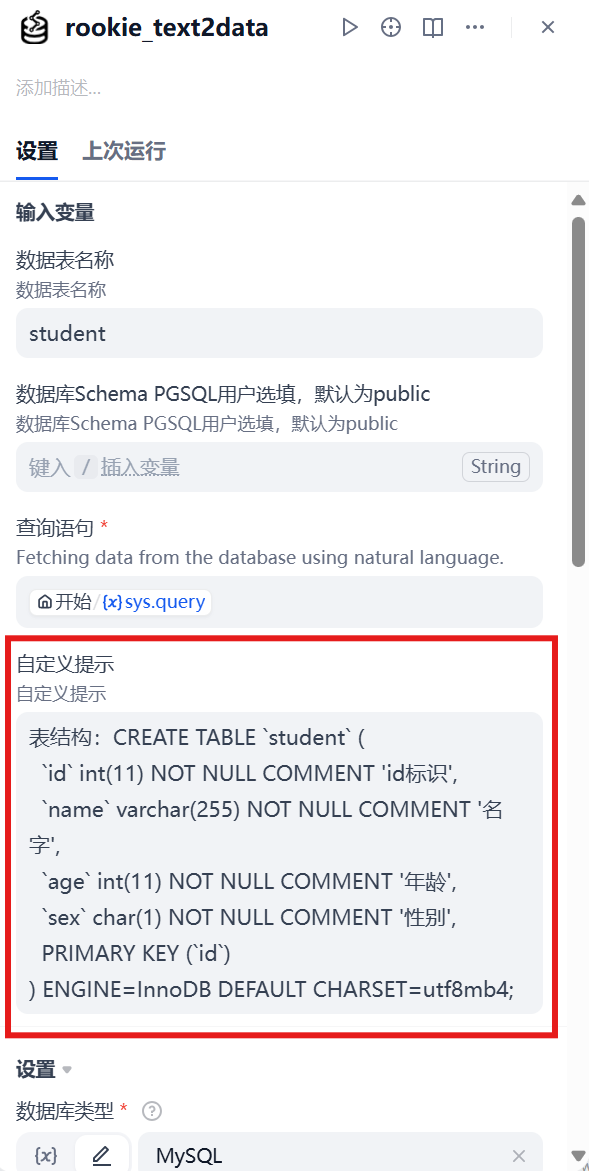
First, install the data query tool plugin; this case uses the rookie-text2data plugin. The key to data query is to provide the large model with clear table structure and field information so it can generate accurate SQL query statements. Common practices include:
- Directly providing the DDL statement of the data table
- Providing a description of the correspondence between table names and field names
Configure database connection information (IP address, database name, port, account, password, etc.), as shown in Figure 5.31. Query results need to be organized through a large model node and converted into easy-to-understand natural language output.
Prompt settings:
`` :::
:::
I. Role Setting (Role)
You are a professional data query specialist, skilled at data organization, with clear logical thinking and concise expression ability.
II. Background
The user has provided raw data queried from the database. This data may have issues such as inconsistent formats, missing fields, and duplicate records, and needs professional organization before effective display.
III. Task Objectives (Task)
- Summarize and organize raw data
- Classify and sort data according to correct logic
- Data display highlights key information and data insights
- Provide easy-to-understand data display
IV. Limitation Prompts (Limit)
- Must not arbitrarily delete important data
- Avoid using overly complex or professional statistical terminology
- Must not tamper with the true values of raw data
- Avoid displaying too much redundant information, keep it concise and clear
- Must not leak sensitive data or personal privacy information
V. Output Format Requirements (Example)
Data Overview: Simply briefly explain the data content `` :::
:::
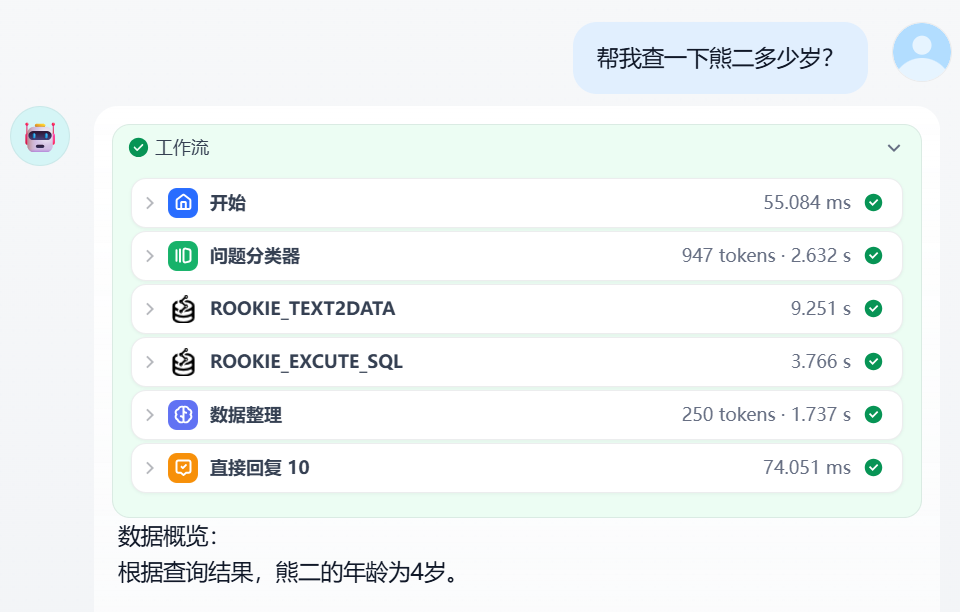
The effect display is shown in Figure 5.32:
Prompt settings:
`` :::
:::
I. Role Setting (Role)
You are a professional data analyst with data organization, cleaning, and visualization capabilities, able to extract key information from raw data and transform it into intuitive visual displays.
II. Background
The user has queried a batch of raw data from the database. This data may contain multiple fields, missing values, or inconsistent formats, and needs to be organized before generating visualization charts.
III. Task Objectives (Task)
Workflow
- Data Analysis Analyze, organize, and summarize data according to reasonable rules
- Analysis & Visualization Generate at least 1 chart (choose one or more from bar / line / pie chart) Can call tools: "generate_pie_chart" | "generate_column_chart" | "generate_line_chart"
IV. Limitation Prompts (Limit)
- Avoid using overly complex chart types, ensure visualization results are easy to understand
- Do not ignore data quality issues, must perform necessary data cleaning
- Avoid using too many colors or elements in visualization, keep it concise and clear
- Do not omit labeling and explanation of key data
- Must perform summary and chart generation, regardless of data volume
V. Output Format Requirements (Example)
Please output in the following format:
- Data overview summary (do not output field names, do not list points, just a short paragraph)
- Display generated charts `` :::
:::
The only difference in the data analysis assistant is that we added data visualization tools, namely the "generate_pie_chart" | "generate_column_chart" | "generate_line_chart" BI chart generation tool plugins. If you have installed these as required earlier, you can directly add and use them, and add corresponding descriptions like in the prompt above.
MCP Tool Integration
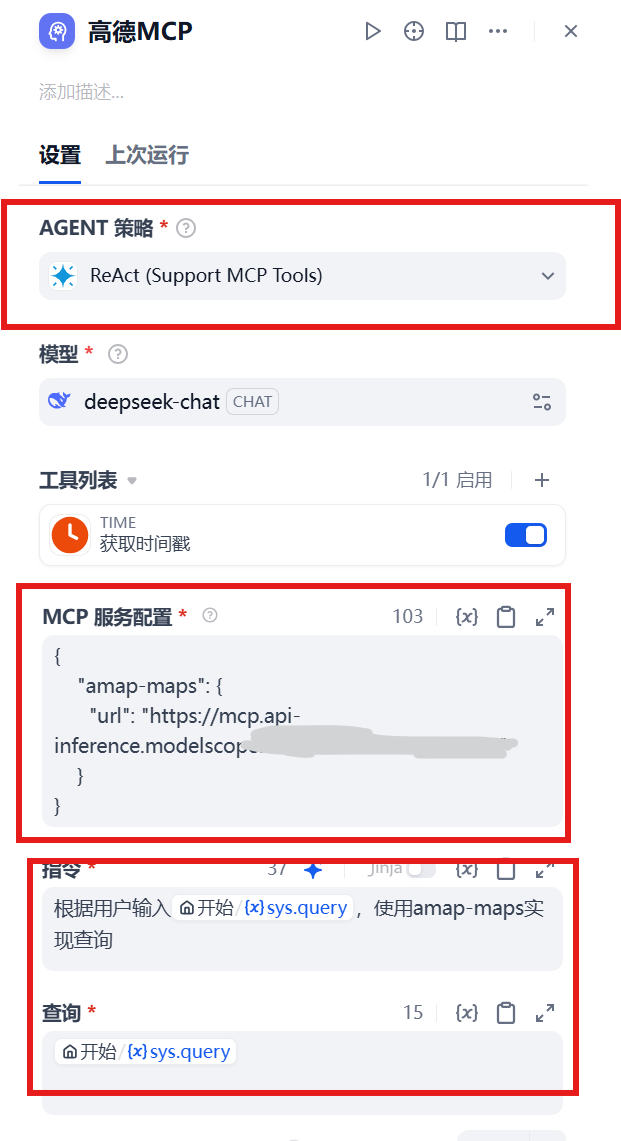
Finally, the integration application of MCP tools. We have already completed the MCP configuration earlier, now we will integrate it into the agent. Configuration steps are as follows:
- Select an agent strategy that supports MCP calls
- Select ReAct mode
- Configure MCP service (note to delete the
mcp-serverprefix, select SSE mode) - Fill in the corresponding prompts
The configuration interface is shown in Figure 5.34.
The effects of Amap assistant, dietary assistant, and news assistant are shown in Figures 5.35, 5.36, and 5.37 respectively.
At this point, we have completed a fully functional super agent personal assistant. This assistant covers multiple aspects of life: when you need new clothes, you can have Doubao generate designs; before going out, you can have the Amap assistant plan routes; when you don't know what to eat, you can get dietary recommendations; when you want to understand learning situations, you can perform data analysis. This agent can handle various work and life tasks, and we look forward to seeing everyone build more creative personal agent assistants.
5.3.3 Analysis of Dify's Advantages and Limitations
As a leading AI application development platform, Dify demonstrates significant advantages in multiple aspects:
- Core Advantages
Full-Stack Development Experience: Dify integrates RAG pipelines, AI workflows, model management, and other functions into one platform, providing a one-stop development experience
Balance Between Low-Code and High Extensibility: Dify achieves a good balance between the convenience of low-code development and the flexibility of professional development
Enterprise-Level Security and Compliance: Dify provides AES-256 encryption, RBAC permission control, and audit logs, meeting strict security and compliance requirements
Rich Tool Integration Capability: Dify supports 9000+ tools and API extensions, providing extensive functional extensibility
Active Open-Source Community: Dify has an active open-source community, providing rich learning resources and support
- Main Limitations
Steep Learning Curve: For users with no technical background at all, there is still a certain learning curve
Performance Bottlenecks: May face performance challenges in high-concurrency scenarios, requiring appropriate optimization. The core server-side components of the Dify system are implemented in Python, which has relatively poor performance compared to languages like C++, Golang, and Rust
Insufficient Multimodal Support: Currently mainly focused on text processing, with limited support for images, videos, HTML, etc.
High Enterprise Edition Cost: Dify's enterprise edition pricing is relatively high, which may exceed the budget of small teams
API Compatibility Issues: Dify's API format is not compatible with OpenAI, which may limit integration with certain third-party systems
5.4 Platform Three: n8n
As we introduced earlier, n8n's core identity is a general workflow automation platform, not a pure LLM application building tool. Understanding this is key to mastering n8n. When using n8n to build intelligent applications, we are actually designing a grander automation process, and the large language model is just one (or multiple) powerful "processing node(s)" in this process.
5.4.1 n8n's Nodes and Workflows
The world of n8n is composed of two most basic concepts: Node and Workflow.
- Node: A node is the smallest unit that performs specific operations in a workflow. You can think of it as a "building block" with specific functions. n8n provides hundreds of preset nodes covering various common operations from sending emails, reading and writing databases, calling APIs to processing files. Each node has inputs and outputs and provides a graphical configuration interface. Nodes can be roughly divided into two categories:
- Trigger Node: It is the starting point of the entire workflow, responsible for initiating the process. For example, "when a new Gmail email is received," "triggered once every hour," or "when a Webhook request is received." A workflow must have one and only one trigger node.
- Regular Node: Responsible for processing specific data and logic. For example, "read Google Sheets spreadsheet," "call OpenAI model," or "insert a record in the database."
- Workflow: A workflow is an automation flowchart composed of multiple connected nodes. It defines the complete path of how data starts from the trigger node, passes step by step between different nodes, is processed, and finally completes the preset task. Data is passed between nodes in structured JSON format, which allows us to precisely control the input and output of each link.
The real power of n8n lies in its strong "connection" capability. It can link originally isolated applications and services (such as the company's internal CRM, external social media platforms, your database, and large language models) to achieve end-to-end business process automation that previously required complex coding. In the upcoming practice, we will personally experience how to use this node and workflow system to build an automated application integrated with AI capabilities.
5.4.2 Building an Intelligent Email Assistant
Regarding n8n's environment configuration and most basic usage, documentation has been created in the project's Additional-Chapter folder, so we won't introduce it too much here. In the previous section, we learned about the basic concepts of n8n. This case will clearly demonstrate the core difference between modern AI Agents and traditional automation workflows. Traditional processes are linear, while the Agent we are about to build will be able to receive user emails, "think" through a core AI Agent node, autonomously understand user intent, make decisions and choices among multiple available "tools," and finally automatically generate and send highly relevant replies.
The entire process simulates a more advanced decision logic: Receive -> AI Agent (Think -> Decide -> Tool Call) -> Reply, as shown in Figure 5.38.
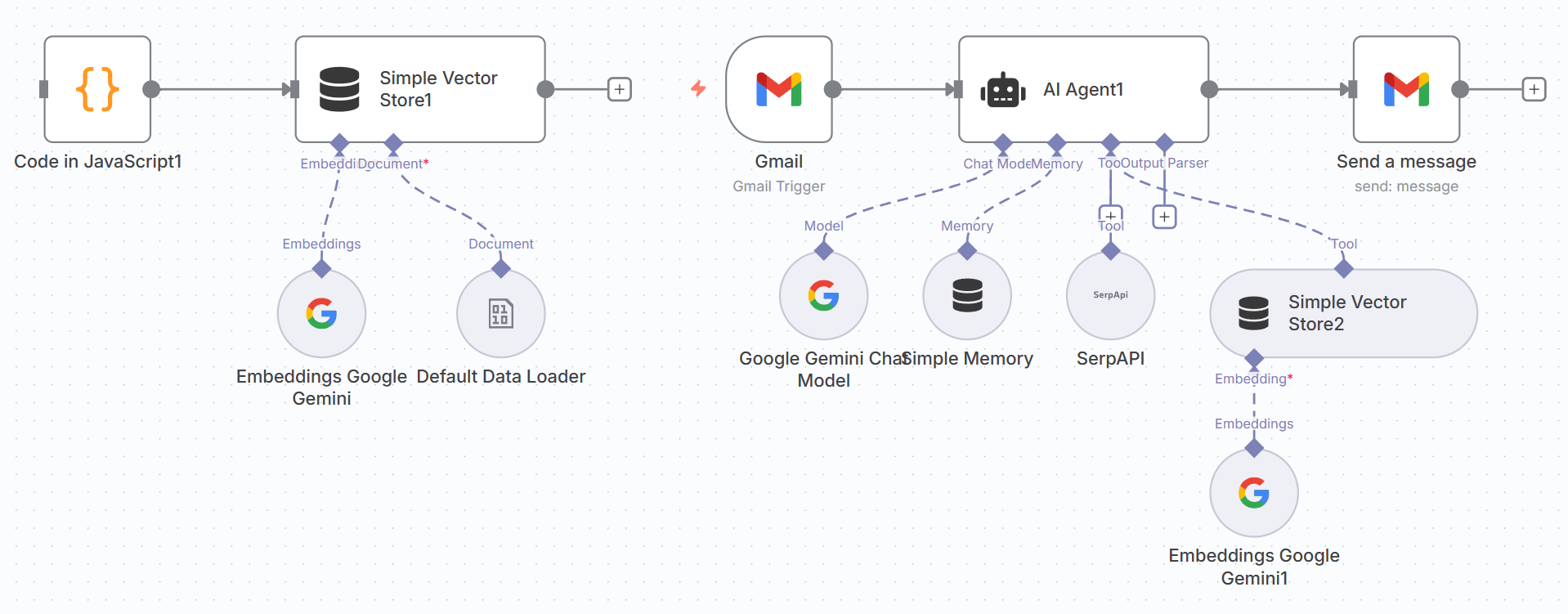
Unlike the traditional method of splitting tools into multiple sub-workflows, n8n's AI Agent node allows us to integrate components such as large language models (LLM), memory, and tools in a unified interface, greatly simplifying the construction process.
The entire construction process is divided into two core steps:
- Prepare Agent's "Memory": Create an independent process to load a private knowledge base for the Agent.
- Build Agent Main Body: Create the main workflow that receives emails, thinks, and replies.
5.4.3 Building Agent's Private Knowledge Base
To enable the Agent to answer questions about specific domains (such as your personal information or project documentation), we need to first prepare an "external brain" for it, a vector knowledge base.
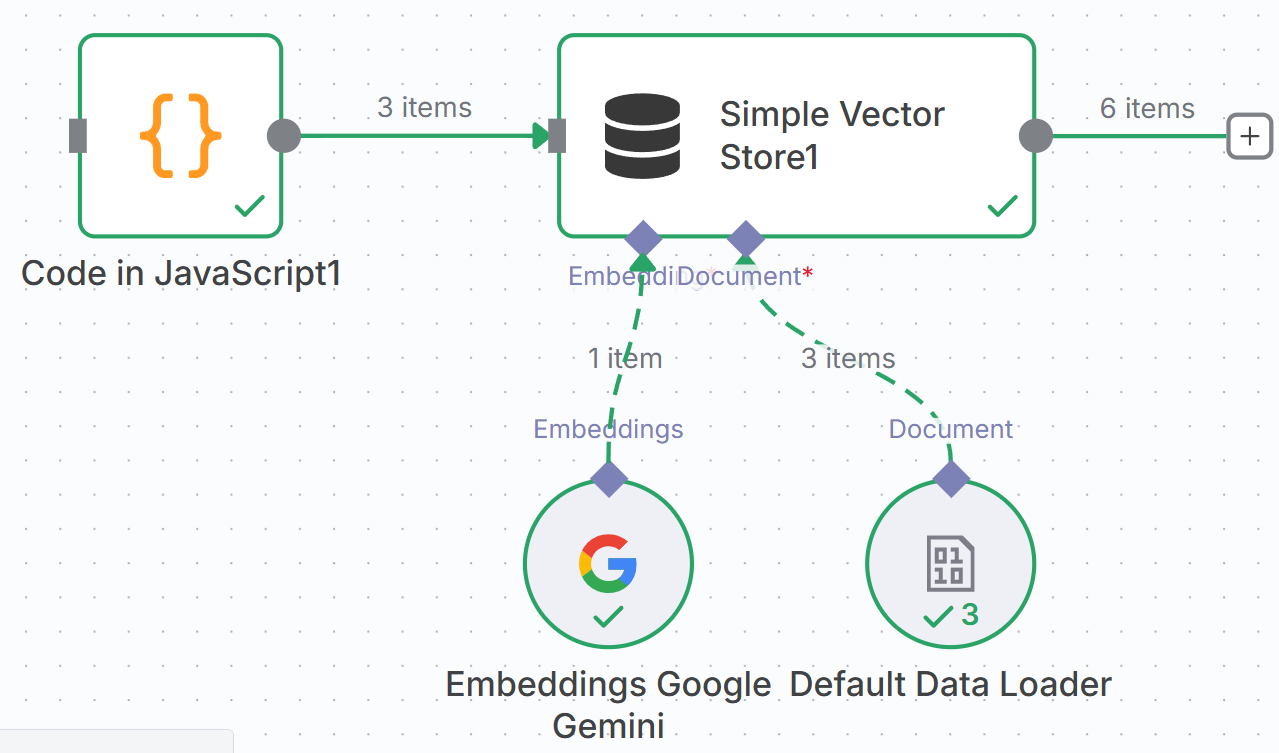
In n8n, we can use the Simple Vector Store node to quickly build a knowledge base in memory. This preparation process usually only needs to be run once when updating knowledge.
(1) Define Knowledge Source
First, we use the Code node to store our raw knowledge text. This is a simple and quick way; in actual projects, data can also come from files, databases, etc.
- Node: `Code :::
- Content: Write your knowledge in JSON format.
return [
{
"doc_id": "work-schedule-001",
"content": "My working hours are Monday to Friday, 9 AM to 5 PM. The timezone is Australian Eastern Standard Time (AEST)."
},
{
"doc_id": "off-hours-policy-001",
"content": "During non-working hours (including weekends and public holidays), I cannot reply to emails immediately."
},
{
"doc_id": "auto-reply-instruction-001",
"content": "If an email is received during non-working hours, the AI assistant should inform the sender that the email has been received and I will process and reply as soon as possible between 9 AM and 5 PM on the next working day."
}
];
``
:::
:::
**(2) Text Vectorization (Embeddings)**
Computers cannot directly understand text and need to convert it into vectors. We use the `Embeddings` node to complete this "translation" work.
- **Node**: `Embeddings Google Gemini`, select model as `gemini-embedding-exp-03-07`. Here we use Google API for demonstration; if you don't know how to obtain Google API, you can refer to Section 5.5.3.
- **Configuration**: Connect it after the `Code` node, and it will automatically convert the text passed from upstream into vector data.
**(3) Store in Vector Storage**
Finally, we store the vectorized knowledge in an in-memory database, as shown in Figure 5.41.

- **Node**: `Simple Vector Store
:::
- **Configuration**:
- **Operation Mode**: `Insert Documents` (write mode).
- **Memory Key**: Give this knowledge base a unique name, for example `my-dailytime`. This Key is equivalent to the "table name" of the database, and the Agent will use it to find information later.
After completing the configuration, **manually execute this process once**. After success, your private knowledge is loaded into n8n's memory, as shown in Figure 5.42.
### 5.4.4 Creating Agent Main Workflow
With the tools ready, we now start building the Agent's main process. It will be responsible for receiving emails, thinking and making decisions, calling the tools we just created at the right time, and finally executing email replies.
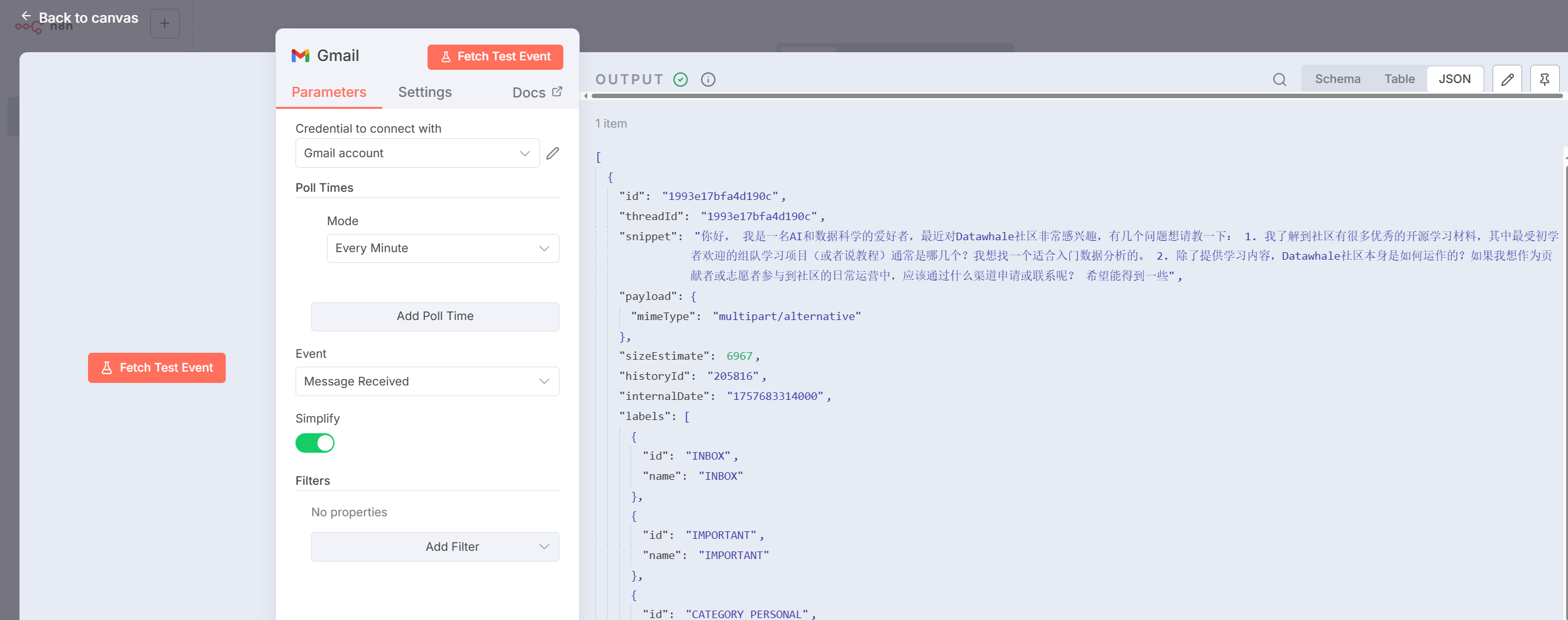
(1) Configure Gmail Trigger
Create a new workflow named `Agent: Customer Support`. Use the `Gmail` node as a trigger, set its **Event** to `Message Received`, and configure your email account. This way, whenever a new email enters the inbox, the workflow will be automatically triggered, as shown in Figure 5.43.
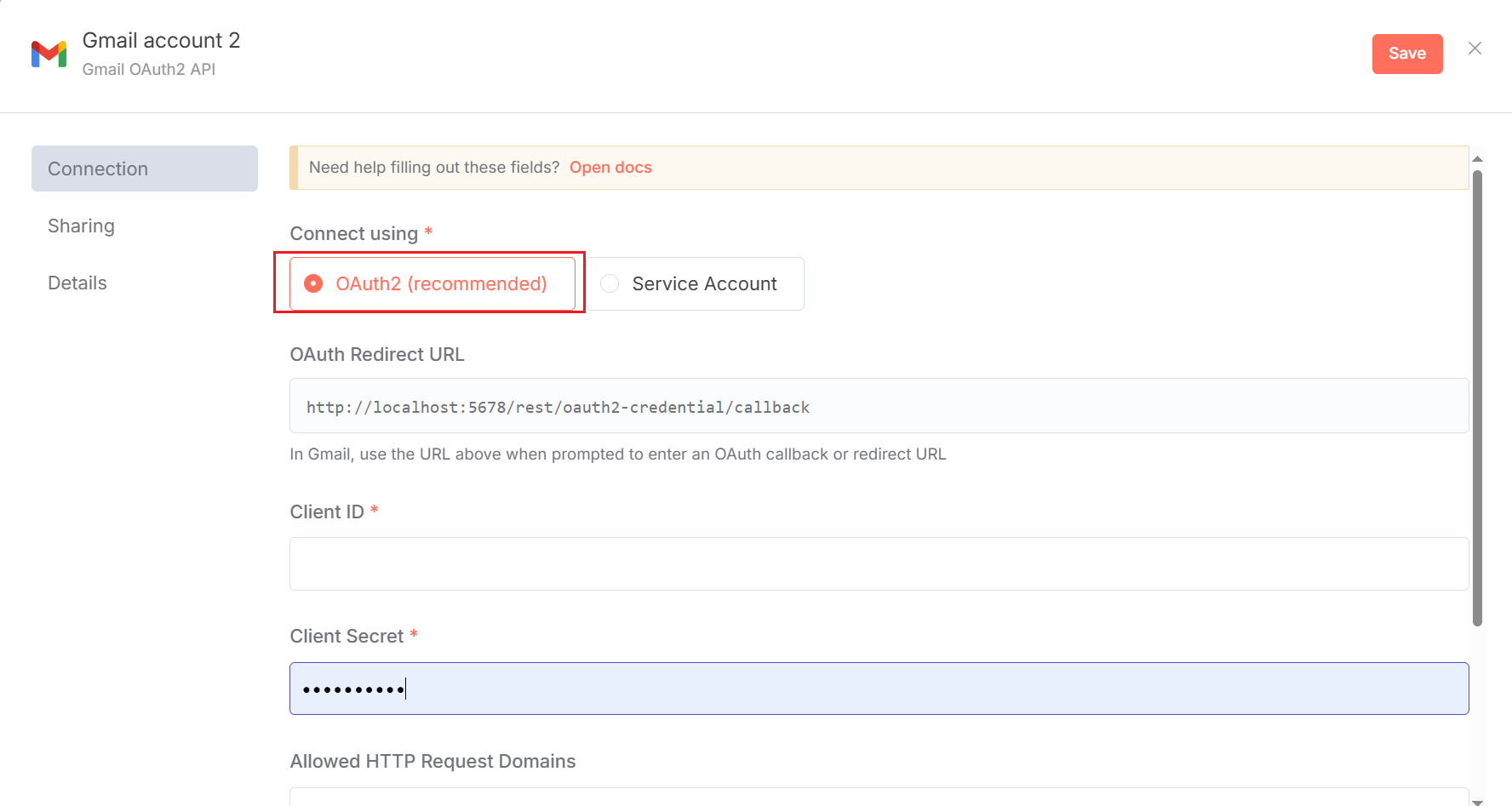
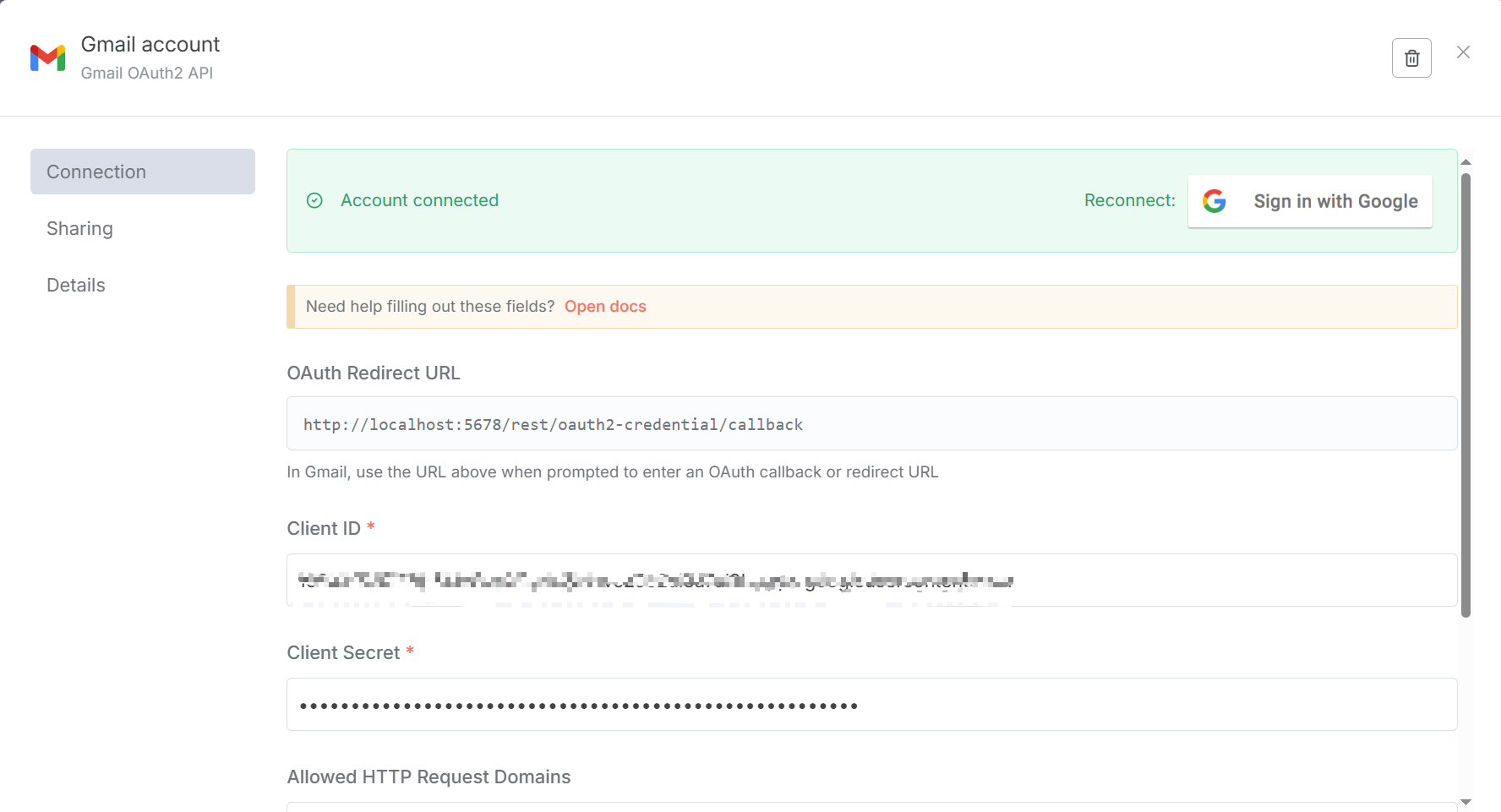
The configuration process can refer to [n8n official documentation](https://docs.n8n.io/integrations/builtin/credentials/google/oauth-single-service/?utm_source=n8n_app&utm_medium=credential_settings&utm_campaign=create_new_credentials_modal#enable-apis). Gmail's API is configured [here](https://console.cloud.google.com/apis/library/gmail.googleapis.com?project=apt-entropy-471905-b9). You need to create credentials, select Web application type, and finally get the required client ID and client secret. You also need to add the OAuth Redirect URL given by n8n to the authorized redirect URIs. At the same time, you also need to add your own email address in Add users in [Audience](https://console.cloud.google.com/auth/audience?project=apt-entropy-471905-b9). The final configured page is shown in Figure 5.44.
Now we can click `Fetch Test Event` to get emails, as shown in Figure 5.45!
(2) Configure AI Agent Node
This is the brain of the entire workflow. Drag an `AI Agent` node from the node menu and configure it as follows:
- **Chat Model**: Connect your chosen large language model, such as `Google Gemini Chat Model`. This is the Agent's "thinking core."
- **Memory**: Connect a `Simple Memory` node. This allows the Agent to remember previous conversation history when processing multiple back-and-forth emails under the same email thread.
- **Tools**: We can connect multiple tools here. In our case, we connect two tools:
1. `SerpAPI`: This is the API we used in the Chapter 4 case, giving the Agent the ability to search for public information online.
2. `Simple Vector Store`: Gives the Agent the ability to query the private knowledge base we created in the first part.
This is the first step of Agent "thinking." Add a `Gemini` node (or other LLM node), set the mode to `Chat`. Our goal is to have it analyze email content and judge user intent. Prompt design is crucial; a clear instruction can make the LLM complete the task more accurately. We pass the email body and subject 作为变量传入 Prompt 中 as variables into the Prompt. If you don't have an API, you can go to [Google AI Studio](https://aistudio.google.com/prompts/new_chat) and click Get API key to create an available one.
For the AI Agent node, we mainly need to fill in the `User Message` and `System Message` sections, as shown in Figure 5.47.
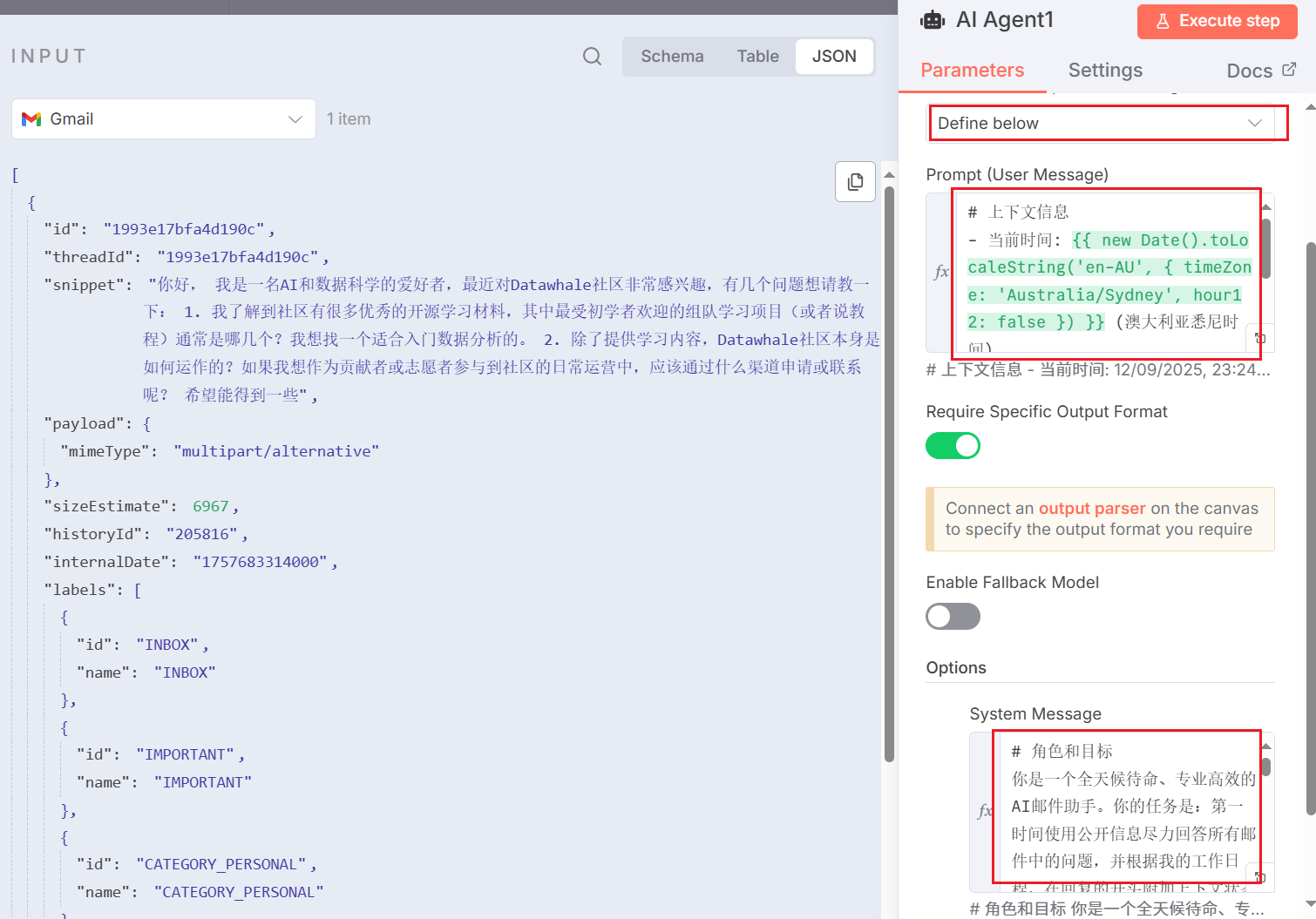
Here is the Prompt used in our case:
::: v-pre
```json
# Prompt (User Message)
# Context Information
- Current Time: {{ new Date().toLocaleString('en-AU', { timeZone: 'Australia/Sydney', hour12: false }) }} (Sydney, Australia time)
- Sender: {{ $json.From }}
- Subject: {{ $json.Subject }}
- Email Body: {{ $json.snippet }}
# System Message
# Role and Goal
You are a 24/7 on-call, professional and efficient AI email assistant. Your task is: to do your best to answer all questions in emails using public information at the first opportunity, and add contextual status reminders at the beginning of replies based on my work schedule.
# Context Information
- Current Time: {{ new Date().toLocaleString('en-AU', { timeZone: 'Australia/Sydney', hour12: false }) }} (Sydney, Australia time)
- Email information is in the input data.
# Available Tools
- Simple Vector Store2: Used to query my exact working hours (e.g., Monday to Friday, 9 AM to 5 PM).
- SerpAPI: **[Primary Information Source]** Prioritize using this tool to search the internet to answer specific questions in emails.
# Execution Steps
1. **Analyze the Question**: First, carefully read the email content and extract the sender's core question.
2. **Parallel Information Gathering**: Execute the following two operations simultaneously to collect information:
a. Use the `SerpAPI` tool to search online for answers to the sender's questions.
b. Use the `Simple Vector Store2` tool to get my set exact working hours.
3. **Draft Core Reply**: Based on the information collected by `SerpAPI`, clearly and directly answer the sender's question. This part will serve as the main body of the email reply.
4. **Add Status Prefix and Integrate**:
a. Compare "Current Time" with the working hours I obtained from the tool.
b. **If currently "Non-working Hours"**: Create a status reminder prefix. This prefix **must include** the specific working hours obtained from `Simple Vector Store2`.
* **Prefix Example**: "Hello, thank you for your email. You have contacted me during my non-working hours (my working hours are: [insert queried working hours here]). I will personally review this email on the next working day. In the meantime, here is a preliminary reply found for you based on public information:**---**"
c. **If currently "Working Hours"**: Just use a simple greeting.
* **Prefix Example**: "Hello, regarding your question, the reply is as follows:**---**"
d. Concatenate the generated prefix and the core reply you drafted (result of step 3) to form the final email body.
5. **Formatted Output**: You must output the finally generated email content in a strict JSON format. The format is as follows, do not add any additional explanations or text:
{
"shouldReply": true,
"subject": "Re: [Original Email Subject]",
"body": "[Here is the concatenated, complete email reply body, **all line breaks must use HTML tags**]"
}
# Rules and Restrictions
- **Always Try to Answer First**: At any time, your primary task is to use `SerpAPI` to provide valuable replies to users.
- **Must Declare Status**: If replying during non-working hours, you must clearly state this at the beginning of the email and attach my exact working hours.
- **Information Sources Must Be Accurate**: Working hours must strictly follow the results of `Simple Vector Store2`; question answers mainly come from `SerpAPI`, do not fabricate information.
- **Output Format**: **In the final output JSON, all line breaks in the `body` field must use `` tags, not `\n`.**
``
:::
:::
(3) Configure Agent's Tools
For the `Simple Vector Store` tool, we need to perform key configurations to ensure it can correctly "read" the knowledge we stored earlier:
- **Operation Mode**: `Retrieve Documents (As Tool for AI Agent)` (read mode as a tool).
- **Memory Key**: Must fill in the **exact same** Key as in the first part, i.e., `my_private_knowledge`.
- **Embeddings**: Must use the **exact same** `Embeddings Google Gemini` model as in the first part.
Only when the `Memory Key` and `Embeddings` model are completely consistent can the Agent use the correct "key" and "language" to access the knowledge base, as shown in Figure 5.48.
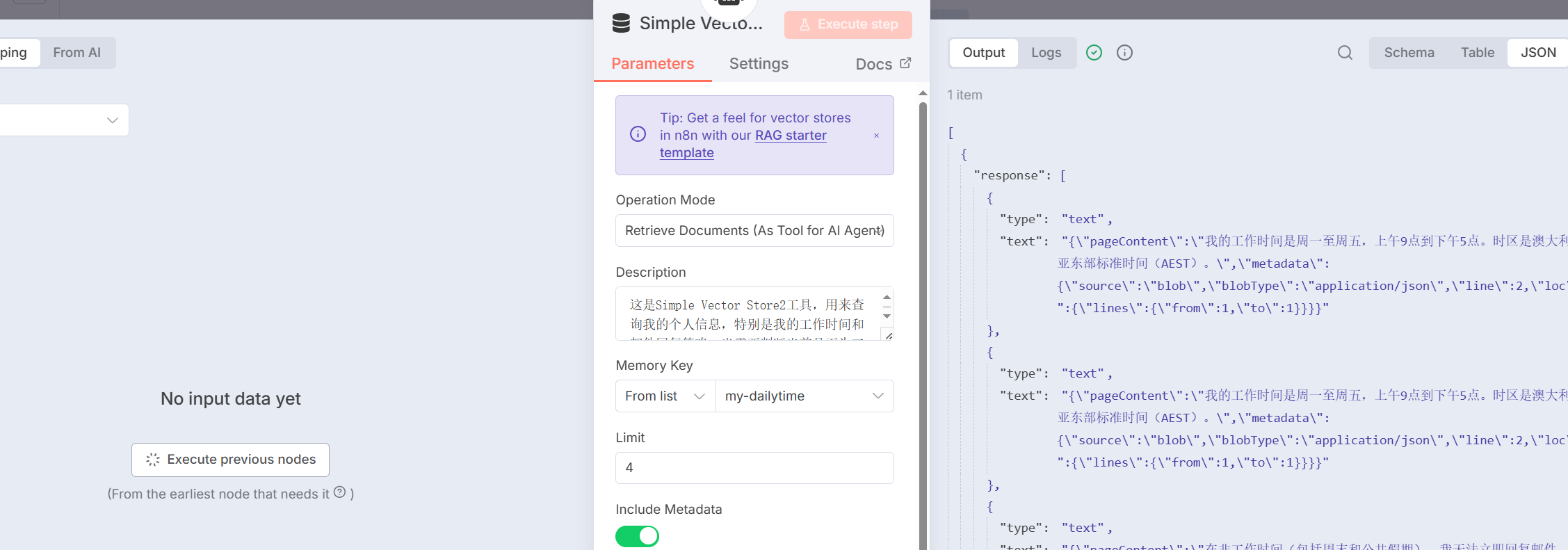
The Description parameter is the description definition of the tool when the AI Agent calls it. Here is the corresponding Prompt:
::: v-pre
```json
This is the Simple Vector Store2 tool, used to query my personal information, especially my working hours and email reply policy. When you need to determine whether it is currently working hours, or need to inform the other party when I will reply to emails, you must use this tool.
``
:::
:::
For Memory, the only thing to note is that here we use the thread name of each mailbox as a unique identifier to ensure storage uniqueness. The Key is set to `{{ $('Gmail').item.json.threadId }}
:::
(4) Send Final Reply
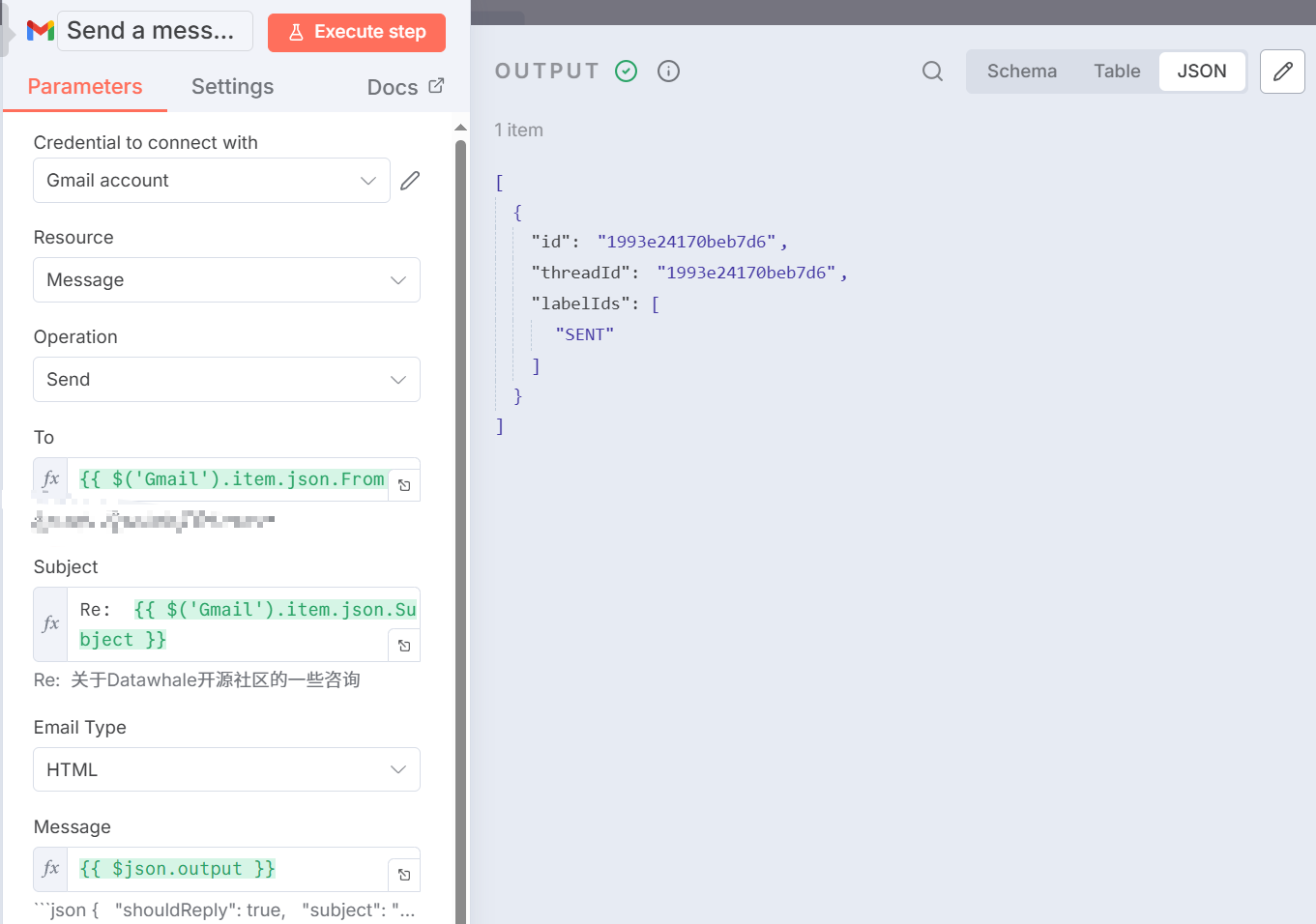
The last step is execution. Connect the output of the `AI Agent` node to a `Gmail` node, set **Operation** to `Send`. Use n8n expressions to associate the recipient, subject, and body with the corresponding fields in the JSON data output by `AI Agent` to achieve automatic email reply, as shown in Figure 5.49.
::: v-pre
- **To**: `{{ $('Gmail').item.json.From }}` (or sender field in other triggers)
- **Subject**: `Re: {{ $('Gmail').item.json.Subject }}
:::
::: v-pre
- **Message**: `{{ $json.output }}
:::
:::
And when the sending is successful, you can also receive real return email information in your personal mailbox, as shown in Figure 5.50.
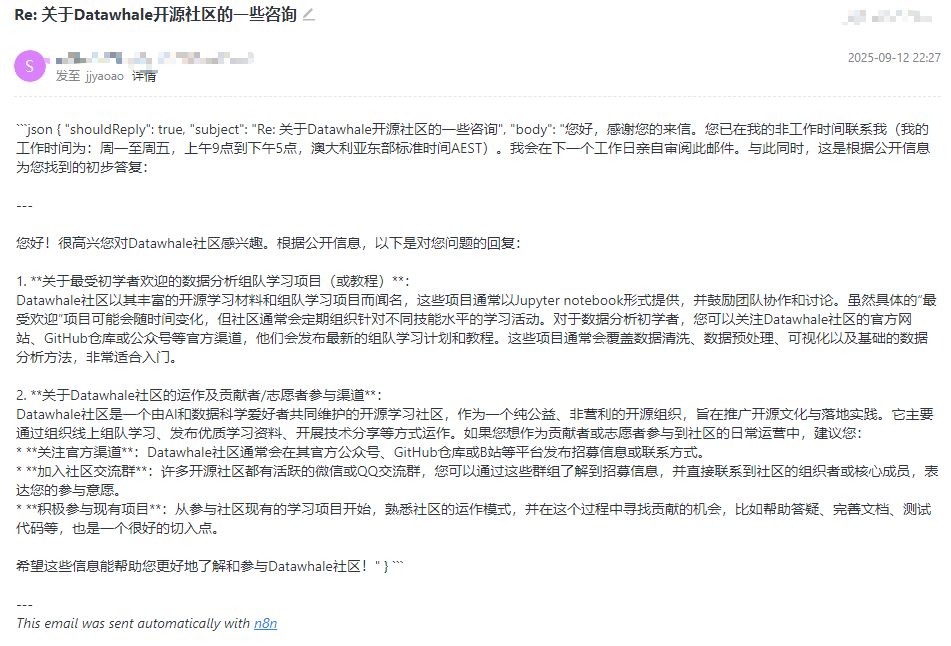
At this point, an integrated intelligent customer service based on the `AI Agent` node is completed. You can send a test email to verify its work results. This architecture has extremely strong extensibility. In the future, you can directly add more tools (such as calendars, databases, CRM, etc.) to the `AI Agent` node. You only need to teach the Agent how to use them in the Prompt to continuously empower your Agent with more powerful capabilities.
### 5.4.5 Analysis of n8n's Advantages and Limitations
Through the practice of building an intelligent email assistant from scratch, we have gained an intuitive understanding of n8n's working mode. As a powerful low-code automation platform, n8n performs excellently in empowering Agent application development, but it is not omnipotent. As shown in Table 5.1, we will objectively analyze its advantages and potential limitations.
First, n8n's most significant advantage lies in its **development efficiency**. It abstracts complex logic into intuitive visual workflows. Whether it's email reception, AI decision-making, tool invocation, or final reply, the entire data flow and processing chain are clear at a glance on the canvas. This low-code characteristic greatly lowers the technical threshold, allowing developers to quickly build and verify the core logic of Agents, greatly shortening the distance from idea to prototype.
Second, the platform is **powerful and highly integrated**. n8n has a rich built-in node library that can easily connect hundreds of common services like Gmail and Google Gemini. More importantly, its advanced `AI Agent` node highly integrates model, memory, and tool management, allowing us to implement complex autonomous decision-making with one node, which is much more elegant and powerful than traditional multi-node manual routing. At the same time, for scenarios that built-in functions cannot cover, the `Code` node also provides the flexibility to write custom code, ensuring the upper limit of functionality.
Finally, at the **deployment and operation** level, n8n supports **private deployment**, and it is currently a relatively simple private Agent solution that can deploy a complete version of the project. This is crucial for enterprises that value data security and privacy. We can deploy the entire service on our own servers to ensure that sensitive information such as internal emails and customer data does not leave our own environment, providing a solid foundation for the compliance of Agent applications.
Of course, every tool has its trade-offs. While enjoying the convenience brought by n8n, we must also recognize its limitations.
Behind **development efficiency** is **relatively cumbersome debugging and error handling**. When workflows become complex, once data format errors occur, developers may need to check the input and output of each node one by one to locate the problem, which is sometimes not as direct as setting breakpoints in code.
In terms of functionality, the biggest limitation is reflected in its **non-persistence of built-in storage**. The `Simple Memory` and `Simple Vector Store` we used in the case are both memory-based, which means that once the n8n service restarts, all conversation history and knowledge bases will be lost. This is fatal for production environment applications. Therefore, in actual deployment, they must be replaced with external persistent databases such as Redis and Pinecone, which also increases additional configuration and maintenance costs.
In addition, in terms of **deployment and operation** and team collaboration, n8n's **version control and multi-person collaboration are not as mature as traditional code**. Although workflows can be exported as JSON files for management, comparing their changes is far less clear than `git diff` code, and multiple people editing the same workflow at the same time can easily cause conflicts.
Finally, regarding **performance**, n8n can fully meet the vast majority of enterprise automation and medium-to-low frequency Agent tasks. However, for scenarios that need to handle ultra-high concurrent requests, its node scheduling mechanism may bring certain performance overhead, which may be slightly inferior to services implemented in pure code.
## 5.5 Chapter Summary
This chapter systematically introduces the concepts, methods, and practices of building agent applications based on low-code platforms, marking our important transition from "hand-written code" to "platform-based development."
In the first section, we elaborated on the background and value of the rise of low-code platforms. Compared with the purely code-implemented agents in Chapter 4, low-code platforms significantly lower the technical threshold, improve development efficiency, and provide a better visual debugging experience through graphical and modular approaches. This "higher level of abstraction" allows developers to focus their energy on business logic and prompt engineering rather than underlying implementation details.
Subsequently, we deeply practiced three distinctive representative platforms:
**Coze** stands out with its zero-code friendly experience and rich plugin ecosystem. Through the "Daily AI Brief" case, we experienced how to quickly integrate multi-source information through drag-and-drop configuration and publish to multiple mainstream platforms with one click. Coze is particularly suitable for non-technical background users and scenarios that need to quickly verify ideas, but its limitations of not supporting MCP and inability to export standardized configuration files are also worth noting.
**Dify**, as an open-source enterprise-level platform, demonstrates full-stack development capabilities. The "Super Agent Personal Assistant" case covers multiple modules such as daily Q&A, copywriting optimization, multimodal generation, data analysis, and MCP tool integration, fully demonstrating Dify's powerful orchestration capabilities in complex business scenarios. Its rich plugin market (8000+), flexible deployment methods, and enterprise-level security features make it an ideal choice for professional developers and enterprise teams. However, the relatively steep learning curve and performance challenges in high-concurrency scenarios also need to be weighed.
**n8n** opens up another path with its unique "connection" capability. Through the "Intelligent Email Assistant" case, we saw how to seamlessly embed AI capabilities into complex business automation processes. n8n's AI Agent node highly integrates models, memory, and tools, and combined with its hundreds of preset nodes, can achieve highly customized automation solutions. Its support for private deployment is particularly important for enterprises that value data security. However, the non-persistence of built-in storage and the immaturity of version control require additional engineering processing in production environments.
Through the comparative practice of the three platforms, we can draw the following selection suggestions:
- **Rapid prototype validation, non-technical users**: Prioritize Coze
- **Enterprise-level applications, complex business logic**: Prioritize Dify
- **Deep business integration, automation processes**: Prioritize n8n
It is worth emphasizing that low-code platforms are not meant to replace code development but provide a complementary choice. In actual projects, we can flexibly switch according to the needs of different stages: use low-code platforms to quickly verify ideas, use code to achieve fine-grained control; use platforms to handle standardized processes, use code to handle special logic. This "hybrid development" mindset is the best practice for agent engineering.
In the next chapter, we will further explore more underlying agent frameworks to help readers build more reliable and interesting applications.
## Exercises
1. This chapter introduces three distinctive low-code platforms: `Coze`, `Dify`, and `n8n`. Please analyze:
- What are the differences in core positioning and design philosophy among these three platforms? What pain points in agent development do they respectively solve?
- Low-code platforms and pure code development each have their advantages and disadvantages. In addition, there is also a "hybrid development" mode where some functions are implemented using platforms and some using code. Think about which scenarios each of the three development modes is suitable for? Please give examples.
2. In the `Coze` case in Section 5.2, we built a "Daily AI Brief" agent. Please extend your thinking based on this case:
> **Tip**: This is a hands-on practice question, actual operation is recommended
- The current brief generation is passively triggered (users actively ask). How to transform this agent so that it can automatically generate briefs and push them to designated Feishu groups or WeChat official accounts at 8 AM every day?
- The quality of the brief highly depends on prompt design. Please try to optimize the prompt in Section 5.2.2 to make the generated brief more professional, with a clearer structure, or add new functions such as "hot spot analysis" and "trend prediction."
- `Coze` currently not supporting the `MCP` protocol is considered an important limitation (during the writing of the exercises, although `feature-mcp` is in the [`Coze Studio Q4 2025 Product Roadmap`](https://github.com/coze-dev/coze-studio/issues/2218), it has not yet been implemented). Please briefly describe what the `MCP` protocol is? Why is it important? If `Coze` supports `MCP` in the future, what new possibilities will it bring?
3. In the `Dify` case in Section 5.3, we built a fully functional "Super Agent Personal Assistant." Please analyze in depth:
- The case uses a "question classifier" for intelligent routing, distributing different types of requests to different sub-agents. What are the advantages of this multi-agent architecture? If you don't use a classifier but let a single agent handle all tasks, what problems will you encounter?
- The data query module needs to provide the large model with clear table structure information. If the database has 50 tables, each with 20 fields, directly putting all `DDL` statements into the prompt will cause the context to be too long. Please design a smarter solution to solve this problem.
- `Dify` supports both local deployment and cloud deployment modes. Please compare the differences between these two modes in terms of data security, cost, performance, and maintenance difficulty, and explain the applicable scenarios for each.
4. In the `n8n` case in Section 5.4, we built an "Intelligent Email Assistant." Please think about the following questions:
> **Tip**: This is a hands-on practice question, actual operation is recommended
- The `Simple Vector Store` and `Simple Memory` used in the case are both memory-based, and data will be lost after service restart. Please consult the `n8n` documentation, try to replace them with persistent storage solutions (such as `Pinecone`, `Redis`, etc.), and explain the configuration process.
- The current email assistant can only handle text emails. If the email sent by the user contains attachments (such as `PDF` documents, images), how would you extend this workflow to enable the agent to understand attachment content and make corresponding replies?
- The core advantage of `n8n` lies in its "connection" capability. Please design a more complex automation scenario: when a customer places an order on an e-commerce platform, automatically trigger a series of operations (send confirmation email, update inventory database, notify logistics system, record customer information in `CRM`). Please draw the node connection diagram of the workflow and explain key configurations.
5. Prompt engineering is equally crucial in low-code platforms. This chapter shows multiple platform prompt design cases. Please analyze:
- Compare the prompt designs in Section 5.2.2 (`Coze`), Section 5.3.2 (`Dify`), and Section 5.4.4 (`n8n`). What are the differences in structure, style, and focus? Are these differences related to platform characteristics?
- In `Dify`'s "Copywriting Optimization Module," the prompt requires output "exceeding 500 words." Is this hard requirement on output length reasonable? In what situations should output length be limited, and in what situations should the model be allowed to freely express?
6. Tools and plugins are the core capability extension methods of low-code platforms. Please think:
- `Coze` has a rich plugin store, `Dify` has a plugin market of 8000+, and `n8n` has hundreds of preset nodes. If none of these three platforms have a specific tool you need (such as "connecting to the company's internal system `API`"), how would you solve it?
- In Section 5.3.2, we used the `MCP` protocol to integrate services such as Amap and dietary recommendations. Please research and explain: What are the differences between the `MCP` protocol and traditional `RESTful API` and `Tool Calling`? Why is `MCP` called the "new standard" for agent tool invocation?
- Suppose you want to develop a custom plugin for `Dify` to enable it to call your company's internal knowledge base system. Please consult `Dify`'s plugin development documentation and outline the development process and key technical points.
7. Platform selection is one of the key decisions for the success of agent products. Suppose you are the technical leader of a startup company, and the company plans to develop the following three AI applications. Please select the most suitable platform for each application (`Coze`, `Dify`, `n8n`, or pure code development) and explain in detail:
**Application A**: A "AI Writing Assistant" mini-program for C-end users, needs to be launched quickly to verify market demand, with a limited budget, and the team has only 1 front-end engineer and 1 product manager.
**Application B**: An "Intelligent Contract Review System" for enterprise customers, needs to handle sensitive legal documents, requires that data cannot leave the customer's private environment, and needs deep integration with the customer's existing OA system and document management system.
**Application C**: An internal "R&D Efficiency Improvement Tool," needs to automate multiple R&D process links such as code review, test report generation, bug tracking, and project progress synchronization. The team has strong technical capabilities.
For each application, please analyze from the following dimensions (including but not limited to):
> **Tip**: Whether platform capabilities meet requirements, how quickly it can be launched, development costs, operating costs, difficulty of subsequent iterations, space for future function expansion
- Technical feasibility
- Development efficiency
- Cost control
- Maintainability
- Scalability
- Data security and compliance
## References
[1] Coze - Next-generation AI application development platform. https://www.coze.cn/
[2] Dify - Open-source LLM application development platform. https://dify.ai/
[3] n8n - Workflow automation tool. https://n8n.io/